Check pathnames for illegal characters (e.g. outputPath for build files)
Nobody has claimed this yet.
Assessment
- Difficulty
- 3/5
- Estimated time
- 1-2 days
- Newbie friendliness
- 35/100
- Issue type
- Bug
- Clarity
- Clearly specified
- Activity status
- Stale
- Tech stack
- angular, typescript
- Domain
- build-system, cli
Research direction
Start by reproducing the ng build command with outputPath set to .../dist in a Windows sandbox, using the angular.json configuration described in the issue. Trace how the build handles that path and verify that an invalid pathname produces a warning or error before creating files or directories.
Written by the indexing model from the issue text.
Description
🐞 Bug report
Command (mark with an x)
- new
- build
- serve
- test
- e2e
- generate
- add
- update
- lint
- extract-i18n
- run
- config
- help
- version
- doc
Description
The Angular CLI should warn the user if a specified path is invalid for the current system.
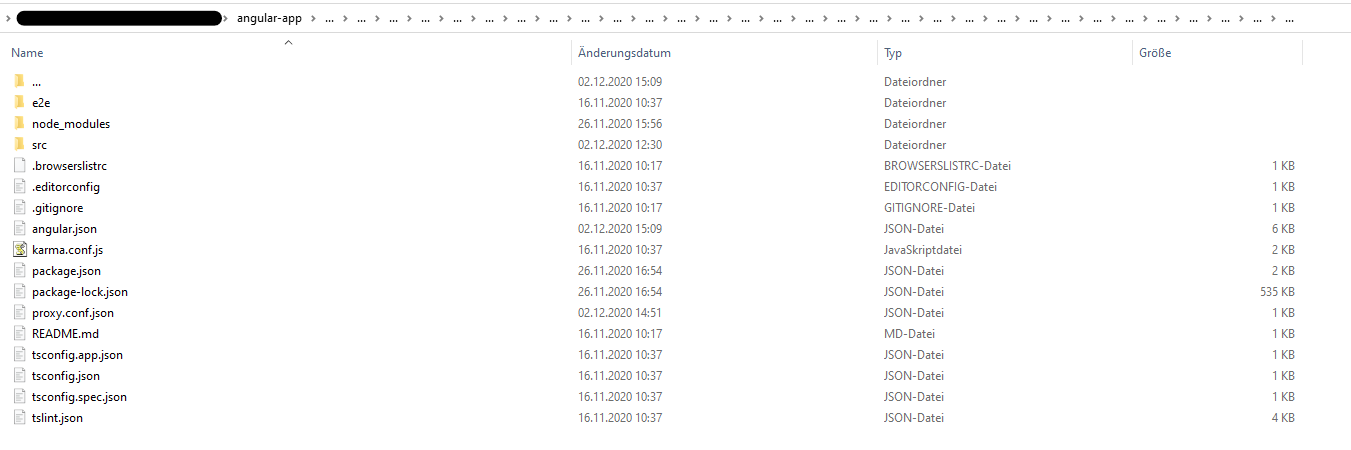
I accidently set ".../dist" (three dots) as outputPath in angular.json. Correct is "../dist" (two dots). Running ng build created a huge mess. In the app root a folder has been created with ... as name (ending a folder name in Windows with a dot is illegal). Inside of this three dot folder all of my project files were listed (including node_modules folder). There was also a folder named ..., which again contained my whole project files. This recursively went to whatever level (I clicked throuhg the folder approximately 30 levels down, there was still a ... folder). Deleting the first ... folder lastet more than 15 minutes, then telling me the files which should be deleted aren't there anymore. Also my project files in the root directory were deleted in this process (luckily most of it in Git). That was the strangest thing, it felt like the content inside of ... mirrored my root project somehow (like in https://superuser.com/questions/528502/cant-remove-three-dots-folder-on-my-hdd). I also tried reverting my files using Git which did not work at all. I managed to delete the whole repository locally with rm -rf 'folder' using the GitBash. After cloning the project again, my IDE (Webstorm) listed the ... folder once again, which luckily could be deleted this time. The project looks fine right now, and with the correct outputPath the app builds correctly.
It would be nice if the CLI checks pathnames for illegal characters. I did not try any other illegal characters inside of the path name.
🔬 Minimal Reproduction
Caution: Try in a sandbox environment with unimported files only to prevent loss of data!
- Change the
"outputPath"inangular.jsonto".../dist"(three dots) - Run
ng build
🌍 Your Environment
Angular CLI: 11.0.1
Node: 14.15.0
OS: win32 x64

Angular: 11.0.0
... animations, common, compiler, compiler-cli, core, forms
... platform-browser, platform-browser-dynamic, router
Ivy Workspace: Yes

Package                         Version
---------------------------------------------------------
@angular-devkit/architect       0.1100.1
@angular-devkit/build-angular   0.1100.1
@angular-devkit/core            11.0.1
@angular-devkit/schematics      11.0.1
@angular/cdk                    11.0.1
@angular/cli                    11.0.1
@angular/material               11.0.1
@schematics/angular             11.0.1
@schematics/update              0.1100.1
rxjs                            6.6.3
typescript                      4.0.5
Anything else relevant?
- Dominant language
- TypeScript
- Stars
- 27k
- Forks
- 11.8k
- Avg merge
- 16h 35m
- Merged PRs (30d)
- 176
Contributor guide
First steps
- Read the whole issue, then the project's contributing guide.
- Comment on the issue to say you are picking it up — it saves two people doing the same work.
- Fork the repository and make your change on a branch.
- Open a pull request that references the issue number.
More from angular/angular-cli
-
area: @angular/build gemini-triaged
Difficulty 2/5 1-3 hours Newbie friendliness 74/100
angular/angular-cli#33955 ·
-
area: @angular/cli gemini-triaged
Difficulty 2/5 1-3 hours Newbie friendliness 72/100
angular/angular-cli#33055 · 1 comment · 3 reactions ·
-
area: @angular/build gemini-triaged
Difficulty 4/5 3-5 days Newbie friendliness 72/100
angular/angular-cli#34137 ·
-
angular/build:library area: @angular/build gemini-triaged
angular/angular-cli#34131 · 1 assignee ·
-
angular/build:library area: @angular/build gemini-triaged
angular/angular-cli#34130 · 1 assignee ·
All issues in angular/angular-cli
Similar issues
-
enhancement
Difficulty 2/5 1-3 hours Newbie friendliness 70/100
dennys-bd/agent-hive#184 ·
-
Add: hunch Open
Difficulty 2/5 1-3 hours Newbie friendliness 74/100
AbdelStark/awesome-typesafe#104 ·
-
ai-observability bug team/ai-observability
Difficulty 2/5 1-3 hours Newbie friendliness 78/100
-
Difficulty 2/5 1-3 hours Newbie friendliness 78/100
-
Difficulty 2/5 1-3 hours Newbie friendliness 78/100
vicharanashala/fln#563 ·