Android visitors are offered the Linux .deb on cap.so's homepage and download page
维护者通常 1 天内回复
评估
- 难度
- 2/5
- 预计耗时
- 1-3 小时
- 新手友好度
- 78/100
- Issue 类型
- 缺陷
- 描述清晰度
- 描述清楚
- 活跃度
- 活跃
- 技术栈
- nextjs, react, typescript
- 领域
- frontend
调研方向
从 apps/web/hooks/useDetectPlatform.ts 开始,这里会把任何包含 "Linux" 的 user agent 归类为桌面版 Linux。然后检查首页按钮和下载页面,它们都读取这个 hook 的结果,并链接到 /download/linux-deb。完成的标准是:像 Pixel 8 示例那样的 Android user agent 不再被识别为 Linux,而 iPhone 和无法识别的 user agent 保持现有的默认值。在 Chrome 开发者工具中将 user agent 覆盖为 Android 进行验证。
由索引模型根据 Issue 内容生成。
描述
Description
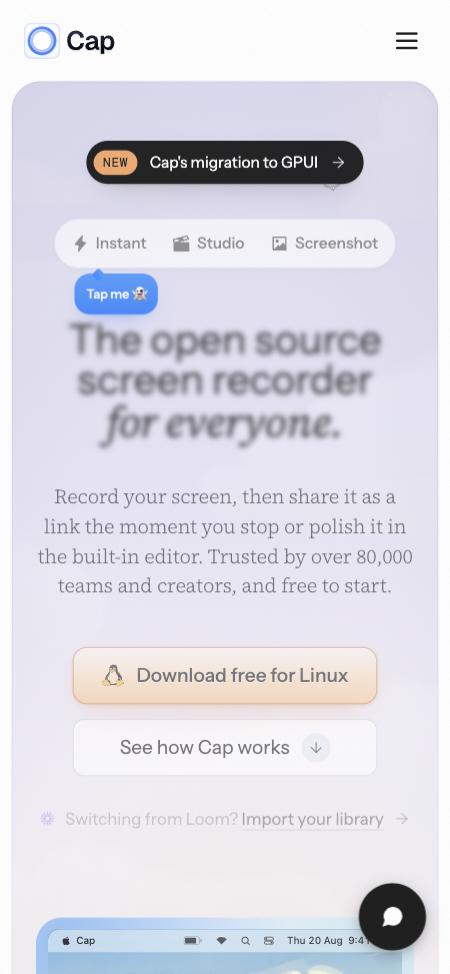
useDetectPlatform (apps/web/hooks/useDetectPlatform.ts) treats any user agent containing "Linux" as desktop Linux. Android browsers include "Linux" in theirs (Mozilla/5.0 (Linux; Android 14; Pixel 8) ...), so on an Android phone or tablet:
- the homepage's main button reads "Download free for Linux" and links to
/download/linux-deb; - the download page's main button has the Linux logo, links to
/download/linux-deb, and is captioned "Linux x86_64 • .deb, AppImage, RPM and Arch available".
Tapping either downloads the desktop Linux package to the phone. iPhones and other unrecognised devices get the site's default instead: the macOS app on the homepage, and a generic "Download Cap" on the download page.
Reproduction
- Open cap.so in Chrome on an Android phone, or in desktop Chrome with device emulation set to an Android device such as a Pixel 8.
- The homepage's main button reads "Download free for Linux".
- On cap.so/download, the main button has the Linux logo and links to
/download/linux-deb.
Expected
Android isn't treated as desktop Linux, so it isn't offered the Linux package.
- 主要语言
- Rust
- 星标
- 24.2k
- 派生
- 2.2k
- 平均合并
- 1 天 9 小时
- 30 天内合并 PR
- 731
环境准备
- 提供 Dockerfile 或 Docker Compose 文件
- 没有 Pull Request 模板
- 阅读贡献指南
从这里开始
- 先读完整个 Issue,再读项目的贡献指南。
- 在 Issue 下留言说明你要接手 —— 这能避免两个人做同样的事。
- Fork 仓库,在一个分支上完成修改。
- 提交 Pull Request,并在描述里引用这个 Issue 编号。
CapSoftware/Cap 的其他 Issue
-
Download, FAQ, privacy and terms pages have no meta description可能已有人在做 @patrickballard 今天认领。 未关闭
难度 2/5 1-3 小时 新手友好度 82/100
CapSoftware/Cap#3675 · 1 条评论 ·
维护者通常 1 天内回复
-
Shortcut recorder rejects ⌘⇧ with a digit or symbol (e.g. ⌘⇧4)可能已有人在做 @HlaKarki 于 1 天前认领。 未关闭
难度 2/5 1-3 小时 新手友好度 72/100
CapSoftware/Cap#3634 · 1 条评论 ·
维护者通常 1 天内回复
-
Web player intercepts ⌘⇧M and blocks Chrome profile-menu shortcut可能已有人在做 @AatmanAJ 于 19 天前认领。 未关闭
难度 2/5 1-3 小时 新手友好度 80/100
CapSoftware/Cap#2596 · 1 条评论 ·
维护者通常 1 天内回复
-
难度 2/5 1-3 小时 新手友好度 68/100
CapSoftware/Cap#2384 · 2 条评论 ·
维护者通常 1 天内回复
-
Dashboard pagination causes full page reloads on self-hosted Cap可能重新可做 关联的 PR 已关闭且未合并。 未关闭
难度 2/5 1-3 小时 新手友好度 88/100
CapSoftware/Cap#2305 · 2 条评论 ·
维护者通常 1 天内回复
相似的 Issue
-
难度 2/5 1-3 小时 新手友好度 72/100
-
could docs good first issue
难度 2/5 1-3 小时 新手友好度 82/100
维护者通常 1 天内回复
-
README em inglês未关闭good first issue help wanted priority:p2 type:docs
难度 2/5 1-3 小时 新手友好度 76/100
lucacasanova/homedeck#122 ·
-
needs-triage
难度 1/5 1 小时以内 新手友好度 78/100
bherbruck/solvecraft#11729 · 1 条评论 · 1 个 reaction ·
-
难度 2/5 1-3 小时 新手友好度 72/100
维护者通常 1 天内回复