Android visitors are offered the Linux .deb on cap.so's homepage and download page
メンテナーはふだん 1 日以内に返信
評価
- 難易度
- 2/5
- 見積もり時間
- 1〜3時間
- 初心者へのやさしさ
- 78/100
- issue の種類
- バグ
- 明瞭さ
- 明確に書かれている
- 活発さ
- 活発
- 技術スタック
- nextjs, react, typescript
- 領域
- frontend
調査の方向性
apps/web/hooks/useDetectPlatform.ts から始めてください。このファイルでは、"Linux" を含むすべての user agent がデスクトップ版 Linux として分類されています。次に、トップページのボタンとダウンロードページを確認してください。どちらもこのフックの結果を読み取り、/download/linux-deb にリンクしています。Pixel 8 の例のような Android の user agent が Linux と判定されなくなり、iPhone や未認識の user agent は既存のデフォルト値を維持すれば完了です。Chrome の DevTools で user agent を Android に上書きして確認してください。
索引モデルが issue の本文から書いたものです。
説明
Description
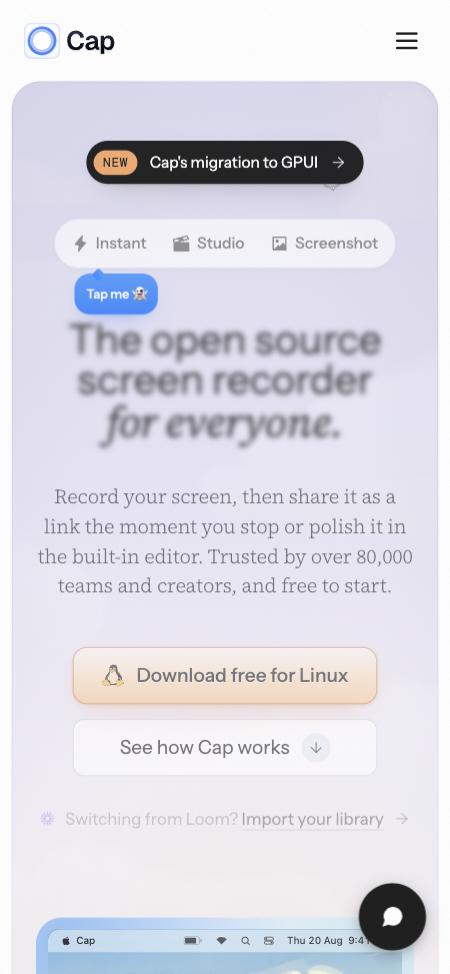
useDetectPlatform (apps/web/hooks/useDetectPlatform.ts) treats any user agent containing "Linux" as desktop Linux. Android browsers include "Linux" in theirs (Mozilla/5.0 (Linux; Android 14; Pixel 8) ...), so on an Android phone or tablet:
- the homepage's main button reads "Download free for Linux" and links to
/download/linux-deb; - the download page's main button has the Linux logo, links to
/download/linux-deb, and is captioned "Linux x86_64 • .deb, AppImage, RPM and Arch available".
Tapping either downloads the desktop Linux package to the phone. iPhones and other unrecognised devices get the site's default instead: the macOS app on the homepage, and a generic "Download Cap" on the download page.
Reproduction
- Open cap.so in Chrome on an Android phone, or in desktop Chrome with device emulation set to an Android device such as a Pixel 8.
- The homepage's main button reads "Download free for Linux".
- On cap.so/download, the main button has the Linux logo and links to
/download/linux-deb.
Expected
Android isn't treated as desktop Linux, so it isn't offered the Linux package.
- 主要言語
- Rust
- スター
- 24.2k
- フォーク
- 2.2k
- 平均マージ
- 1日 9時間
- マージ済み PR(30日)
- 731
環境構築
- Dockerfile または Docker Compose ファイルあり
- プルリクエストのテンプレートなし
- コントリビューションガイドを読む
はじめの一歩
- issue を最後まで読み、次にプロジェクトのコントリビューションガイドを読みます。
- 着手することを issue にコメントします — 二人が同じ作業をするのを防げます。
- リポジトリをフォークし、ブランチを切って変更します。
- issue 番号を参照したプルリクエストを送ります。
CapSoftware/Cap のほかの issue
-
Download, FAQ, privacy and terms pages have no meta description対応中かも @patrickballard が今日担当しました。 オープン
難易度 2/5 1〜3時間 初心者へのやさしさ 82/100
CapSoftware/Cap#3675 · コメント 1 件 ·
メンテナーはふだん 1 日以内に返信
-
Shortcut recorder rejects ⌘⇧ with a digit or symbol (e.g. ⌘⇧4)対応中かも @HlaKarki が 2 日前に担当しました。 オープン
難易度 2/5 1〜3時間 初心者へのやさしさ 72/100
CapSoftware/Cap#3634 · コメント 1 件 ·
メンテナーはふだん 1 日以内に返信
-
Web player intercepts ⌘⇧M and blocks Chrome profile-menu shortcut対応中かも @AatmanAJ が 19 日前に担当しました。 オープン
難易度 2/5 1〜3時間 初心者へのやさしさ 80/100
CapSoftware/Cap#2596 · コメント 1 件 ·
メンテナーはふだん 1 日以内に返信
-
難易度 2/5 1〜3時間 初心者へのやさしさ 68/100
CapSoftware/Cap#2384 · コメント 2 件 ·
メンテナーはふだん 1 日以内に返信
-
Dashboard pagination causes full page reloads on self-hosted Cap再び着手できるかも このイシューのプルリクエストはマージされずにクローズされました。 オープン
難易度 2/5 1〜3時間 初心者へのやさしさ 88/100
CapSoftware/Cap#2305 · コメント 2 件 ·
メンテナーはふだん 1 日以内に返信
CapSoftware/Cap の issue をすべて見る
似ている issue
-
A-linter
難易度 2/5 1〜3時間 初心者へのやさしさ 73/100
oxc-project/oxc#28783 ·
メンテナーはふだん 1 日以内に返信
-
Substrait consumer doesn't recognise `shift_left` / `shift_right` from functions_arithmetic.yamlオープンbug
難易度 2/5 1〜3時間 初心者へのやさしさ 76/100
apache/datafusion#27059 ·
メンテナーはふだん 1 日以内に返信
-
Bump calamine to 0.38: RUSTSEC-2026-0436 (CFB/OLE2 panic and unbounded allocation) fails cargo auditオープン
難易度 2/5 1〜3時間 初心者へのやさしさ 70/100
docling-project/docling.rs#979 ·
メンテナーはふだん 1 日以内に返信
-
llm translation
難易度 2/5 1〜3時間 初心者へのやさしさ 72/100
メンテナーはふだん 1 日以内に返信
-
難易度 2/5 1〜3時間 初心者へのやさしさ 74/100
メンテナーはふだん 1 日以内に返信