Permission Errors Freeze CLI
维护者通常 1 天内回复
还没有人认领这个 Issue。
评估
调研方向
Reproduce by running b2 sync from PowerShell on a local folder that contains a subfolder the user cannot read, such as AppData. The payload names only the command and a screenshot of the error, not the source files, so start by finding where the sync walks local directories and handles permission errors. Done means the sync reports the unreadable path and either skips it or exits, instead of freezing until the terminal is closed.
由索引模型根据 Issue 内容生成。
描述
Hello,
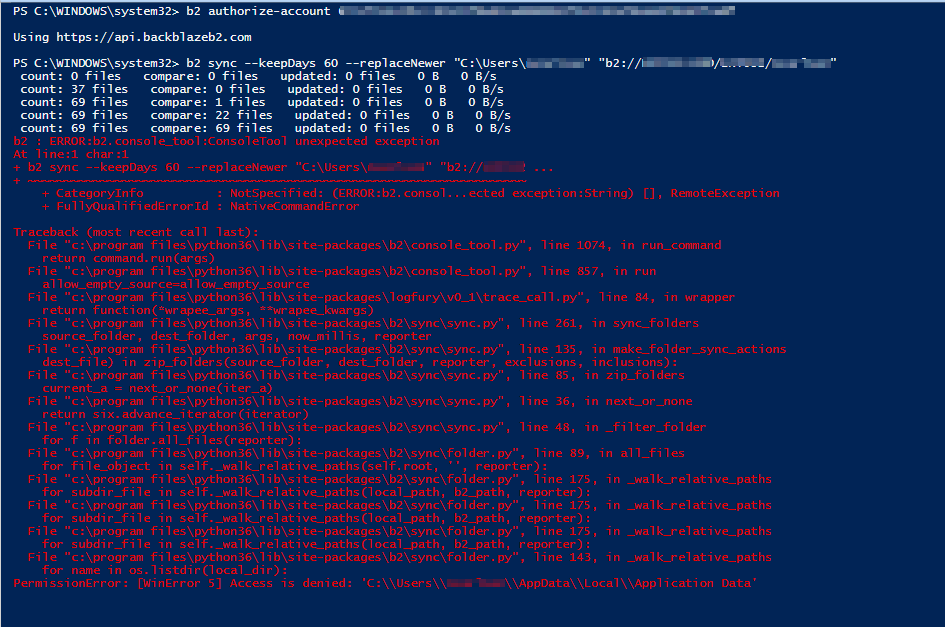
I was directed here by BackBlaze Support to try to get some help with an issue we're having. We are trying to run a simple sync between the local PC and B2 Cloud using Windows command line or Powershell (issue occurring in both). Any time the our sync hits a file/folder that it does not have proper permission to, the CLI will freeze and not allow us to cancel the active command unless we close/reopen the CLI.
Here's what we have:
-Windows 10 64bit
-Python 3.6.3
-BackBlaze B2 Cloud
Here are the commands we're trying to run:
b2 authorize-account <account number> <key>
This works successfully.
b2 sync --keepDays 60 --replaceNewer "C:\Users\ncarlson\" "b2://BUCKET/ncarlson/"
As soon as the the sync hits a folder that it doesn't have perission to (usually the AppData folder since that's the first folder it attempts), it will give me a permission error and not continue.
We have tried some other more specific folders which have worked just fine but a lot of folders contain 1 or more files which the Sync tool doesn't like.
I've attached a screenshot of the errors we receive. Please let me know if you need any additional information.
- 主要语言
- Python
- 星标
- 638
- 派生
- 138
- 平均合并
- 8 小时 27 分钟
- 30 天内合并 PR
- 8
环境准备
- 没有 Dockerfile 或 Docker Compose 文件
- 没有 Pull Request 模板
- 阅读贡献指南
从这里开始
- 先读完整个 Issue,再读项目的贡献指南。
- 在 Issue 下留言说明你要接手 —— 这能避免两个人做同样的事。
- Fork 仓库,在一个分支上完成修改。
- 提交 Pull Request,并在描述里引用这个 Issue 编号。
Backblaze/B2_Command_Line_Tool 的其他 Issue
-
enhancement
难度 2/5 1-3 小时 新手友好度 62/100
Backblaze/B2_Command_Line_Tool#553 · 2 条评论 · 3 个 reaction ·
维护者通常 1 天内回复
-
Adopt the AI-native SDLC playbook and repository policies可能已有人在做 @goanpeca 于 18 天前认领。 未关闭enhancement
难度 5/5 一周以上 新手友好度 25/100
Backblaze/B2_Command_Line_Tool#1192 ·
维护者通常 1 天内回复
-
难度 5/5 一周以上 新手友好度 25/100
Backblaze/B2_Command_Line_Tool#1168 ·
维护者通常 1 天内回复
-
Add to MacPorts未关闭
难度 3/5 1-2 天 新手友好度 50/100
Backblaze/B2_Command_Line_Tool#1161 ·
维护者通常 1 天内回复
-
难度 2/5 1-3 小时 新手友好度 56/100
Backblaze/B2_Command_Line_Tool#1155 ·
维护者通常 1 天内回复
查看 Backblaze/B2_Command_Line_Tool 的全部 Issue
相似的 Issue
-
ライブラリを追加未关闭priority middle
难度 1/5 1 小时以内 新手友好度 62/100
KATO-Hiro/AtCoderClans#13015 ·
维护者通常 1 天内回复
-
StringLiteral to IntegerType/LongType silently truncates fractional strings, changing predicate meaning可能已有人在做 @Shahzeb-DataEngineer 今天认领。 未关闭kind:bug
难度 2/5 1-3 小时 新手友好度 68/100
apache/iceberg-python#4382 · 2 条评论 ·
维护者通常 1 天内回复
-
request-theme
难度 2/5 1 小时以内 新手友好度 62/100
LizardByte/ThemerrDB#10024 · 2 条评论 ·
-
难度 1/5 1 小时以内 新手友好度 72/100
btclib-org/btclib-node#2505 · 1 条评论 ·
维护者通常 1 天内回复
-
bug
难度 2/5 1-3 小时 新手友好度 78/100
open-webui/open-webui#34462 · 1 条评论 ·
维护者通常 1 天内回复