Permission Errors Freeze CLI
Los mantenedores suelen responder en 1 día
Nadie ha tomado este issue todavía.
Evaluación
- Dificultad
- 4/5
- Tiempo estimado
- 3-5 días
- Aptitud para principiantes
- 15/100
Línea de trabajo
Reproduce by running b2 sync from PowerShell on a local folder that contains a subfolder the user cannot read, such as AppData. The payload names only the command and a screenshot of the error, not the source files, so start by finding where the sync walks local directories and handles permission errors. Done means the sync reports the unreadable path and either skips it or exits, instead of freezing until the terminal is closed.
Escrito por el modelo de indexación a partir del texto del issue.
Descripción
Hello,
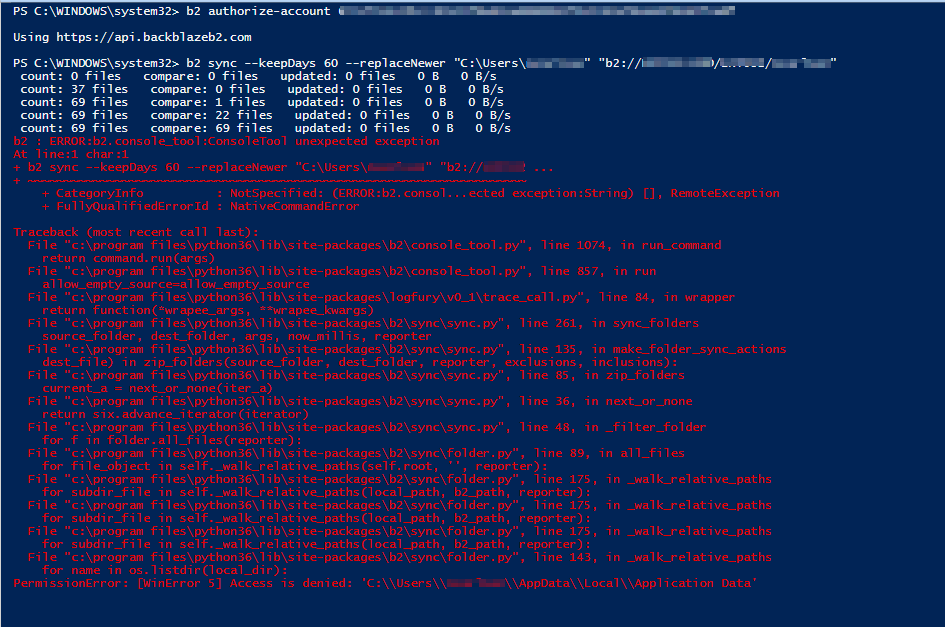
I was directed here by BackBlaze Support to try to get some help with an issue we're having. We are trying to run a simple sync between the local PC and B2 Cloud using Windows command line or Powershell (issue occurring in both). Any time the our sync hits a file/folder that it does not have proper permission to, the CLI will freeze and not allow us to cancel the active command unless we close/reopen the CLI.
Here's what we have:
-Windows 10 64bit
-Python 3.6.3
-BackBlaze B2 Cloud
Here are the commands we're trying to run:
b2 authorize-account <account number> <key>
This works successfully.
b2 sync --keepDays 60 --replaceNewer "C:\Users\ncarlson\" "b2://BUCKET/ncarlson/"
As soon as the the sync hits a folder that it doesn't have perission to (usually the AppData folder since that's the first folder it attempts), it will give me a permission error and not continue.
We have tried some other more specific folders which have worked just fine but a lot of folders contain 1 or more files which the Sync tool doesn't like.
I've attached a screenshot of the errors we receive. Please let me know if you need any additional information.
- Lenguaje dominante
- Python
- Estrellas
- 638
- Forks
- 138
- Merge medio
- 8 h 27 min
- PR fusionados (30 d)
- 8
Preparar el entorno
- Sin Dockerfile ni archivo de Docker Compose
- Sin plantilla de pull request
- Leer la guía de contribución
Primeros pasos
- Lee el issue completo y luego la guía de contribución del proyecto.
- Comenta en el issue que vas a ocuparte — evita que dos personas hagan lo mismo.
- Haz un fork del repositorio y trabaja en una rama.
- Abre un pull request que haga referencia al número del issue.
Más de Backblaze/B2_Command_Line_Tool
-
enhancement
Dificultad 2/5 1-3 horas Aptitud para principiantes 62/100
Backblaze/B2_Command_Line_Tool#553 · 2 comentarios · 3 reacciones ·
Los mantenedores suelen responder en 1 día
-
Adopt the AI-native SDLC playbook and repository policiesPosiblemente ocupada @goanpeca la tomó hace 18 días. Abiertoenhancement
Dificultad 5/5 Más de una semana Aptitud para principiantes 25/100
Backblaze/B2_Command_Line_Tool#1192 ·
Los mantenedores suelen responder en 1 día
-
Dificultad 5/5 Más de una semana Aptitud para principiantes 25/100
Backblaze/B2_Command_Line_Tool#1168 ·
Los mantenedores suelen responder en 1 día
-
Add to MacPortsAbierto
Dificultad 3/5 1-2 días Aptitud para principiantes 50/100
Backblaze/B2_Command_Line_Tool#1161 ·
Los mantenedores suelen responder en 1 día
-
b2 ls timestamps human readableAbierto
Dificultad 2/5 1-3 horas Aptitud para principiantes 56/100
Backblaze/B2_Command_Line_Tool#1155 ·
Los mantenedores suelen responder en 1 día
Todos los issues de Backblaze/B2_Command_Line_Tool
Issues similares
-
ライブラリを追加Abiertopriority middle
Dificultad 1/5 Menos de una hora Aptitud para principiantes 62/100
KATO-Hiro/AtCoderClans#13015 ·
Los mantenedores suelen responder en 1 día
-
StringLiteral to IntegerType/LongType silently truncates fractional strings, changing predicate meaningPosiblemente ocupada @Shahzeb-DataEngineer la tomó hoy. Abiertokind:bug
Dificultad 2/5 1-3 horas Aptitud para principiantes 68/100
apache/iceberg-python#4382 · 2 comentarios ·
Los mantenedores suelen responder en 1 día
-
request-theme
Dificultad 2/5 Menos de una hora Aptitud para principiantes 62/100
LizardByte/ThemerrDB#10024 · 2 comentarios ·
-
Dificultad 1/5 Menos de una hora Aptitud para principiantes 72/100
btclib-org/btclib-node#2505 · 1 comentario ·
Los mantenedores suelen responder en 1 día
-
bug
Dificultad 2/5 1-3 horas Aptitud para principiantes 78/100
open-webui/open-webui#34462 · 1 comentario ·
Los mantenedores suelen responder en 1 día