[Windows]: 微信
Chưa có ai nhận issue này.
Đánh giá
- Độ khó
- 4/5
- Thời gian dự kiến
- 3-5 ngày
- Mức phù hợp với người mới
- 42/100
- Loại issue
- Lỗi
- Độ rõ ràng
- Khá rõ ràng
- Mức độ hoạt động
- Sôi nổi
- Lĩnh vực
- devtools
Hướng nghiên cứu
The report identifies Weixin on AdGuard for Windows 8.0.4 and says friend avatars appear after disabling traffic filtering for Weixin. Start by investigating how AdGuard for Windows filters Weixin traffic and whether a filtering rule blocks the avatar requests. Reproduce with the reported setup; done means avatars display while filtering remains enabled.
Do mô hình lập chỉ mục viết ra từ nội dung của issue.
Mô tả
Application Name
微信
Application Executable Name
Weixin
Troubleshooting Result
- Disabling Ad blocking, Tracking protection, Browsing security, and DNS protection (Suggests a filtering rule issue)
Suggested Configuration List
I am not sure, please investigate
Description of the Problem
- Some features aren’t working
What changed: 电脑版微信好友头像图片不显示,单独关掉微信 过滤流量 选项就可以正常显示了
把AdGuard软件里微信控制的广告拦截关了就好了
Final Checks
- I have confirmed that disabling the Tracking Protection or specific filters did NOT fix the issue.
Screenshots
Screenshot 1
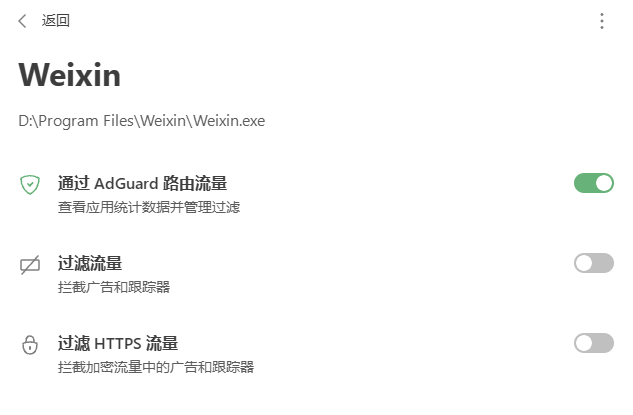
System configuration
| Information | Value |
|---|---|
| AdGuard product: | AdGuard for Windows v8.0.4 |
| System version: | Microsoft Windows NT 10.0.19045.0 |
| License type: | paid |
| AdGuard driver: | WFP |
| Filters: | Ad blocking: AdGuard Base Privacy: AdGuard Tracking Protection Annoyances: AdGuard Cookie Notices, AdGuard Popups, AdGuard Mobile App Banners, AdGuard Other Annoyances, AdGuard Widgets Language-specific: AdGuard Chinese |
| Custom filters: | User rules (url: none) |
| Tracking protection: | General settings: Block trackers, Hide your search queries, Send Do-Not-Track header Windows tracking: Disable Windows Telemetry, Turn off Advertising ID, Disable Windows Recall Miscellaneous: Hide your IP address (208.54.104.184), Remove X-Client-Data header from HTTP requests, Protect against DPI |
| DNS filtering: | server: Systemfilters: AdGuard DNS filter, User rules (url: none), KOR: YousList (url: https://raw.githubusercontent.com/yous/YousList/master/hosts.txt) |
| Browsing Security: | enabled |
| Browsing Security statistics: | disabled |
| Userscripts: | AdGuard Extra (url: https://userscripts.adtidy.org/release/adguard-extra/1.0/adguard-extra.user.js)<br>AdGuard Popup Blocker (url: https://userscripts.adtidy.org/release/popup-blocker/2.5/popupblocker.user.js) |
| Userstyles: | disabled |
Issue configuration
- Ngôn ngữ chính
- Không có dữ liệu ngôn ngữ
- Star
- 10
- Fork
- 4
- Merge trung bình
- 1 giờ 20 phút
- Pull request đã merge (30 ngày)
- 6
Chuẩn bị môi trường
Dự án này không cung cấp dev container, Dockerfile hay hướng dẫn đóng góp, nên bạn cần tự thiết lập môi trường: hãy bắt đầu từ README và xem hướng dẫn đóng góp lần đầu của chúng tôi để biết các bước chung.
Bắt đầu từ đâu
- Đọc hết issue, rồi đọc hướng dẫn đóng góp của dự án.
- Bình luận trên issue rằng bạn sẽ nhận — tránh hai người làm cùng một việc.
- Fork repository và làm thay đổi trên một nhánh.
- Mở pull request có tham chiếu số hiệu của issue.
Issue khác của AdguardTeam/CompatibilityIssues
-
[Windows]: Arduino IDE 2.3.11Đang mởCompatibility Priority: P4 Windows
Độ khó 2/5 1-3 giờ Mức phù hợp với người mới 45/100
-
[Windows]: AdguardĐang mởCompatibility Priority: P4 Windows
Độ khó 4/5 3-5 ngày Mức phù hợp với người mới 28/100
-
[Windows]: DiscordĐang mởCompatibility Priority: P4 Windows
Độ khó 4/5 3-5 ngày Mức phù hợp với người mới 45/100
-
[Windows]: VK Play Игровой центрĐang mởCompatibility Priority: P4 Windows
Độ khó 4/5 3-5 ngày Mức phù hợp với người mới 30/100
-
Compatibility Priority: P4 Windows
Độ khó 4/5 3-5 ngày Mức phù hợp với người mới 20/100
Tất cả issue của AdguardTeam/CompatibilityIssues
Issue tương tự
-
Độ khó 2/5 1-3 giờ Mức phù hợp với người mới 68/100
astral-sh/ty-pre-commit#46 ·
-
bug from-app needs-triage
Độ khó 2/5 1-3 giờ Mức phù hợp với người mới 72/100
nightly-labs/openbot#18462 ·
Maintainer thường phản hồi trong vòng 1 ngày
-
🌐 browser-only 🏷️ tagger owasp-korea-day 🟢 easy
Độ khó 2/5 1-3 giờ Mức phù hợp với người mới 74/100
owasp-noir/noir#3941 ·
Maintainer thường phản hồi trong vòng 1 ngày
-
Độ khó 2/5 1-3 giờ Mức phù hợp với người mới 76/100
Maintainer thường phản hồi trong vòng 1 ngày
-
documentation good first issue help wanted
Độ khó 2/5 1-3 giờ Mức phù hợp với người mới 78/100