[Windows]: Adguard
Chưa có ai nhận issue này.
Đánh giá
- Độ khó
- 4/5
- Thời gian dự kiến
- 3-5 ngày
- Mức phù hợp với người mới
- 28/100
- Loại issue
- Lỗi
- Độ rõ ràng
- Cần làm rõ
- Mức độ hoạt động
- Sôi nổi
- Lĩnh vực
- backend
Hướng nghiên cứu
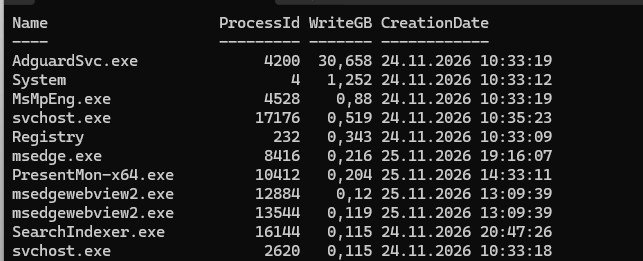
The report identifies AdGuard for Windows v8.0.4 and AdguardSvc.exe, but does not identify a code location or explain what is writing data to the SSD. Start by investigating the screenshot and reproducing the reported disk writes with the listed configuration. Done means identifying the source and confirming a fix stops the excessive writes.
Do mô hình lập chỉ mục viết ra từ nội dung của issue.
Mô tả
Application Name
Adguard
Application Executable Name
AdguardSvc.exe
Troubleshooting Result
- None of the above helped
Suggested Configuration List
I am not sure, please investigate
Description of the Problem
- Other: большие объёмы данных пишутся на SSD
Final Checks
- I have confirmed that disabling the Tracking Protection or specific filters did NOT fix the issue.
Screenshots
Screenshot 1
System configuration
| Information | Value |
|---|---|
| AdGuard product: | AdGuard for Windows v8.0.4 |
| System version: | Windows 11 26H2 |
| AdGuard driver: | WFP |
| Filters: | Ad blocking: AdGuard Base, AdGuard Mobile Ads Privacy: AdGuard Tracking Protection, AdGuard URL Tracking Social widgets: AdGuard Social Media Annoyances: AdGuard Annoyances Language-specific: AdGuard Russian |
| Tracking protection: | General settings: Block trackers, Strip URLs from tracking parameters, Hide your search queries |
| DNS filtering: | disabled |
| Browsing Security: | enabled |
| Browsing Security statistics: | enabled |
| Userscripts: | disabled |
| Userstyles: | disabled |
Issue configuration
- Ngôn ngữ chính
- Không có dữ liệu ngôn ngữ
- Star
- 10
- Fork
- 4
- Merge trung bình
- 1 giờ 20 phút
- Pull request đã merge (30 ngày)
- 6
Chuẩn bị môi trường
Dự án này không cung cấp dev container, Dockerfile hay hướng dẫn đóng góp, nên bạn cần tự thiết lập môi trường: hãy bắt đầu từ README và xem hướng dẫn đóng góp lần đầu của chúng tôi để biết các bước chung.
Bắt đầu từ đâu
- Đọc hết issue, rồi đọc hướng dẫn đóng góp của dự án.
- Bình luận trên issue rằng bạn sẽ nhận — tránh hai người làm cùng một việc.
- Fork repository và làm thay đổi trên một nhánh.
- Mở pull request có tham chiếu số hiệu của issue.
Issue khác của AdguardTeam/CompatibilityIssues
-
[Windows]: Arduino IDE 2.3.11Đang mởCompatibility Priority: P4 Windows
Độ khó 2/5 1-3 giờ Mức phù hợp với người mới 45/100
-
[Windows]: DiscordĐang mởCompatibility Priority: P4 Windows
Độ khó 4/5 3-5 ngày Mức phù hợp với người mới 45/100
-
[Windows]: VK Play Игровой центрĐang mởCompatibility Priority: P4 Windows
Độ khó 4/5 3-5 ngày Mức phù hợp với người mới 30/100
-
Compatibility Priority: P4 Windows
Độ khó 4/5 3-5 ngày Mức phù hợp với người mới 20/100
-
Compatibility Priority: P4 Windows
Độ khó 4/5 3-5 ngày Mức phù hợp với người mới 22/100
Tất cả issue của AdguardTeam/CompatibilityIssues
Issue tương tự
-
area/config comp/agent P2 type/perf
Độ khó 2/5 1-3 giờ Mức phù hợp với người mới 75/100
NousResearch/hermes-agent#161039 ·
Maintainer thường phản hồi trong vòng 1 ngày
-
Độ khó 2/5 1-3 giờ Mức phù hợp với người mới 82/100
quickwit-oss/tantivy#3299 ·
Maintainer thường phản hồi trong vòng 1 ngày
-
Độ khó 2/5 1-3 giờ Mức phù hợp với người mới 76/100
Maintainer thường phản hồi trong vòng 1 ngày
-
Độ khó 2/5 1-3 giờ Mức phù hợp với người mới 78/100
verl-project/verl#8893 ·
Maintainer thường phản hồi trong vòng 1 ngày
-
Độ khó 2/5 1-3 giờ Mức phù hợp với người mới 69/100
Maintainer thường phản hồi trong vòng 2 ngày