Objects snapped to grid do not have integer mm sizes or positions
Nobody has claimed this yet.
Assessment
- Difficulty
- 3/5
- Estimated time
- 1-2 days
- Newbie friendliness
- 52/100
- Issue type
- Bug
- Clarity
- Mostly clear
- Activity status
- Active
- Tech stack
- javascript
- Domain
- frontend
Research direction
Start by reproducing the steps in the Windows app with diagram units set to mm and grid size 10, then inspect the code that handles grid snapping and unit conversion. The issue does not name files or tests, so locate the relevant entry points from the reproduction. Done means a rectangle snapped to one major grid square reports 10 mm × 10 mm and integer positions in the Arrange tab.
Written by the indexing model from the issue text.
Description
Hi,
When working in mm, objects snapped to grid boundaries do not have integer mm sizes or positions.
Steps to reproduce:
- Create new diagram
- Set the diagram units to be mm
- Set the grid to 10 (there's no unit here, so presumably it matches the diagram's unit type?)
- Drop a rectangle onto the page
- Resize the rectangle using the mouse to fit it into one "Major gridline square"
- Look at the size of the rectangle in the "Arrange" tab
Expected:
- The rectangle's size is 10 mm × 10 mm
- The rectangle's position is an integer
Actual:
- The rectangle's size is 10.2 mm × 10.2 mm
- The rectangle's position is not an integer
Could it be that the grid is still in points despite the page being in mm?
This was seen in the latest version of the Windows app (v12.1.0)
Screenshot below, with peculiar size and position highlighted in yellow:
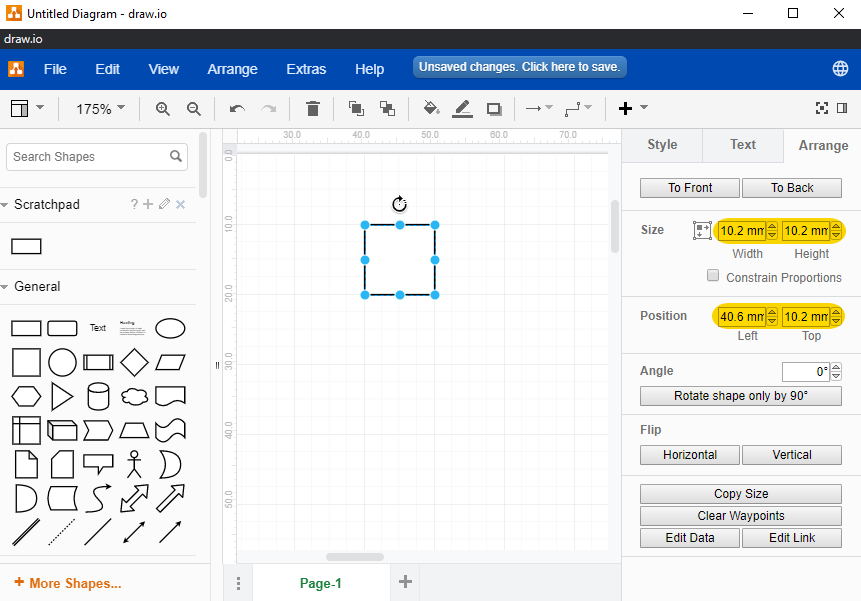
- Dominant language
- JavaScript
- Stars
- 9.4k
- Forks
- 1.4k
- PR merge metrics
- No merged PRs in 30d
Getting set up
This project ships no dev container, Dockerfile or contributing guide, so setting up is up to you: start from its README, and see our first-contribution guide for the general steps.
First steps
- Read the whole issue, then the project's contributing guide.
- Comment on the issue to say you are picking it up — it saves two people doing the same work.
- Fork the repository and make your change on a branch.
- Open a pull request that references the issue number.
More from jgraph/drawio
-
Difficulty 2/5 1-3 hours Newbie friendliness 72/100
-
Requesting a VPAT for app.diagrams.netPossibly taken @alderg claimed this 24 days ago. Openenhancement
Difficulty 2/5 1-3 hours Newbie friendliness 67/100
-
enhancement
Difficulty 5/5 Over a week Newbie friendliness 35/100
-
enhancement
Difficulty 3/5 1-2 days Newbie friendliness 68/100
-
Import TablesOpenenhancement possible-duplicate
Difficulty 4/5 3-5 days Newbie friendliness 35/100
Similar issues
-
Difficulty 1/5 Under an hour Newbie friendliness 62/100
Maintainers usually reply within 1 day
-
Difficulty 2/5 Under an hour Newbie friendliness 82/100
Leonxlnx/taste-skill#216 ·
Maintainers usually reply within 1 day
-
Difficulty 1/5 Under an hour Newbie friendliness 88/100
all-contributors/cli#690 ·
Maintainers usually reply within 1 day
-
Difficulty 2/5 1-3 hours Newbie friendliness 82/100
Maintainers usually reply within 1 day
-
area: ui Bug Payload OSS
Difficulty 1/5 Under an hour Newbie friendliness 88/100
payloadcms/payload#19839 ·
Maintainers usually reply within 1 day