Objects snapped to grid do not have integer mm sizes or positions
Chưa có ai nhận issue này.
Đánh giá
- Độ khó
- 3/5
- Thời gian dự kiến
- 1-2 ngày
- Mức phù hợp với người mới
- 52/100
- Loại issue
- Lỗi
- Độ rõ ràng
- Khá rõ ràng
- Mức độ hoạt động
- Sôi nổi
- Công nghệ
- javascript
- Lĩnh vực
- frontend
Hướng nghiên cứu
Start by reproducing the steps in the Windows app with diagram units set to mm and grid size 10, then inspect the code that handles grid snapping and unit conversion. The issue does not name files or tests, so locate the relevant entry points from the reproduction. Done means a rectangle snapped to one major grid square reports 10 mm × 10 mm and integer positions in the Arrange tab.
Do mô hình lập chỉ mục viết ra từ nội dung của issue.
Mô tả
Hi,
When working in mm, objects snapped to grid boundaries do not have integer mm sizes or positions.
Steps to reproduce:
- Create new diagram
- Set the diagram units to be mm
- Set the grid to 10 (there's no unit here, so presumably it matches the diagram's unit type?)
- Drop a rectangle onto the page
- Resize the rectangle using the mouse to fit it into one "Major gridline square"
- Look at the size of the rectangle in the "Arrange" tab
Expected:
- The rectangle's size is 10 mm × 10 mm
- The rectangle's position is an integer
Actual:
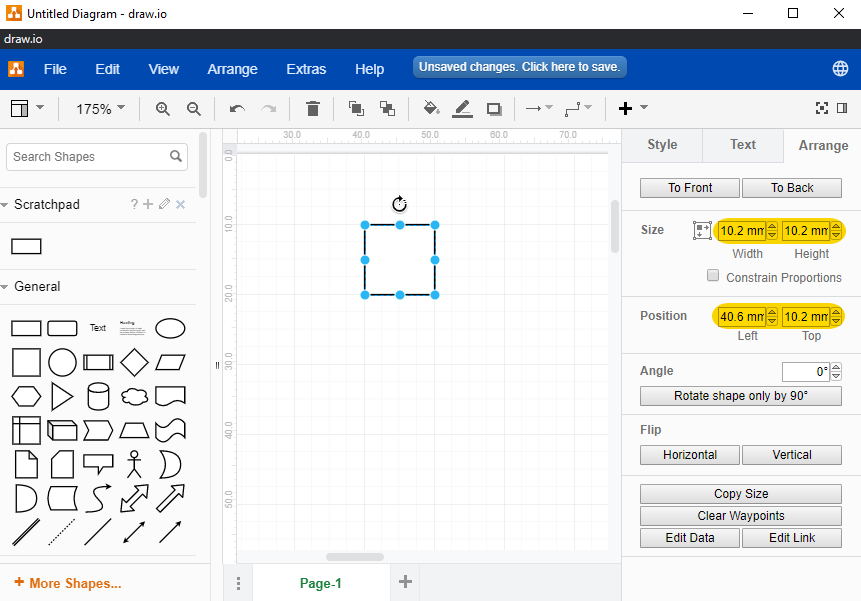
- The rectangle's size is 10.2 mm × 10.2 mm
- The rectangle's position is not an integer
Could it be that the grid is still in points despite the page being in mm?
This was seen in the latest version of the Windows app (v12.1.0)
Screenshot below, with peculiar size and position highlighted in yellow:
- Ngôn ngữ chính
- JavaScript
- Star
- 9.4k
- Fork
- 1.4k
- Chỉ số merge pull request
- Không có pull request nào được merge trong 30 ngày
Chuẩn bị môi trường
Dự án này không cung cấp dev container, Dockerfile hay hướng dẫn đóng góp, nên bạn cần tự thiết lập môi trường: hãy bắt đầu từ README và xem hướng dẫn đóng góp lần đầu của chúng tôi để biết các bước chung.
Bắt đầu từ đâu
- Đọc hết issue, rồi đọc hướng dẫn đóng góp của dự án.
- Bình luận trên issue rằng bạn sẽ nhận — tránh hai người làm cùng một việc.
- Fork repository và làm thay đổi trên một nhánh.
- Mở pull request có tham chiếu số hiệu của issue.
Issue khác của jgraph/drawio
-
Độ khó 2/5 1-3 giờ Mức phù hợp với người mới 72/100
-
Requesting a VPAT for app.diagrams.netCó thể đã có người làm @alderg đã nhận 24 ngày trước. Đang mởenhancement
Độ khó 2/5 1-3 giờ Mức phù hợp với người mới 67/100
-
enhancement
Độ khó 5/5 Hơn một tuần Mức phù hợp với người mới 35/100
-
enhancement
Độ khó 3/5 1-2 ngày Mức phù hợp với người mới 68/100
-
Import TablesĐang mởenhancement possible-duplicate
Độ khó 4/5 3-5 ngày Mức phù hợp với người mới 35/100
Tất cả issue của jgraph/drawio
Issue tương tự
-
Độ khó 1/5 Dưới một giờ Mức phù hợp với người mới 62/100
Maintainer thường phản hồi trong vòng 1 ngày
-
Độ khó 2/5 Dưới một giờ Mức phù hợp với người mới 82/100
Leonxlnx/taste-skill#216 ·
Maintainer thường phản hồi trong vòng 1 ngày
-
Docs: 11 broken linksĐang mở
Độ khó 1/5 Dưới một giờ Mức phù hợp với người mới 88/100
all-contributors/cli#690 ·
Maintainer thường phản hồi trong vòng 1 ngày
-
Độ khó 2/5 1-3 giờ Mức phù hợp với người mới 82/100
Maintainer thường phản hồi trong vòng 1 ngày
-
area: ui Bug Payload OSS
Độ khó 1/5 Dưới một giờ Mức phù hợp với người mới 88/100
payloadcms/payload#19839 ·
Maintainer thường phản hồi trong vòng 1 ngày