Only the "Raw Theme Data" should be selected when using the "Select All" option
まだ誰も着手していません。
評価
- 難易度
- 3/5
- 見積もり時間
- 1〜2日
- 初心者へのやさしさ
- 45/100
- issue の種類
- バグ
- 明瞭さ
- 明確に書かれている
- 活発さ
- 停滞
- 技術スタック
- javascript
- 領域
- frontend
調査の方向性
一覧にある Firefox Color プロファイルを使って問題を再現し、"Raw Theme Data" タブを開いて、Select All と Ctrl+A の両方を試します。Raw Theme Data 領域の選択動作を追跡します。完了の条件は、ページ全体ではなく、その領域のコンテンツだけが選択されることです。
索引モデルが issue の本文から書いたものです。
説明
[Affected versions]:
- Firefox 62.0.2 and above
[Affected Platforms]:
- All Windows
- All Mac
- All Linux
[Prerequisites]:
- Have a Firefox profile with the latest version of the "Firefox Color" add-on (1.2.0) custom built on 10/1/2018 installed.
[Steps to reproduce]:
- Open the browser with the profile from prerequisites and click the "Firefox Color" toolbar button.
- Click the "Firefox Color" toolbar button and select the "Raw Theme Data" tab.
- Right click in the "Raw Theme Data" area and select the "Select All" option.
- Observe the behavior.
[Expected result]:
- Only the content from the "Raw Theme Data" area is selected.
[Actual result]:
- All the page's content is selected.
[Notes]:
- This issue is also reproducible if at step 3 you will use the "Ctrl+A" keyboard shortcut instead.
- Attached a screen recording of the issue:
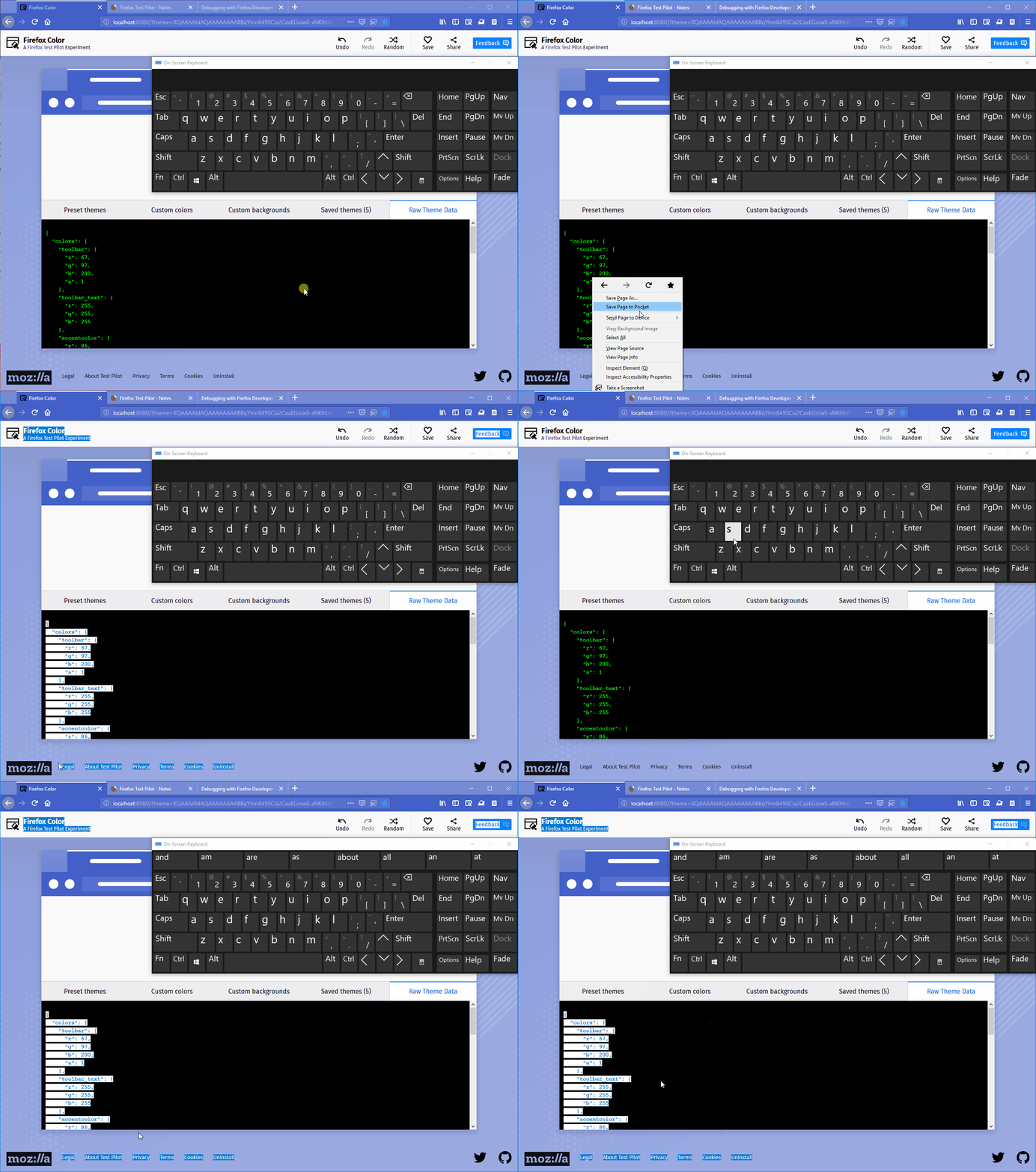
- 主要言語
- JavaScript
- スター
- 506
- フォーク
- 100
- PR マージ指標
- 30日以内にマージされた PR はありません
環境構築
はじめの一歩
- issue を最後まで読み、次にプロジェクトのコントリビューションガイドを読みます。
- 着手することを issue にコメントします — 二人が同じ作業をするのを防げます。
- リポジトリをフォークし、ブランチを切って変更します。
- issue 番号を参照したプルリクエストを送ります。
mozilla/FirefoxColor のほかの issue
-
難易度 2/5 1〜3時間 初心者へのやさしさ 68/100
mozilla/FirefoxColor#1081 · コメント 1 件 ·
-
does not see browserオープン
難易度 3/5 1〜2日 初心者へのやさしさ 35/100
mozilla/FirefoxColor#1087 · コメント 1 件 ·
-
難易度 5/5 1週間以上 初心者へのやさしさ 35/100
mozilla/FirefoxColor#1085 · コメント 1 件 ·
-
難易度 3/5 1〜2日 初心者へのやさしさ 68/100
mozilla/FirefoxColor#1084 · コメント 1 件 ·
-
難易度 5/5 1週間以上 初心者へのやさしさ 35/100
mozilla/FirefoxColor#1083 · リアクション 1 件 ·
mozilla/FirefoxColor の issue をすべて見る
似ている issue
-
curriculum documentation quality
難易度 2/5 1〜3時間 初心者へのやさしさ 78/100
githubnext/gh-aw-workshop#3897 ·
メンテナーはふだん 2 日以内に返信
-
agent/quality hive/hosted-available-lke648397-260827-5n31 quality testing
難易度 2/5 1〜3時間 初心者へのやさしさ 91/100
メンテナーはふだん 1 日以内に返信
-
check:failed feeds:add
難易度 2/5 1〜3時間 初心者へのやさしさ 70/100
iptv-org/database#36179 · コメント 1 件 ·
メンテナーはふだん 1 日以内に返信
-
bug
難易度 2/5 1〜3時間 初心者へのやさしさ 88/100
メンテナーはふだん 1 日以内に返信
-
難易度 2/5 1〜3時間 初心者へのやさしさ 84/100
メンテナーはふだん 1 日以内に返信