Preview generated workflows as a graph or YAML in Agent Chat
メンテナーはふだん 2 日以内に返信
@nastasha-solomon がすでに取り組んでいます。
2026年11月18日 から。
評価
- 難易度
- 1/5
- 見積もり時間
- 1時間未満
- 初心者へのやさしさ
- 85/100
- issue の種類
- ドキュメント
- 明瞭さ
- 明確に書かれている
- 活発さ
- 活発
調査の方向性
https://www.elastic.co/docs/explore-analyze/ai-features/agent-builder/chat の Agent Chat ページで、「Create skills and workflows in chat」の項を更新してください。まずワークフローのプレビュー手順を読み、グラフビュー、ノードの詳細、Graph/YAML の切り替え、YAML のみのフォールバックを説明する、バージョンを明記した文を追加してください。Save または Override の前に、9.6.0 と serverless での動作がドキュメントに記載されていれば完了です。
索引モデルが issue の本文から書いたものです。
説明
Summary
In Agent Builder, the workflow.yaml attachment canvas (opened with Preview on a generated workflow) now matches the Template library preview. It has a graph view and a YAML view with a toggle, and selecting a graph node shows that step's details. In this PR, the graph needs `workflows:experimentalFeatures` and falls back to YAML only. #295453, also in 9.6, removes that gate, so the graph is the default view in 9.6. Step and trigger icons on the inline attachment card and in the canvas now come from the same workflows extensions registry.
Why this needs docs: The Agent Chat docs say to select Preview and 'review the definition'; that's still accurate but doesn't mention the graph view or the step-details panel that users now see first.
Resources
- PR #294767 — [One Workflow] Show a YAML/graph preview in the workflow.yaml attachment canvas
Screenshots from PR
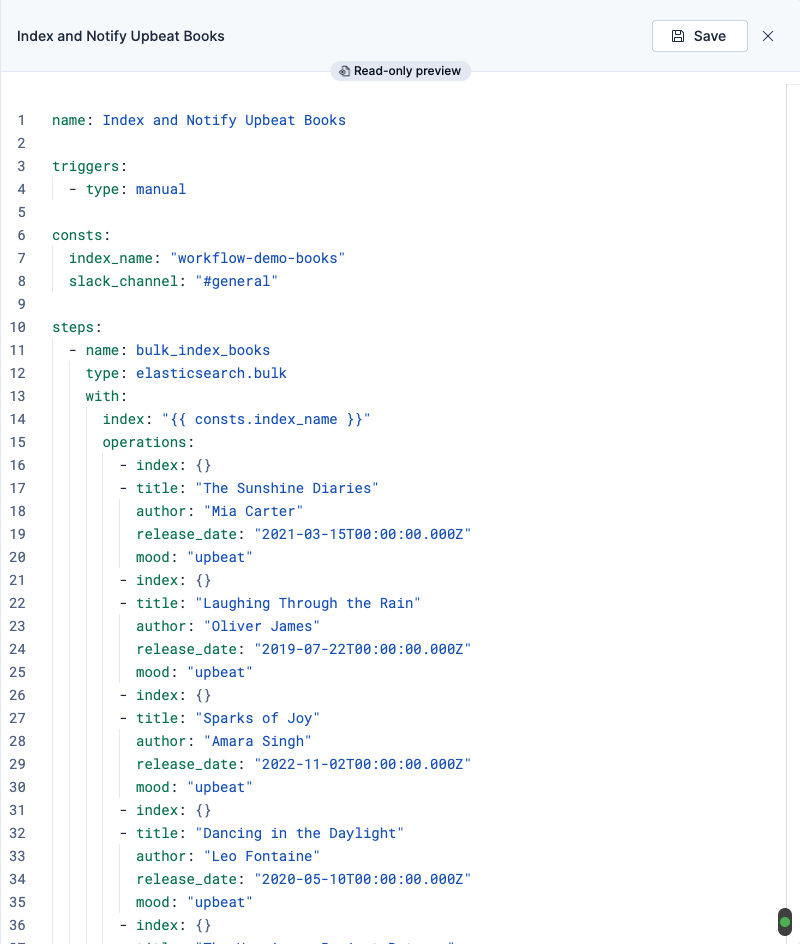
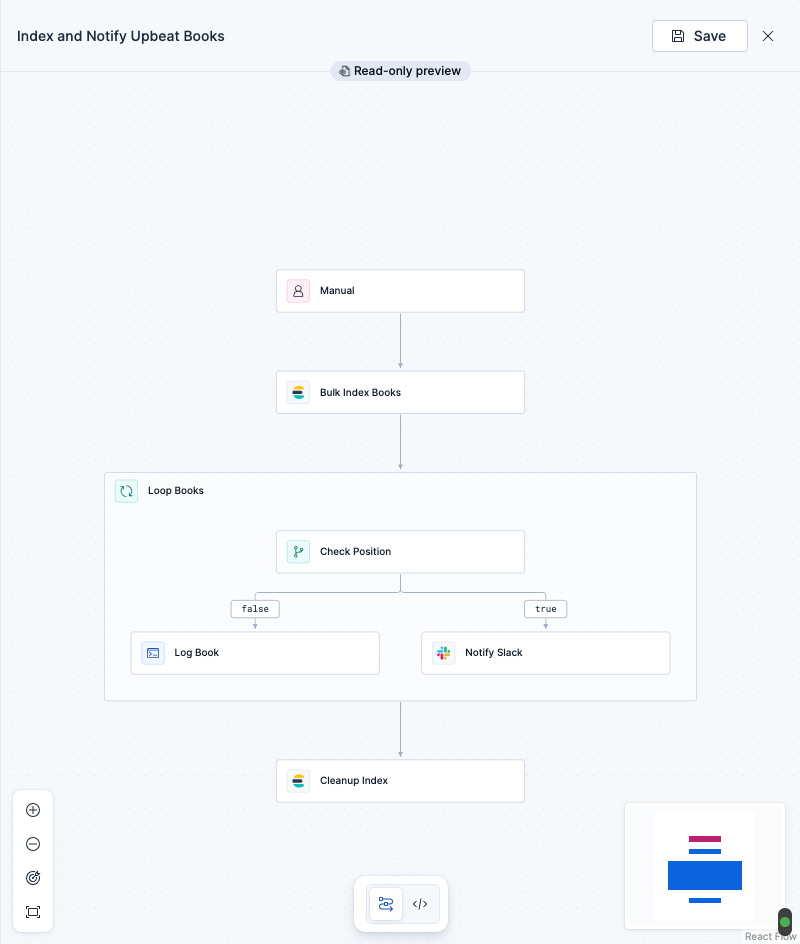
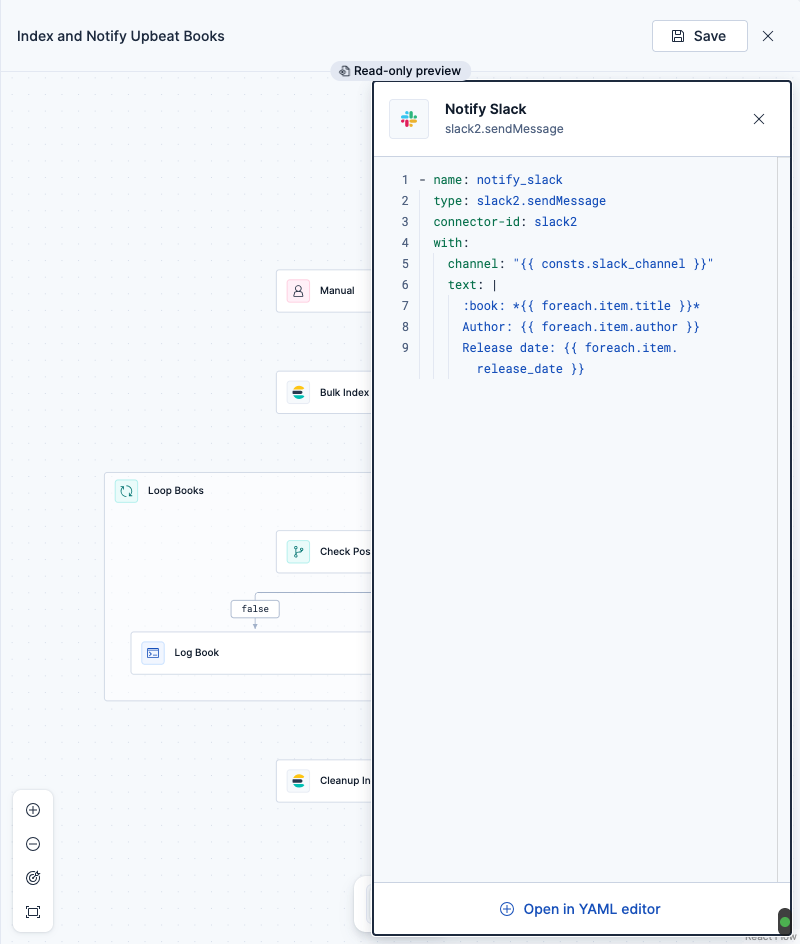
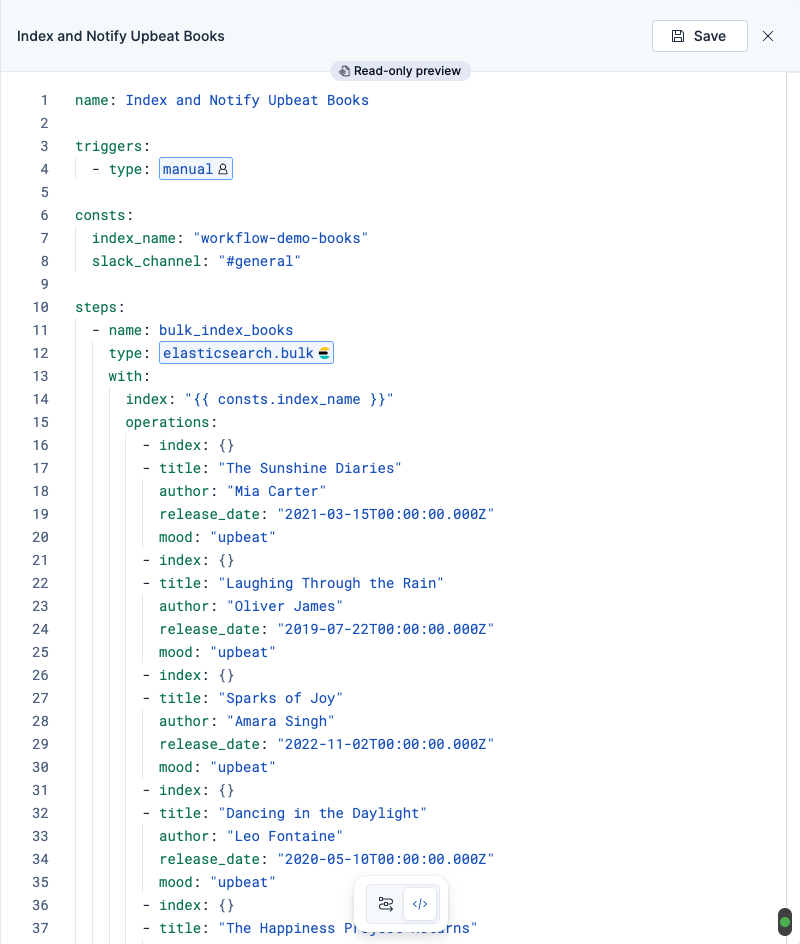


Availability
| Channel | Details |
|---|---|
| Stack | v9.6.0 |
| Serverless | Oct 5–Oct 9 |
| Feature flag | experimentalFeatures |
Created with Docs Quest Scanner by @nastasha-solomon
Suggested edits
Chat with Elastic Agent Builder agents > Create skills and workflows in chat
- What the docs say: "For workflows, select Preview, review the definition, then select Save. If you are replacing an existing workflow, select Override."
- What to add: Add a version-tagged sentence. The workflow preview opens on a read-only graph of the workflow's triggers and steps. Select a node to see that step's details, or use the Graph/YAML toggle to review the YAML before you select Save or Override. If the YAML can't be parsed, the preview shows the YAML only. Applies from 9.6.0 and in serverless.
- 主要言語
- 言語のデータがありません
- スター
- 50
- フォーク
- 269
- 平均マージ
- 4日 4時間
- マージ済み PR(30日)
- 235
環境構築
- Dockerfile・Docker Compose ファイルなし
- プルリクエストのテンプレートあり
- コントリビューションガイドなし
はじめの一歩
- issue を最後まで読み、次にプロジェクトのコントリビューションガイドを読みます。
- 着手することを issue にコメントします — 二人が同じ作業をするのを防げます。
- リポジトリをフォークし、ブランチを切って変更します。
- issue 番号を参照したプルリクエストを送ります。
elastic/docs-content のほかの issue
-
source:web Team:SKI triaged
難易度 1/5 1時間未満 初心者へのやさしさ 85/100
elastic/docs-content#9508 · コメント 1 件 · リアクション 1 件 ·
メンテナーはふだん 2 日以内に返信
-
Team:SKI triaged
難易度 2/5 1〜3時間 初心者へのやさしさ 75/100
elastic/docs-content#9493 · コメント 1 件 · リアクション 1 件 ·
メンテナーはふだん 2 日以内に返信
-
[Alerting V2] Get ES|QL help and recommended queries in the rule query sandbox対応中かも @nastasha-solomon が 3 日前に担当しました。 オープンalerting-v2 Team:SKI triaged
難易度 2/5 1〜3時間 初心者へのやさしさ 78/100
elastic/docs-content#9428 · コメント 1 件 · リアクション 1 件 · 担当者 1 名 ·
メンテナーはふだん 2 日以内に返信
-
Allow close all alerts checkbox when creating an exception from runtime fields対応中かも @nastasha-solomon が 3 日前に担当しました。 オープンTeam:SKI triaged
難易度 2/5 1〜3時間 初心者へのやさしさ 66/100
elastic/docs-content#9425 · コメント 1 件 · リアクション 1 件 · 担当者 1 名 ·
メンテナーはふだん 2 日以内に返信
-
[Security][TH][9.6 & Serverless] Choose which sensitive values are masked in AI requests on the new Anonymization page対応中かも @nastasha-solomon が 3 日前に担当しました。 オープンFeature: Threat Hunting Team:SKI triaged
難易度 2/5 1〜3時間 初心者へのやさしさ 76/100
elastic/docs-content#9424 · コメント 1 件 · リアクション 1 件 · 担当者 1 名 ·
メンテナーはふだん 2 日以内に返信
elastic/docs-content の issue をすべて見る
似ている issue
-
難易度 2/5 1〜3時間 初心者へのやさしさ 65/100
メンテナーはふだん 1 日以内に返信
-
needs discussion
難易度 2/5 1〜3時間 初心者へのやさしさ 78/100
openfga/openfga.dev#1436 · コメント 1 件 ·
メンテナーはふだん 2 日以内に返信
-
難易度 2/5 1〜3時間 初心者へのやさしさ 82/100
solidjs/solid-docs#1716 ·
メンテナーはふだん 1 日以内に返信
-
documentation
難易度 1/5 1時間未満 初心者へのやさしさ 86/100
Awesome-Embedded-Learning-Studio/Tutorial_AwesomeModernCPP#335 ·
メンテナーはふだん 1 日以内に返信
-
難易度 1/5 1時間未満 初心者へのやさしさ 75/100