Preview generated workflows as a graph or YAML in Agent Chat
I maintainer di solito rispondono entro 2 giorni
@nastasha-solomon ci sta già lavorando.
Dal 18/11/2026.
Valutazione
- Difficoltà
- 1/5
- Tempo stimato
- Meno di un'ora
- Idoneità per principianti
- 85/100
- Tipo di issue
- Documentazione
- Chiarezza
- Specificata chiaramente
- Stato di attività
- Attiva
- Ambito
- documentation
Direzione di ricerca
Aggiorna la pagina Agent Chat all’indirizzo https://www.elastic.co/docs/explore-analyze/ai-features/agent-builder/chat, nella sezione “Create skills and workflows in chat”. Inizia leggendo le istruzioni per l’anteprima dei workflow e aggiungi una frase con l’indicazione della versione che spieghi la vista a grafo, i dettagli dei nodi, il selettore Graph/YAML e l’alternativa solo YAML. Il lavoro è completato quando la documentazione descrive il comportamento nella versione 9.6.0 e in serverless prima di Save o Override.
Scritto dal modello di indicizzazione a partire dal testo della issue.
Descrizione
Summary
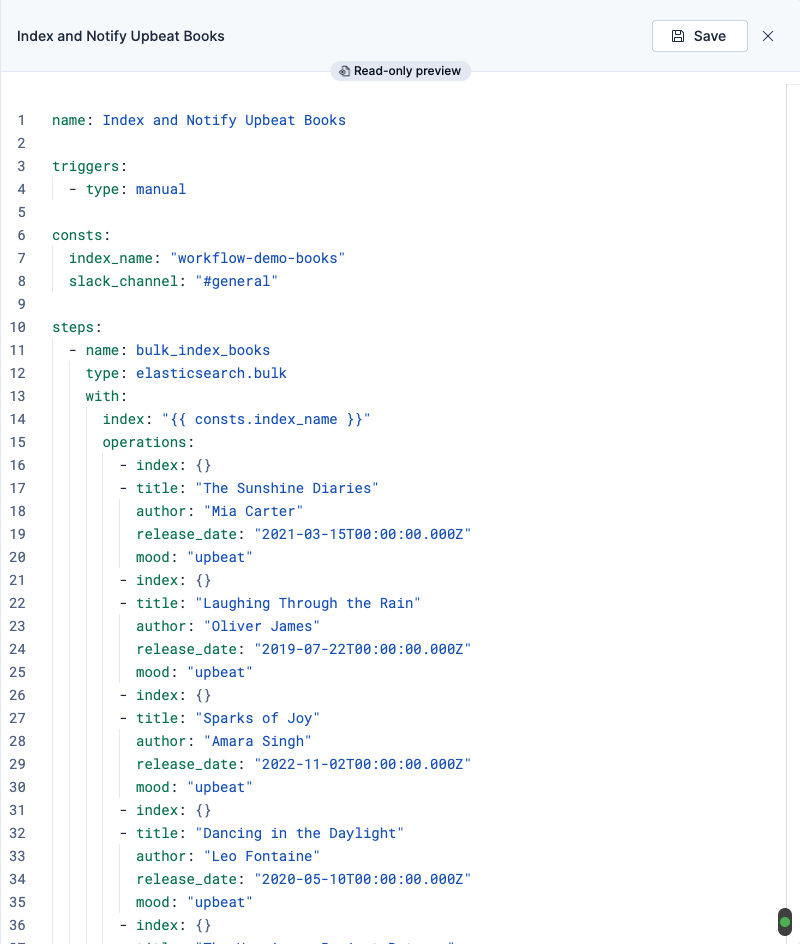
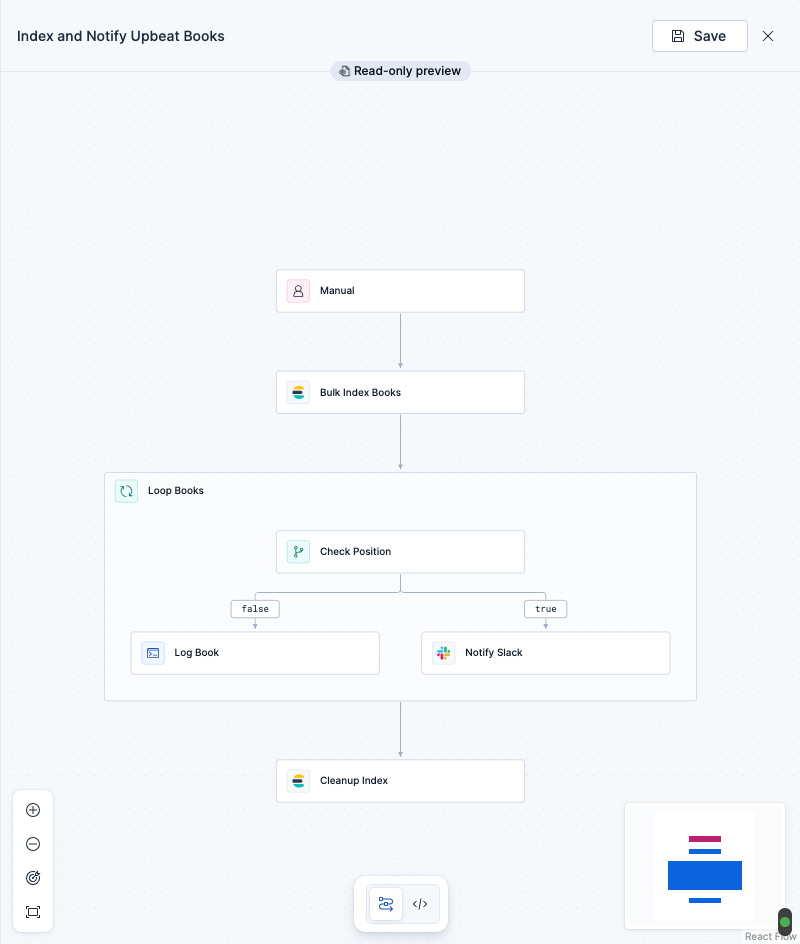
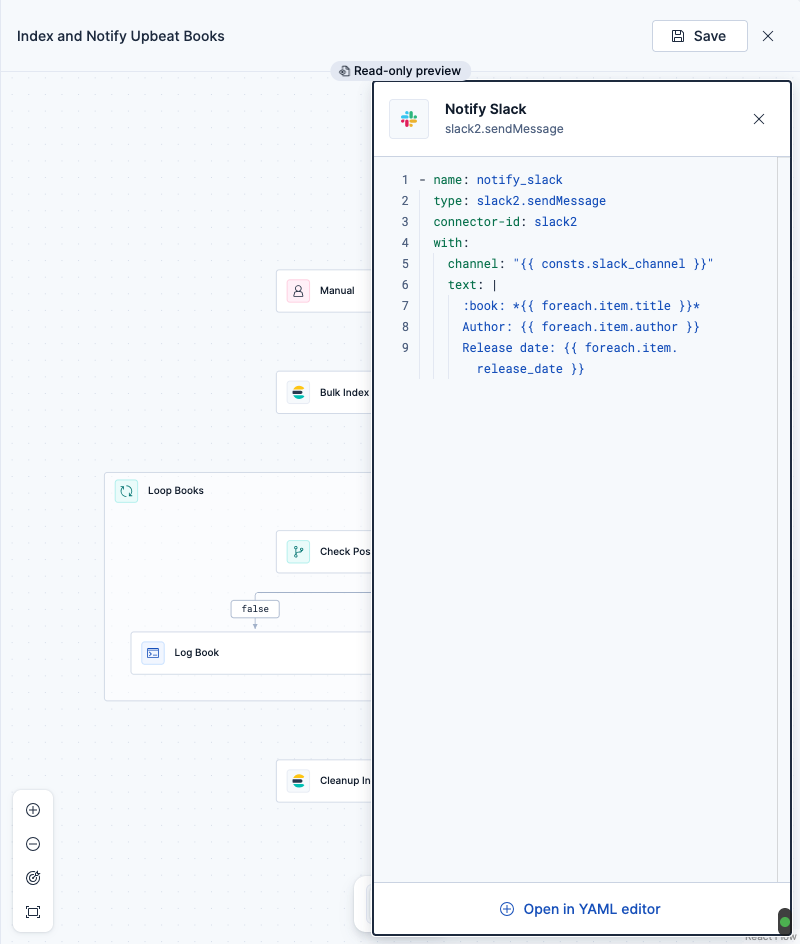
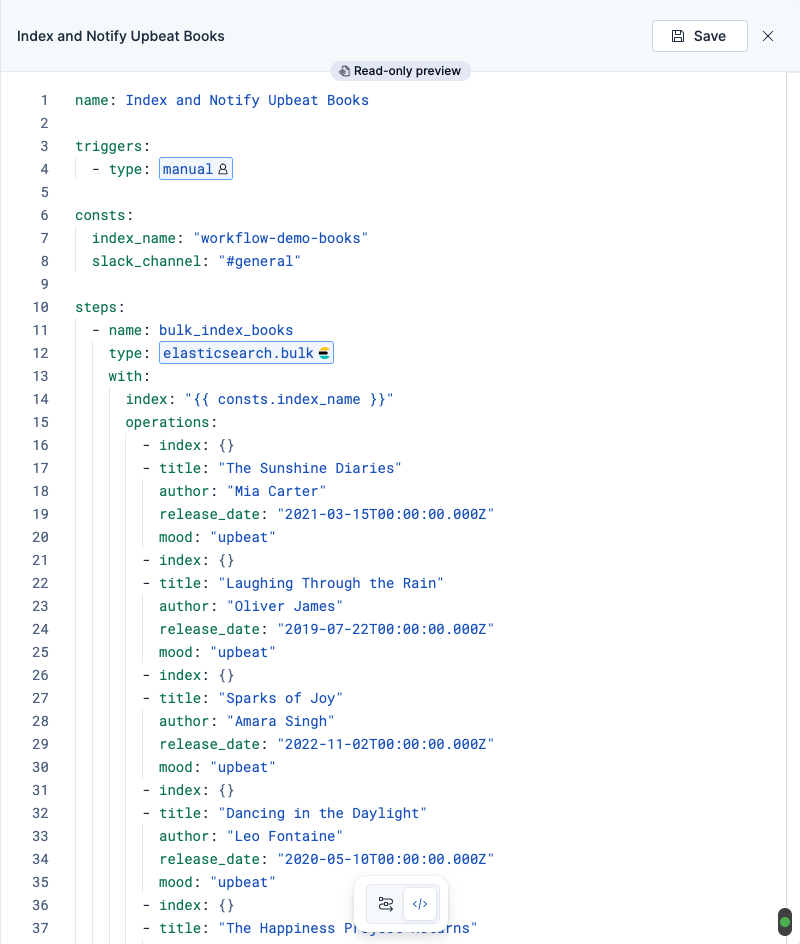
In Agent Builder, the workflow.yaml attachment canvas (opened with Preview on a generated workflow) now matches the Template library preview. It has a graph view and a YAML view with a toggle, and selecting a graph node shows that step's details. In this PR, the graph needs `workflows:experimentalFeatures` and falls back to YAML only. #295453, also in 9.6, removes that gate, so the graph is the default view in 9.6. Step and trigger icons on the inline attachment card and in the canvas now come from the same workflows extensions registry.
Why this needs docs: The Agent Chat docs say to select Preview and 'review the definition'; that's still accurate but doesn't mention the graph view or the step-details panel that users now see first.
Resources
- PR #294767 — [One Workflow] Show a YAML/graph preview in the workflow.yaml attachment canvas
Screenshots from PR


Availability
| Channel | Details |
|---|---|
| Stack | v9.6.0 |
| Serverless | Oct 5–Oct 9 |
| Feature flag | experimentalFeatures |
Created with Docs Quest Scanner by @nastasha-solomon
Suggested edits
Chat with Elastic Agent Builder agents > Create skills and workflows in chat
- What the docs say: "For workflows, select Preview, review the definition, then select Save. If you are replacing an existing workflow, select Override."
- What to add: Add a version-tagged sentence. The workflow preview opens on a read-only graph of the workflow's triggers and steps. Select a node to see that step's details, or use the Graph/YAML toggle to review the YAML before you select Save or Override. If the YAML can't be parsed, the preview shows the YAML only. Applies from 9.6.0 and in serverless.
- Lingua principale
- Nessun dato sulla lingua
- Stelle
- 50
- Fork
- 269
- Merge medio
- 4g 4h
- PR unite (30g)
- 235
Preparare l'ambiente
- Nessun Dockerfile né file Docker Compose
- Ha un modello di pull request
- Nessuna guida per i contributori
Come iniziare
- Leggi tutta la issue e poi la guida ai contributi del progetto.
- Commenta sulla issue per dire che te ne occupi tu — evita che due persone facciano lo stesso lavoro.
- Fai un fork del repository e lavora su un branch.
- Apri una pull request che faccia riferimento al numero della issue.
Altre issue di elastic/docs-content
-
source:web Team:SKI triaged
Difficoltà 1/5 Meno di un'ora Idoneità per principianti 85/100
elastic/docs-content#9508 · 1 commento · 1 reazione ·
I maintainer di solito rispondono entro 2 giorni
-
Team:SKI triaged
Difficoltà 2/5 1-3 ore Idoneità per principianti 75/100
elastic/docs-content#9493 · 1 commento · 1 reazione ·
I maintainer di solito rispondono entro 2 giorni
-
[Alerting V2] Get ES|QL help and recommended queries in the rule query sandboxForse già presa @nastasha-solomon l’ha presa 2 giorni fa. Apertaalerting-v2 Team:SKI triaged
Difficoltà 2/5 1-3 ore Idoneità per principianti 78/100
elastic/docs-content#9428 · 1 commento · 1 reazione · 1 assegnatario ·
I maintainer di solito rispondono entro 2 giorni
-
Allow close all alerts checkbox when creating an exception from runtime fieldsForse già presa @nastasha-solomon l’ha presa 2 giorni fa. ApertaTeam:SKI triaged
Difficoltà 2/5 1-3 ore Idoneità per principianti 66/100
elastic/docs-content#9425 · 1 commento · 1 reazione · 1 assegnatario ·
I maintainer di solito rispondono entro 2 giorni
-
[Security][TH][9.6 & Serverless] Choose which sensitive values are masked in AI requests on the new Anonymization pageForse già presa @nastasha-solomon l’ha presa 2 giorni fa. ApertaFeature: Threat Hunting Team:SKI triaged
Difficoltà 2/5 1-3 ore Idoneità per principianti 76/100
elastic/docs-content#9424 · 1 commento · 1 reazione · 1 assegnatario ·
I maintainer di solito rispondono entro 2 giorni
Tutte le issue di elastic/docs-content
Issue simili
-
Difficoltà 1/5 1-3 ore Idoneità per principianti 78/100
I maintainer di solito rispondono entro 1 giorno
-
type:documentation
Difficoltà 2/5 1-3 ore Idoneità per principianti 78/100
AbsaOSS/living-doc#140 ·
I maintainer di solito rispondono entro 1 giorno
-
feedback simulation workshop
Difficoltà 2/5 1-3 ore Idoneità per principianti 68/100
githubnext/gh-aw-workshop#5896 ·
I maintainer di solito rispondono entro 1 giorno
-
Difficoltà 2/5 1-3 ore Idoneità per principianti 62/100
flet-dev/flet#7102 · 1 commento ·
I maintainer di solito rispondono entro 1 giorno
-
Difficoltà 1/5 Meno di un'ora Idoneità per principianti 85/100
kubescape/node-agent#1112 ·
I maintainer di solito rispondono entro 1 giorno