[Windows]: Mailwasher and Microsoft Outlook client
まだ誰も着手していません。
評価
- 難易度
- 4/5
- 見積もり時間
- 3〜5日
- 初心者へのやさしさ
- 18/100
- issue の種類
- バグ
- 明瞭さ
- 説明が足りない
- 活発さ
- 活発
- 領域
- networking
調査の方向性
The payload names no source files or tests. The starting point is the reproduction details: with DNS protection on (server System, AdGuard DNS filter plus user rules), Outlook and Mailwasher cannot reach their mail servers, and turning DNS protection off fixes it. Identify which DNS filter rule or domain blocks the mail hosts, then confirm the fix with a reproduction on Windows with the WFP driver. Done means the cause is known and documented or a rule exception is verified, which needs access to the AdGuard product, so this is not a self-contained first task.
索引モデルが issue の本文から書いたものです。
説明
Application Name
Mailwasher and Microsoft Outlook client
Application Executable Name
outlook.exe, mailwasher.exe
Troubleshooting Result
- Disabling Ad blocking, Tracking protection, Browsing security, and DNS protection (Suggests a filtering rule issue)
Suggested Configuration List
I am not sure, please investigate
Description of the Problem
- App can’t connect to the Internet
What changed: First install of AdGuard
With DNS Protection enabled, Outlook (and Mailwasher) cannot access the mail servers to download emails. Disabling DNS Protection allows them both to download emails.
Please note as well, in order to upload the attached file, I had to disable AdGuard completely as it was apparently blocking me from adding the JPG.
Final Checks
- I have confirmed that disabling the Tracking Protection or specific filters did NOT fix the issue.
Screenshots
Screenshot 1
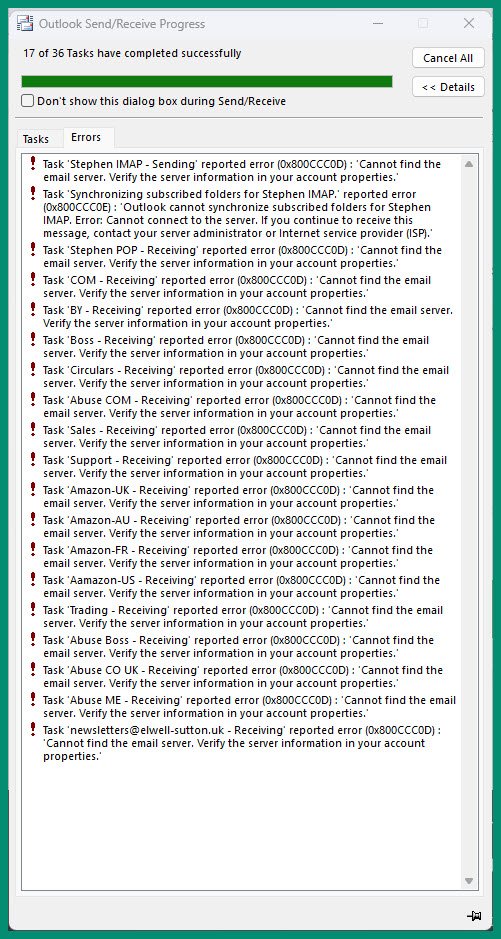
System configuration
| Information | Value |
|---|---|
| AdGuard product: | AdGuard for Windows v8.0.4 |
| System version: | Microsoft Windows NT 10.0.26300.0 |
| License type: | paid |
| AdGuard driver: | WFP |
| Filters: | Ad blocking: AdGuard Base Privacy: AdGuard Tracking Protection Annoyances: AdGuard Cookie Notices, AdGuard Popups, AdGuard Mobile App Banners, AdGuard Other Annoyances, AdGuard Widgets |
| Custom filters: | User rules (url: none) |
| Tracking protection: | disabled |
| DNS filtering: | server: Systemfilters: AdGuard DNS filter, User rules (url: none) |
| Browsing Security: | disabled |
| Browsing Security statistics: | enabled |
| Userscripts: | disabled |
| Userstyles: | disabled |
Issue configuration
- 主要言語
- 言語のデータがありません
- スター
- 10
- フォーク
- 4
- 平均マージ
- 1時間 20分
- マージ済み PR(30日)
- 6
環境構築
このプロジェクトには開発コンテナ、Dockerfile、コントリビューションガイドがありません。まず README を読み、一般的な手順ははじめてのコントリビューションガイドを参照してください。
はじめの一歩
- issue を最後まで読み、次にプロジェクトのコントリビューションガイドを読みます。
- 着手することを issue にコメントします — 二人が同じ作業をするのを防げます。
- リポジトリをフォークし、ブランチを切って変更します。
- issue 番号を参照したプルリクエストを送ります。
AdguardTeam/CompatibilityIssues のほかの issue
-
Compatibility Priority: P4 Windows
難易度 2/5 1〜3時間 初心者へのやさしさ 45/100
-
[Windows]: AdguardオープンCompatibility Priority: P4 Windows
難易度 4/5 3〜5日 初心者へのやさしさ 28/100
-
[Windows]: DiscordオープンCompatibility Priority: P4 Windows
難易度 4/5 3〜5日 初心者へのやさしさ 45/100
-
Compatibility Priority: P4 Windows
難易度 4/5 3〜5日 初心者へのやさしさ 30/100
-
Compatibility Priority: P4 Windows
難易度 4/5 3〜5日 初心者へのやさしさ 20/100
AdguardTeam/CompatibilityIssues の issue をすべて見る
似ている issue
-
難易度 2/5 1〜3時間 初心者へのやさしさ 78/100
smartcontractkit/external-adapters-js#5651 ·
メンテナーはふだん 1 日以内に返信
-
needs-info
難易度 2/5 1〜3時間 初心者へのやさしさ 78/100
-
難易度 2/5 1〜3時間 初心者へのやさしさ 82/100
メンテナーはふだん 1 日以内に返信
-
good first issue help wanted
難易度 2/5 1〜3時間 初心者へのやさしさ 85/100
vishwagw/Sky-Sim-drone-simulator-3.0#46 ·
メンテナーはふだん 1 日以内に返信
-
難易度 2/5 1〜3時間 初心者へのやさしさ 76/100
NuSkooler/enigma-bbs#1213 ·
メンテナーはふだん 1 日以内に返信