[Windows]: Mailwasher and Microsoft Outlook client
Nessuno ha ancora preso questa issue.
Valutazione
- Difficoltà
- 4/5
- Tempo stimato
- 3-5 giorni
- Idoneità per principianti
- 18/100
- Tipo di issue
- Bug
- Chiarezza
- Da chiarire
- Stato di attività
- Attiva
- Ambito
- networking
Direzione di ricerca
The payload names no source files or tests. The starting point is the reproduction details: with DNS protection on (server System, AdGuard DNS filter plus user rules), Outlook and Mailwasher cannot reach their mail servers, and turning DNS protection off fixes it. Identify which DNS filter rule or domain blocks the mail hosts, then confirm the fix with a reproduction on Windows with the WFP driver. Done means the cause is known and documented or a rule exception is verified, which needs access to the AdGuard product, so this is not a self-contained first task.
Scritto dal modello di indicizzazione a partire dal testo della issue.
Descrizione
Application Name
Mailwasher and Microsoft Outlook client
Application Executable Name
outlook.exe, mailwasher.exe
Troubleshooting Result
- Disabling Ad blocking, Tracking protection, Browsing security, and DNS protection (Suggests a filtering rule issue)
Suggested Configuration List
I am not sure, please investigate
Description of the Problem
- App can’t connect to the Internet
What changed: First install of AdGuard
With DNS Protection enabled, Outlook (and Mailwasher) cannot access the mail servers to download emails. Disabling DNS Protection allows them both to download emails.
Please note as well, in order to upload the attached file, I had to disable AdGuard completely as it was apparently blocking me from adding the JPG.
Final Checks
- I have confirmed that disabling the Tracking Protection or specific filters did NOT fix the issue.
Screenshots
Screenshot 1
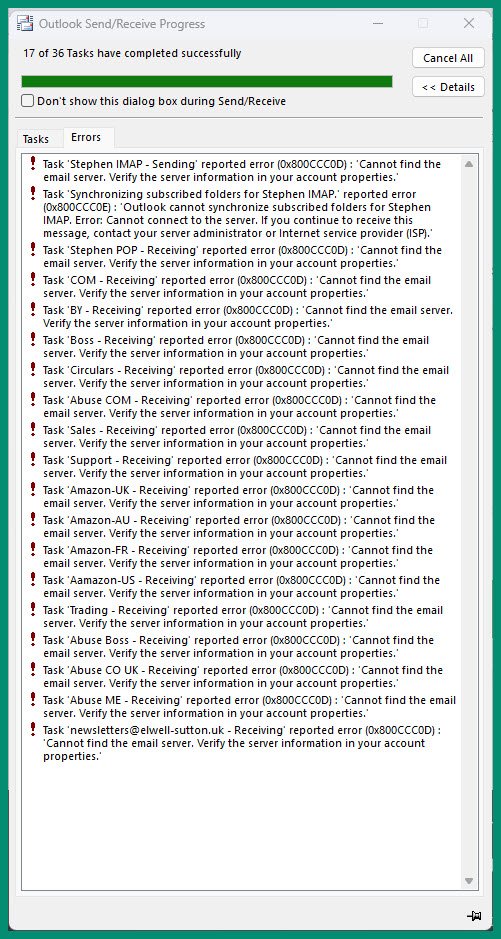
System configuration
| Information | Value |
|---|---|
| AdGuard product: | AdGuard for Windows v8.0.4 |
| System version: | Microsoft Windows NT 10.0.26300.0 |
| License type: | paid |
| AdGuard driver: | WFP |
| Filters: | Ad blocking: AdGuard Base Privacy: AdGuard Tracking Protection Annoyances: AdGuard Cookie Notices, AdGuard Popups, AdGuard Mobile App Banners, AdGuard Other Annoyances, AdGuard Widgets |
| Custom filters: | User rules (url: none) |
| Tracking protection: | disabled |
| DNS filtering: | server: Systemfilters: AdGuard DNS filter, User rules (url: none) |
| Browsing Security: | disabled |
| Browsing Security statistics: | enabled |
| Userscripts: | disabled |
| Userstyles: | disabled |
Issue configuration
- Lingua principale
- Nessun dato sulla lingua
- Stelle
- 10
- Fork
- 4
- Merge medio
- 1h 20m
- PR unite (30g)
- 6
Preparare l'ambiente
Questo progetto non fornisce container di sviluppo, Dockerfile né guida per i contributori, quindi l'ambiente è a tuo carico: parti dal suo README e consulta la nostra guida al primo contributo per i passaggi generali.
Come iniziare
- Leggi tutta la issue e poi la guida ai contributi del progetto.
- Commenta sulla issue per dire che te ne occupi tu — evita che due persone facciano lo stesso lavoro.
- Fai un fork del repository e lavora su un branch.
- Apri una pull request che faccia riferimento al numero della issue.
Altre issue di AdguardTeam/CompatibilityIssues
-
Compatibility Priority: P4 Windows
Difficoltà 2/5 1-3 ore Idoneità per principianti 45/100
-
[Windows]: AdguardApertaCompatibility Priority: P4 Windows
Difficoltà 4/5 3-5 giorni Idoneità per principianti 28/100
-
[Windows]: DiscordApertaCompatibility Priority: P4 Windows
Difficoltà 4/5 3-5 giorni Idoneità per principianti 45/100
-
Compatibility Priority: P4 Windows
Difficoltà 4/5 3-5 giorni Idoneità per principianti 30/100
-
Compatibility Priority: P4 Windows
Difficoltà 4/5 3-5 giorni Idoneità per principianti 20/100
Tutte le issue di AdguardTeam/CompatibilityIssues
Issue simili
-
Difficoltà 2/5 1-3 ore Idoneità per principianti 78/100
smartcontractkit/external-adapters-js#5651 ·
I maintainer di solito rispondono entro 1 giorno
-
needs-info
Difficoltà 2/5 1-3 ore Idoneità per principianti 78/100
-
Difficoltà 2/5 1-3 ore Idoneità per principianti 82/100
I maintainer di solito rispondono entro 1 giorno
-
tools/*_probe.py crash onApertagood first issue help wanted
Difficoltà 2/5 1-3 ore Idoneità per principianti 85/100
vishwagw/Sky-Sim-drone-simulator-3.0#46 ·
I maintainer di solito rispondono entro 1 giorno
-
Difficoltà 2/5 1-3 ore Idoneità per principianti 76/100
NuSkooler/enigma-bbs#1213 ·
I maintainer di solito rispondono entro 1 giorno