gcp-cloud-run image pins Chrome 148, which drops `background-clip: text` glyphs inside layered children; the CLI's Chrome 152 paints them
I maintainer di solito rispondono entro 1 giorno
Valutazione
- Difficoltà
- 1/5
- Tempo stimato
- Meno di un'ora
- Idoneità per principianti
- 84/100
- Tipo di issue
- Bug
- Chiarezza
- Specificata chiaramente
- Stato di attività
- Attiva
- Stack tecnologico
- docker, typescript
- Ambito
- build-system
Direzione di ricerca
Inizia da packages/gcp-cloud-run/Dockerfile e Dockerfile.test, dove chrome-headless-shell è fissato a 148.0.7778.167; aggiorna entrambi a 152.0.7977.30, la versione già gestita da packages/cli/src/browser/manager.ts. Conferma che la versione sia coerente con la CLI leggendo manager.ts, quindi esegui la build dell'immagine affinché la sua sonda BeginFrame validi il nuovo pin. È completato quando la build del Dockerfile supera quella sonda e un render dell'immagine Cloud Run corrisponde a un render locale del riproducibile collegato.
Scritto dal modello di indicizzazione a partire dal testo della issue.
Descrizione
Describe the bug
packages/gcp-cloud-run/Dockerfile (and Dockerfile.test) pin [email protected]. That Chromium build leaves descendants with their own paint layer (transform, opacity, filter, position, will-change) out of a background-clip: text mask, so gradient text whose glyphs live in such a child is painted with its transparent fill and nothing else: the line is invisible in the render.
The CLI's managed Chrome (152.0.7977.30, packages/cli/src/browser/manager.ts) paints it, as does hyperframes preview in any current browser. So the same project renders differently on a workstation and on Cloud Run, and only the Cloud Run output is wrong.
This hits any split-text entrance (lines or words wrapped in divs that a GSAP tween translates, fades or blurs) applied to gradient text. The tween leaves a transform on each wrapper, which is enough.
Related: #2810 resolved the BeginFrame question for this exact pin, so I don't think BeginFrame is a reason to stay on 148. check flags the pattern as text_not_painted (transparent fill) on every Chrome, which matches the 148 output rather than what 150+ and browsers paint; that may be worth a look too.
Minimal reproduction
https://github.com/ArcadeHQ/hyperframes-repros/tree/patch/bg-clip-text-layered-child
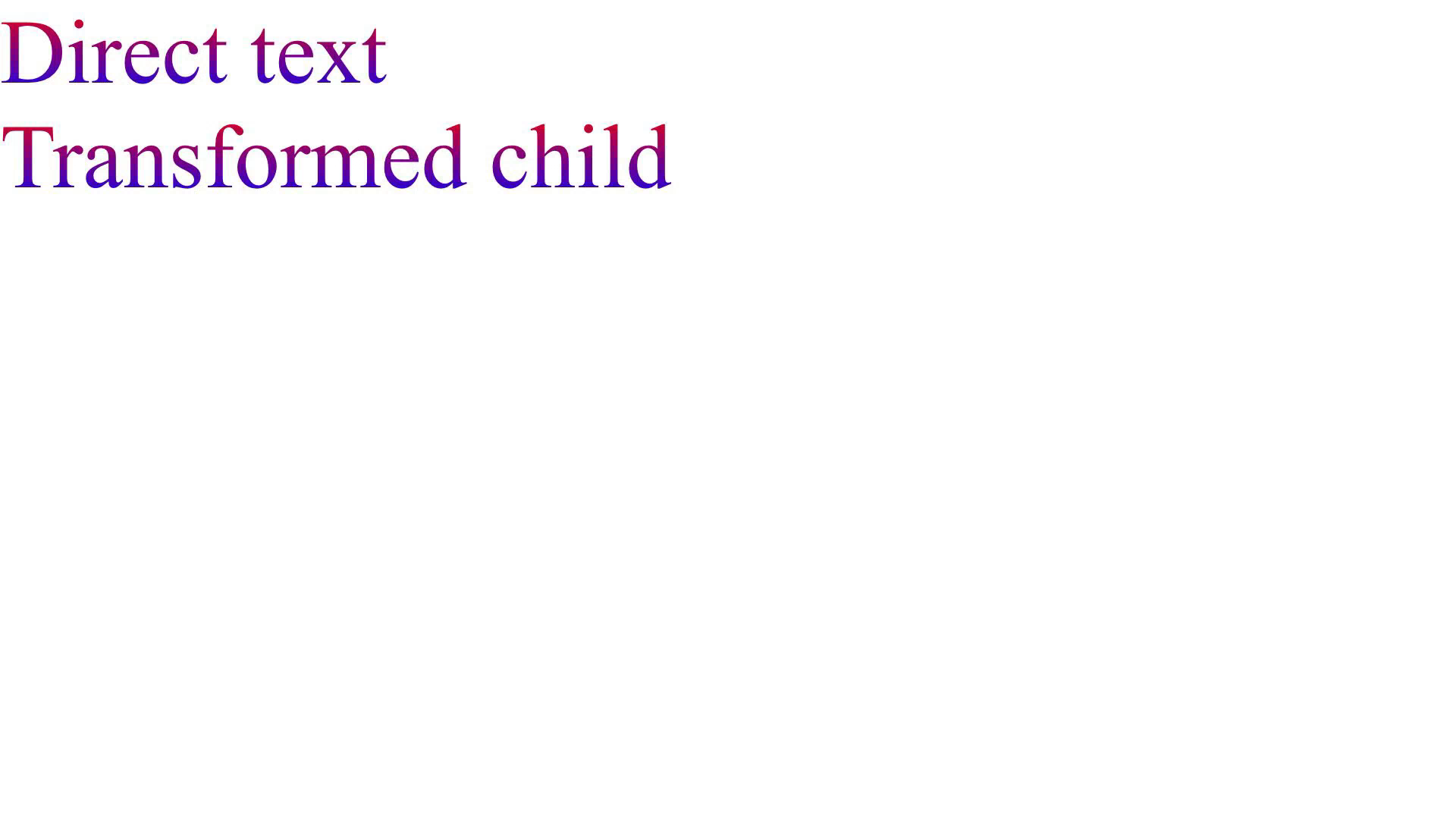
One index.html, no scripts, no animation: two gradient lines, the second inside a child with transform: translateY(0).
Steps to reproduce
git clone -b patch/bg-clip-text-layered-child https://github.com/ArcadeHQ/hyperframes-repros
cd hyperframes-repros
npm run render -- --quality draft --output out/chrome-152.mp4            # CLI's managed Chrome: both lines

npx --yes @puppeteer/browsers install [email protected]
HYPERFRAMES_BROWSER_PATH=<path printed above> npm run render -- --quality draft --output out/chrome-148.mp4   # second line missing

ffmpeg -ss 0.5 -i out/chrome-152.mp4 -frames:v 1 out/chrome-152.png
ffmpeg -ss 0.5 -i out/chrome-148.mp4 -frames:v 1 out/chrome-148.png
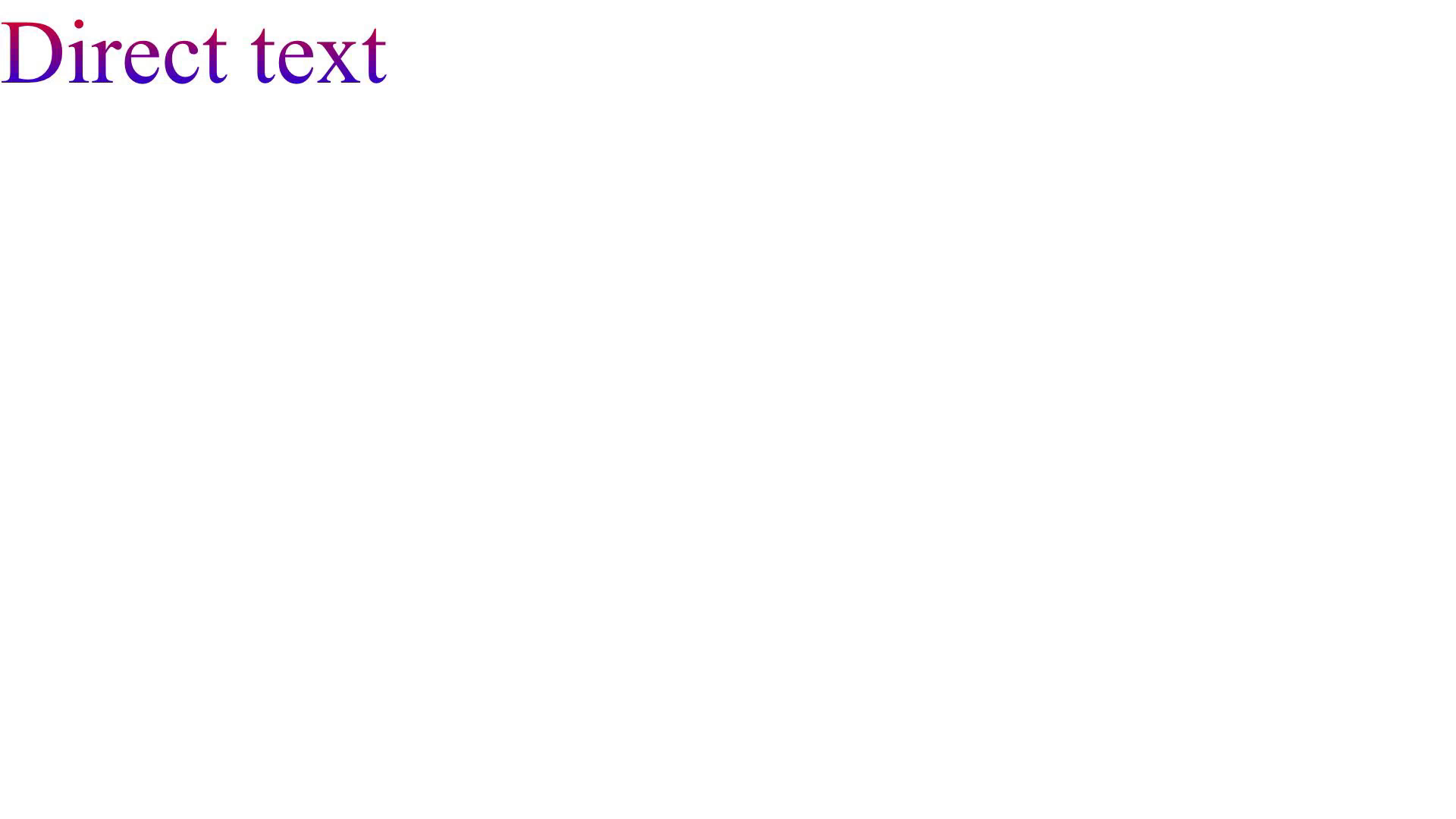
The 148 render is what the @hyperframes/gcp-cloud-run image produces.
Expected behavior
Both lines render with the gradient, matching preview and a local render.
Actual behavior
On Chrome 148 only "Direct text" renders. The second line's box is still laid out, but nothing paints in it.
Frame at 0.5 s, CLI Chrome 152 (expected):
Same frame on Chrome 148 (the Cloud Run image):
Environment
- hyperframes 0.8.134
- Node v24.21.0, macOS arm64 (Apple M1 Pro)
- Chrome:
chrome-headless-shell152.0.7977.30 (CLI managed) vs 148.0.7778.97 viaHYPERFRAMES_BROWSER_PATH; Linux 148.0.7778.167 in the Cloud Run image shows the same - ffmpeg 9.0.2
npx hyperframes doctor from the repro checkout:
  ✓ Version          0.8.134 (latest)
  ✓ Node.js          v24.21.0 (darwin arm64)
  ✓ CPU              10 cores · Apple M1 Pro @ 2400MHz
  ✓ Memory           16.0 GB total
  ✓ FFmpeg           ffmpeg 9.0.2 at /opt/homebrew/bin/ffmpeg
  ✓ FFprobe          ffprobe 9.0.2 at /opt/homebrew/bin/ffprobe
  ✓ Chrome           cache: ~/.cache/puppeteer/chrome-headless-shell/mac_arm-154.0.8037.92/...
  ✗ Docker           Not found
Additional context
Requested fix: pin the gcp-cloud-run image (and Dockerfile.test) to the same build the CLI manages, 152.0.7977.30, so Cloud Run and workstation renders use one Chrome. The image build's BeginFrame probe gates that, and our render corpus passes on 152. Happy to send the one-line PR if useful.
Note for completeness: Chromium 150+ paints the layered child's glyphs but still in the clipping box's own space (no transform, opacity or filter applied to the mask), which Firefox does apply. That is a Chromium limitation, not a HyperFrames one, and is not what this issue asks to change.
- Lingua principale
- TypeScript
- Stelle
- 54.1k
- Fork
- 4.9k
- Merge medio
- 7h 19m
- PR unite (30g)
- 746
Preparare l'ambiente
Questo progetto non fornisce container di sviluppo, Dockerfile né guida per i contributori, quindi l'ambiente è a tuo carico: parti dal suo README e consulta la nostra guida al primo contributo per i passaggi generali.
Come iniziare
- Leggi tutta la issue e poi la guida ai contributi del progetto.
- Commenta sulla issue per dire che te ne occupi tu — evita che due persone facciano lo stesso lavoro.
- Fai un fork del repository e lavora su un branch.
- Apri una pull request che faccia riferimento al numero della issue.
Altre issue di heygen-com/hyperframes
-
Docs: clarify that "Enable auto-update" is only available in the Claude Code terminal (CLI) /plugin UIForse già presa @rumi7911 l’ha presa 2 giorni fa. Aperta
Difficoltà 2/5 1-3 ore Idoneità per principianti 85/100
heygen-com/hyperframes#5027 ·
I maintainer di solito rispondono entro 1 giorno
-
fix(producer): propagate useGpu to HDR layered streaming encoderForse già presa @Monster-GM l’ha presa 4 giorni fa. Aperta
Difficoltà 2/5 1-3 ore Idoneità per principianti 87/100
heygen-com/hyperframes#5002 ·
I maintainer di solito rispondono entro 1 giorno
-
skills: remoteHeadSha() can open a Git Credential Manager dialog on Windows (GIT_TERMINAL_PROMPT does not cover GUI helpers; slug unvalidated)Forse già presa @RaphaelFakhri l’ha presa 8 giorni fa. Aperta
Difficoltà 2/5 1-3 ore Idoneità per principianti 78/100
heygen-com/hyperframes#4702 · 1 commento · 1 reazione ·
I maintainer di solito rispondono entro 1 giorno
-
Studio catalog prompt editor has no accessible nameForse già presa @lorenzozanee l’ha presa 14 giorni fa. Apertabug difficulty/easy triage/ready
Difficoltà 2/5 1-3 ore Idoneità per principianti 78/100
heygen-com/hyperframes#4384 ·
I maintainer di solito rispondono entro 1 giorno
-
lint: validate composition variables declared on supported root elementsForse di nuovo libera Una pull request per questa issue è stata chiusa senza essere unita. Apertabug difficulty/easy triage/ready
Difficoltà 2/5 1-3 ore Idoneità per principianti 88/100
heygen-com/hyperframes#4383 ·
I maintainer di solito rispondono entro 1 giorno
Tutte le issue di heygen-com/hyperframes
Issue simili
-
Difficoltà 2/5 1-3 ore Idoneità per principianti 76/100
I maintainer di solito rispondono entro 1 giorno
-
Difficoltà 1/5 1-3 ore Idoneità per principianti 84/100
answerLoops/answerLoops#345 ·
I maintainer di solito rispondono entro 1 giorno
-
Difficoltà 1/5 Meno di un'ora Idoneità per principianti 82/100
siyuan-note/siyuan#20313 ·
I maintainer di solito rispondono entro 1 giorno
-
bug
Difficoltà 2/5 1-3 ore Idoneità per principianti 78/100
LanternOps/breeze#8254 ·
I maintainer di solito rispondono entro 1 giorno
-
Difficoltà 1/5 1-3 ore Idoneità per principianti 82/100
gofish-graphics/gofish-graphics#1084 ·
I maintainer di solito rispondono entro 1 giorno