gcp-cloud-run image pins Chrome 148, which drops `background-clip: text` glyphs inside layered children; the CLI's Chrome 152 paints them
Los mantenedores suelen responder en 1 día
@user-github-me ya está trabajando en esto.
Desde el 9/10/2026.
Evaluación
- Dificultad
- 1/5
- Tiempo estimado
- Menos de una hora
- Aptitud para principiantes
- 84/100
- Tipo de issue
- Error
- Claridad
- Bien especificado
- Estado de actividad
- Activo
- Stack tecnológico
- docker, typescript
- Área
- build-system
Línea de trabajo
Comienza en packages/gcp-cloud-run/Dockerfile y Dockerfile.test, donde chrome-headless-shell está fijado en 148.0.7778.167; actualiza ambos a 152.0.7977.30, la versión que ya gestiona packages/cli/src/browser/manager.ts. Confirma que la versión sea consistente con el CLI leyendo manager.ts; después ejecuta la construcción de la imagen para que su sonda BeginFrame valide el nuevo pin. Se considera terminado cuando la construcción del Dockerfile supera esa sonda y un renderizado de la imagen en Cloud Run coincide con un renderizado local del repro enlazado.
Escrito por el modelo de indexación a partir del texto del issue.
Descripción
Describe the bug
packages/gcp-cloud-run/Dockerfile (and Dockerfile.test) pin [email protected]. That Chromium build leaves descendants with their own paint layer (transform, opacity, filter, position, will-change) out of a background-clip: text mask, so gradient text whose glyphs live in such a child is painted with its transparent fill and nothing else: the line is invisible in the render.
The CLI's managed Chrome (152.0.7977.30, packages/cli/src/browser/manager.ts) paints it, as does hyperframes preview in any current browser. So the same project renders differently on a workstation and on Cloud Run, and only the Cloud Run output is wrong.
This hits any split-text entrance (lines or words wrapped in divs that a GSAP tween translates, fades or blurs) applied to gradient text. The tween leaves a transform on each wrapper, which is enough.
Related: #2810 resolved the BeginFrame question for this exact pin, so I don't think BeginFrame is a reason to stay on 148. check flags the pattern as text_not_painted (transparent fill) on every Chrome, which matches the 148 output rather than what 150+ and browsers paint; that may be worth a look too.
Minimal reproduction
https://github.com/ArcadeHQ/hyperframes-repros/tree/patch/bg-clip-text-layered-child
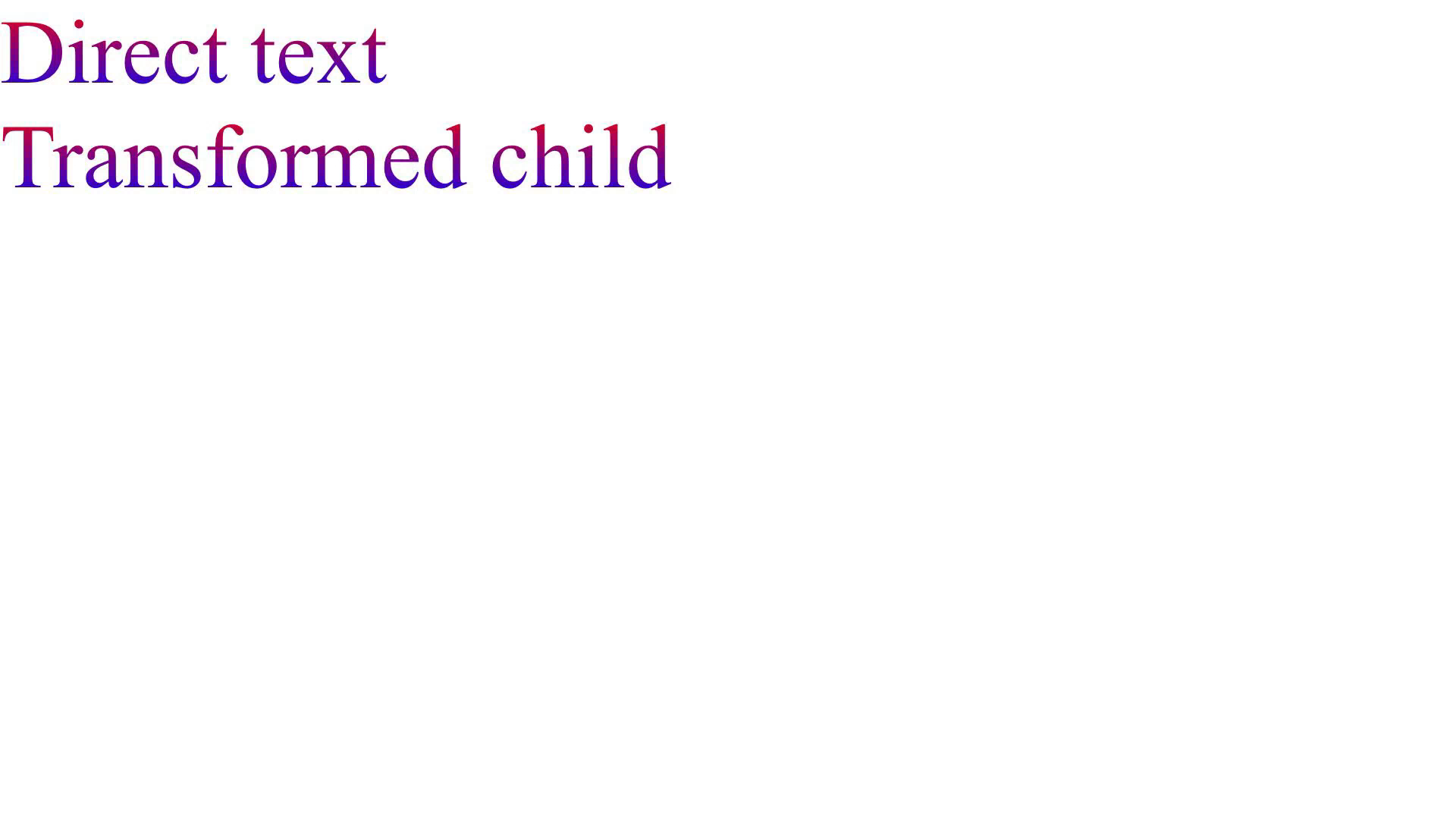
One index.html, no scripts, no animation: two gradient lines, the second inside a child with transform: translateY(0).
Steps to reproduce
git clone -b patch/bg-clip-text-layered-child https://github.com/ArcadeHQ/hyperframes-repros
cd hyperframes-repros
npm run render -- --quality draft --output out/chrome-152.mp4            # CLI's managed Chrome: both lines

npx --yes @puppeteer/browsers install [email protected]
HYPERFRAMES_BROWSER_PATH=<path printed above> npm run render -- --quality draft --output out/chrome-148.mp4   # second line missing

ffmpeg -ss 0.5 -i out/chrome-152.mp4 -frames:v 1 out/chrome-152.png
ffmpeg -ss 0.5 -i out/chrome-148.mp4 -frames:v 1 out/chrome-148.png
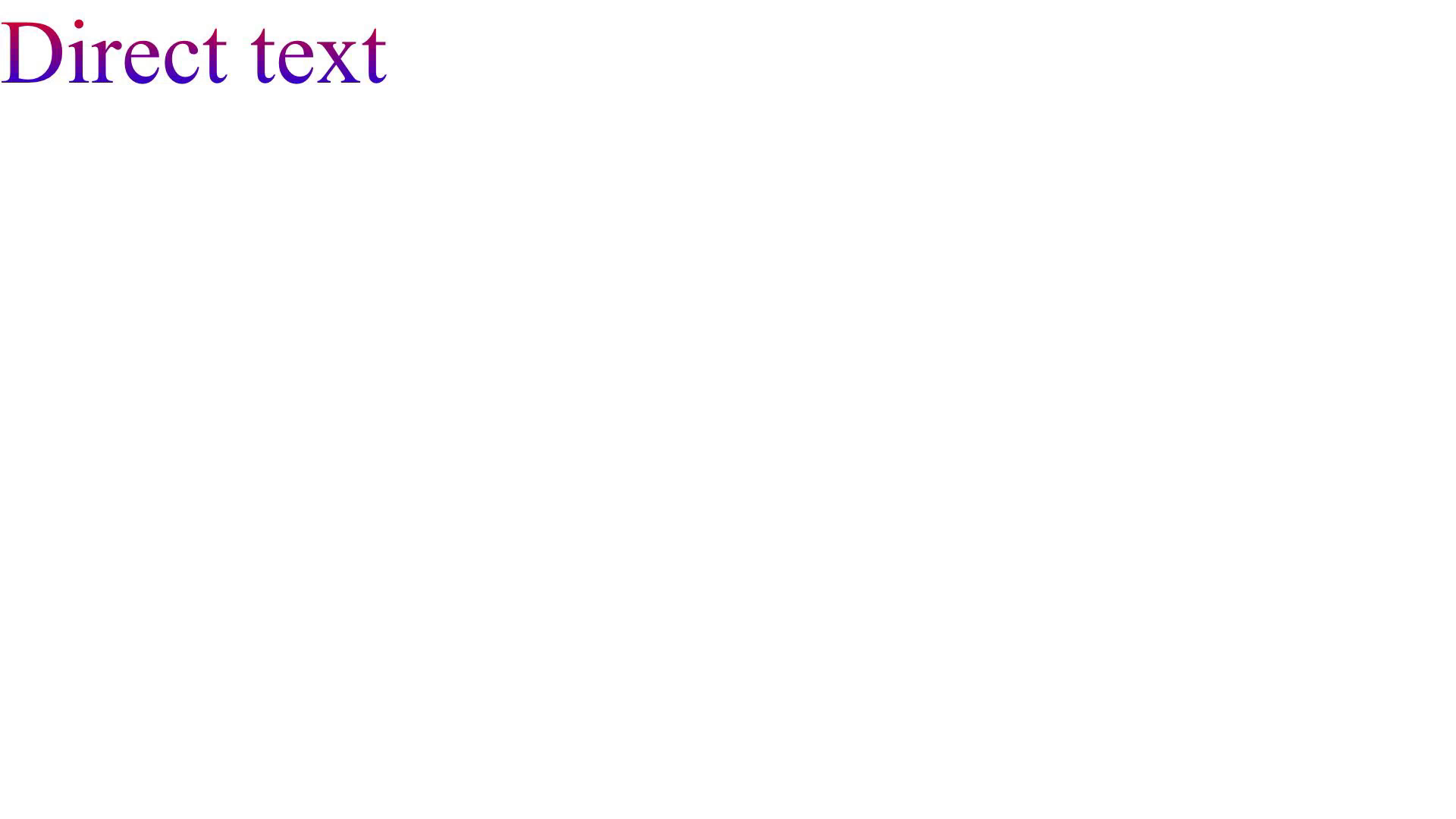
The 148 render is what the @hyperframes/gcp-cloud-run image produces.
Expected behavior
Both lines render with the gradient, matching preview and a local render.
Actual behavior
On Chrome 148 only "Direct text" renders. The second line's box is still laid out, but nothing paints in it.
Frame at 0.5 s, CLI Chrome 152 (expected):
Same frame on Chrome 148 (the Cloud Run image):
Environment
- hyperframes 0.8.134
- Node v24.21.0, macOS arm64 (Apple M1 Pro)
- Chrome:
chrome-headless-shell152.0.7977.30 (CLI managed) vs 148.0.7778.97 viaHYPERFRAMES_BROWSER_PATH; Linux 148.0.7778.167 in the Cloud Run image shows the same - ffmpeg 9.0.2
npx hyperframes doctor from the repro checkout:
  ✓ Version          0.8.134 (latest)
  ✓ Node.js          v24.21.0 (darwin arm64)
  ✓ CPU              10 cores · Apple M1 Pro @ 2400MHz
  ✓ Memory           16.0 GB total
  ✓ FFmpeg           ffmpeg 9.0.2 at /opt/homebrew/bin/ffmpeg
  ✓ FFprobe          ffprobe 9.0.2 at /opt/homebrew/bin/ffprobe
  ✓ Chrome           cache: ~/.cache/puppeteer/chrome-headless-shell/mac_arm-154.0.8037.92/...
  ✗ Docker           Not found
Additional context
Requested fix: pin the gcp-cloud-run image (and Dockerfile.test) to the same build the CLI manages, 152.0.7977.30, so Cloud Run and workstation renders use one Chrome. The image build's BeginFrame probe gates that, and our render corpus passes on 152. Happy to send the one-line PR if useful.
Note for completeness: Chromium 150+ paints the layered child's glyphs but still in the clipping box's own space (no transform, opacity or filter applied to the mask), which Firefox does apply. That is a Chromium limitation, not a HyperFrames one, and is not what this issue asks to change.
- Lenguaje dominante
- TypeScript
- Estrellas
- 54.1k
- Forks
- 4.9k
- Merge medio
- 9 h 3 min
- PR fusionados (30 d)
- 670
Preparar el entorno
Este proyecto no incluye contenedor de desarrollo, Dockerfile ni guía de contribución, así que la configuración corre por tu cuenta: empieza por su README y consulta nuestra guía para la primera contribución para los pasos generales.
Primeros pasos
- Lee el issue completo y luego la guía de contribución del proyecto.
- Comenta en el issue que vas a ocuparte — evita que dos personas hagan lo mismo.
- Haz un fork del repositorio y trabaja en una rama.
- Abre un pull request que haga referencia al número del issue.
Más de heygen-com/hyperframes
-
Dificultad 1/5 Menos de una hora Aptitud para principiantes 88/100
heygen-com/hyperframes#5863 ·
Los mantenedores suelen responder en 1 día
-
product-launch-video: assemble-index.mjs is not idempotent — a second run drops every approved frame videoPosiblemente ocupada @Dante-dan la tomó hace 3 días. Abierto
Dificultad 2/5 1-3 horas Aptitud para principiantes 75/100
heygen-com/hyperframes#5733 ·
Los mantenedores suelen responder en 1 día
-
gsap_tween_tail counts GSAP's force3D and autoRound flags as propertiesPosiblemente ocupada @rudycelekli la tomó hace 3 días. Abiertobug triage/needs-triage
Dificultad 2/5 1-3 horas Aptitud para principiantes 78/100
heygen-com/hyperframes#5683 ·
Los mantenedores suelen responder en 1 día
-
Timeline: show a clip's full name when its label is cut offPosiblemente ocupada @DanielMcSheehy la tomó hace 2 días. Abiertodesktop-candidate difficulty/easy enhancement good first issue help wanted triage/ready
Dificultad 2/5 1-3 horas Aptitud para principiantes 85/100
heygen-com/hyperframes#5582 · 2 comentarios ·
Los mantenedores suelen responder en 1 día
-
Studio: press ? to open the keyboard shortcuts panelPosiblemente ocupada @B-Payal la tomó hace 6 días. Abiertodesktop-candidate difficulty/easy enhancement good first issue help wanted triage/ready
Dificultad 2/5 1-3 horas Aptitud para principiantes 82/100
heygen-com/hyperframes#5580 · 1 comentario ·
Los mantenedores suelen responder en 1 día
Todos los issues de heygen-com/hyperframes
Issues similares
-
Edit: Travel Mix (RO)Abiertocheck:failed streams:edit
Dificultad 2/5 1-3 horas Aptitud para principiantes 64/100
iptv-org/iptv#55901 · 1 comentario ·
Los mantenedores suelen responder en 1 día
-
Dificultad 2/5 1-3 horas Aptitud para principiantes 82/100
Los mantenedores suelen responder en 2 días
-
package:ios ships XCFrameworks with absolute symlinks, which SwiftPM refuses to extractPosiblemente ocupada @cusnirvladislav la tomó hoy. Abierto
Dificultad 2/5 1-3 horas Aptitud para principiantes 78/100
callstackincubator/rock#740 ·
-
S: triage
Dificultad 2/5 1-3 horas Aptitud para principiantes 68/100
Los mantenedores suelen responder en 2 días
-
RED ladder stopped @ 4db4ed91Abiertoarea:workflow bug ready-for-human
Dificultad 1/5 Menos de una hora Aptitud para principiantes 78/100
fil-donadoni/tolaria#6108 ·
Los mantenedores suelen responder en 1 día