Poor dark theme contrast on console output
Nessuno ha ancora preso questa issue.
Valutazione
- Difficoltà
- 4/5
- Tempo stimato
- 3-5 giorni
- Idoneità per principianti
- 32/100
- Tipo di issue
- Bug
- Chiarezza
- Abbastanza chiara
- Stato di attività
- Ferma
- Stack tecnologico
- linux
- Ambito
- accessibility, desktop, frontend
Direzione di ricerca
Riproduci il problema in Epiphany 41.0 aprendo la console devtools su elementaryOS 6.1 in modalità scura e selezionando l’output della console. Confronta gli screenshot dei temi scuro e chiaro, quindi determina se il contrasto proviene da Epiphany, WebKitGTK o dal foglio di stile di elementaryOS. Il lavoro è completato quando il testo della console selezionato è leggibile in modalità scura.
Scritto dal modello di indicizzazione a partire dal testo della issue.
Descrizione
What Happened?
Hello! How are y'all doing?
I'd like to thank y'all first for the amazing work with elementaryOS 6.1 Jólnir, you guys did something really good here.
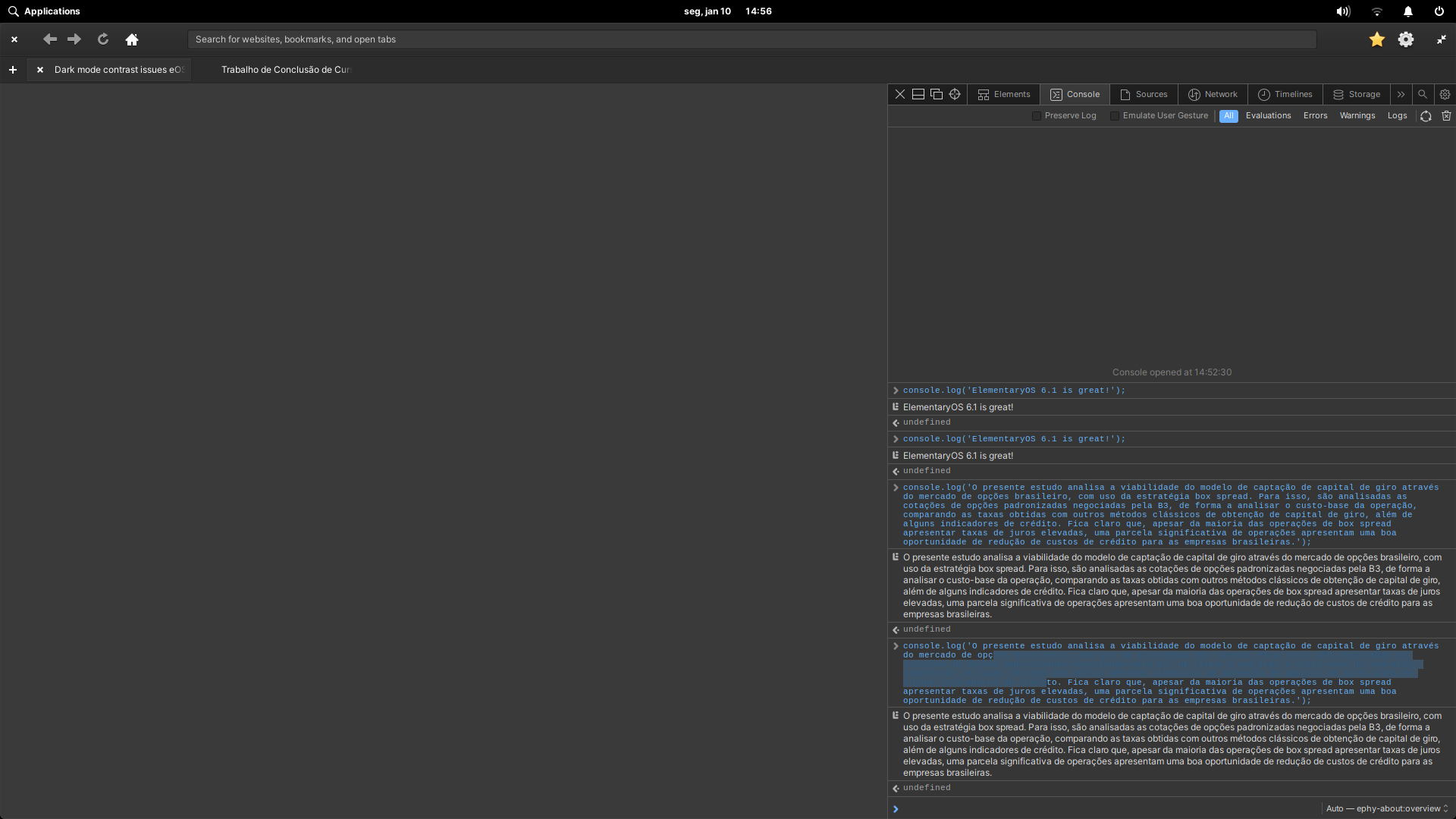
About the issue, I was experimenting with Epiphany 41.0 today on my elementaryOS 6.1 install and noticed that, when using the dark mode, the text selection becomes quite hard to read on the devtools console due to bad contrast. I don't know if it is a WebkitGTK issue, if it is an Epiphany issue or if it is a elementaryOS stylesheet issue, but it gets really bad to read, and that's not a good experience for those using dark mode and GNOME Web at the same time.
Here are some screenshots of this problem.
Dark theme console selection with poor contrast
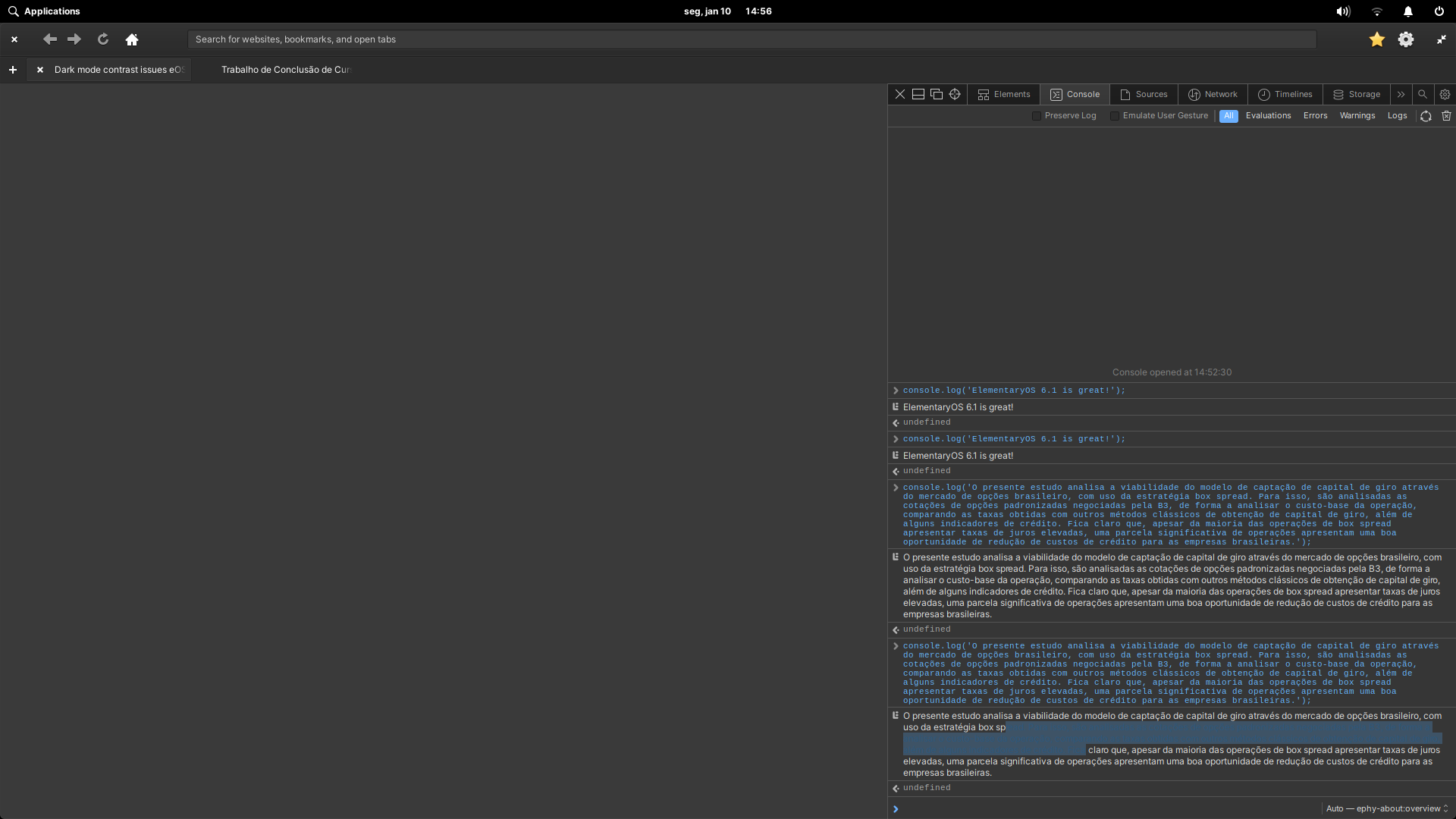
Dark theme console output selection with poor contrast
And here are some screenshots of the light theme that works just fine!
Light theme console selection with good contrast
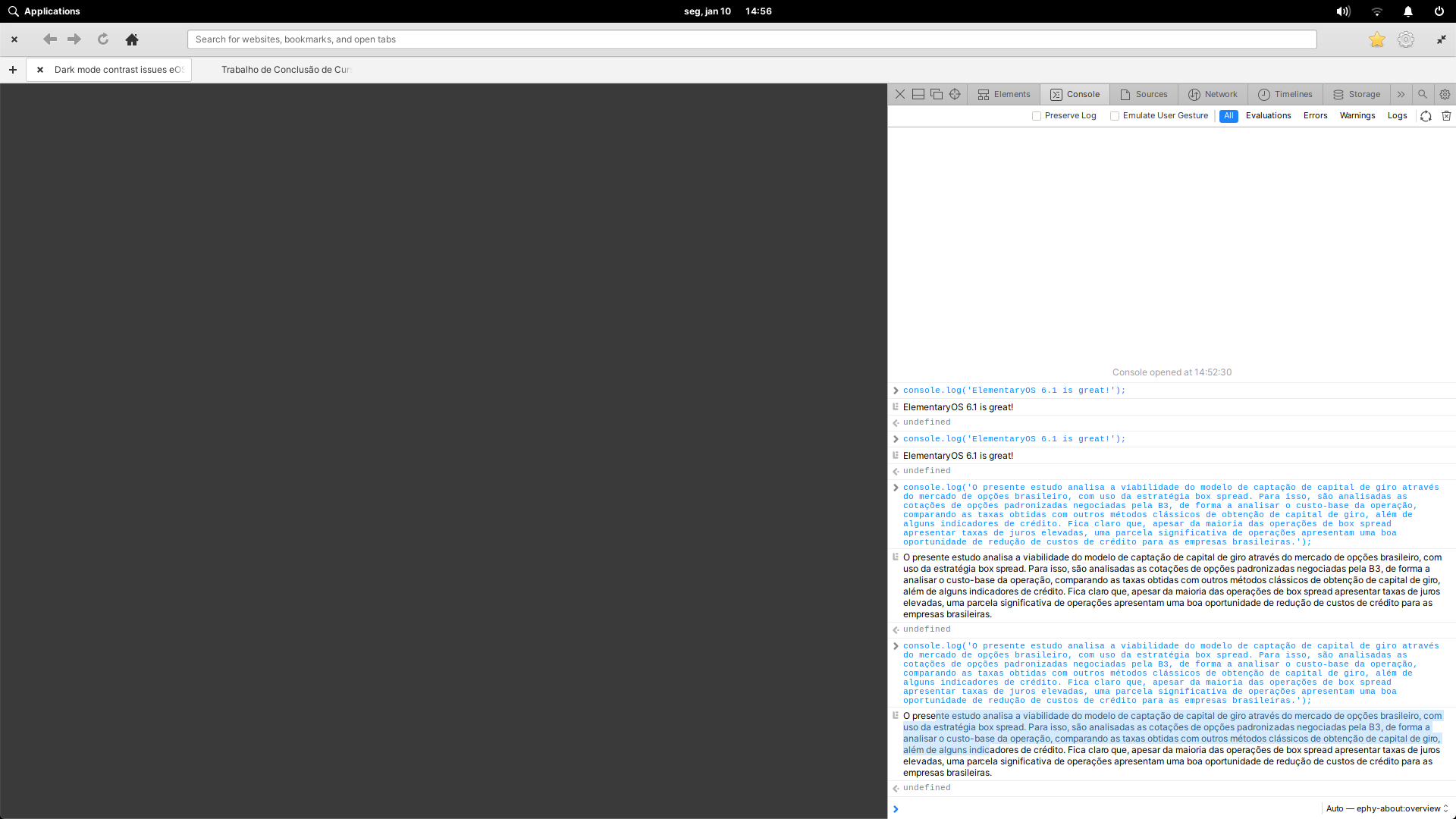
Light theme console output selection with good contrast

Using elementaryOS 6.1 Jólnir and GNOME Web 41.0.
System up to date as of January 1st, 2022.
Steps to Reproduce
- Set your elementaryOS 6.1 Jólnir to dark mode.
- Open Epiphany 41.0 (GNOME Web).
- Open the devtools (F12).
- Open the console.
- console.log('something');
- Try to select the logged text.
Expected Behavior
Good contrast in dark mode.
OS Version
6.x (Odin)
Software Version
Latest release (I have run all updates)
Log Output
No logs found.
Hardware Info
System specs:
- CPU: Intel Core i5 4460
- GPU: Nvidia Geforce GTX 750 TI
- RAM: 8GB DDR3 1600MHz
- Lingua principale
- Meson
- Stelle
- 8
- Fork
- 4
- Merge medio
- 3h 6m
- PR unite (30g)
- 4
Preparare l'ambiente
Come iniziare
- Leggi tutta la issue e poi la guida ai contributi del progetto.
- Commenta sulla issue per dire che te ne occupi tu — evita che due persone facciano lo stesso lavoro.
- Fai un fork del repository e lavora su un branch.
- Apri una pull request che faccia riferimento al numero della issue.
Altre issue di elementary/browser
-
Difficoltà 4/5 3-5 giorni Idoneità per principianti 25/100
elementary/browser#182 ·
-
Needs Design
Difficoltà 3/5 1-2 giorni Idoneità per principianti 35/100
elementary/browser#178 ·
-
Needs Design Status: Confirmed
Difficoltà 2/5 1-3 ore Idoneità per principianti 40/100
elementary/browser#145 · 2 reazioni ·
-
Poor performance on WebAperta
Difficoltà 4/5 3-5 giorni Idoneità per principianti 25/100
elementary/browser#132 ·
-
Difficoltà 4/5 3-5 giorni Idoneità per principianti 25/100
elementary/browser#118 · 2 commenti ·
Tutte le issue di elementary/browser
Issue simili
-
Issue-Bug
Difficoltà 2/5 1-3 ore Idoneità per principianti 86/100
sugarlabs/musicblocks#9079 · 3 commenti ·
I maintainer di solito rispondono entro 1 giorno
-
accessibility bug revealjs
Difficoltà 2/5 1-3 ore Idoneità per principianti 84/100
quarto-dev/quarto-cli#14961 ·
I maintainer di solito rispondono entro 1 giorno
-
accessibility bug
Difficoltà 2/5 1-3 ore Idoneità per principianti 78/100
untemps/svelte-use-tooltip#269 ·
-
Difficoltà 2/5 1-3 ore Idoneità per principianti 84/100
react/react-native#58746 ·
I maintainer di solito rispondono entro 1 giorno
-
bug good first issue
Difficoltà 2/5 1-3 ore Idoneità per principianti 82/100
juspay/xyne-spaces#2446 ·
I maintainer di solito rispondono entro 1 giorno