Rust analyzer highlighting with nvim-lsp
Dieses Issue hat noch niemand übernommen.
Bewertung
- Schwierigkeit
- 3/5
- Geschätzter Aufwand
- 1-2 Tage
- Anfängerfreundlichkeit
- 35/100
- Issue-Typ
- Bug
- Klarheit
- Größtenteils klar
- Aktivitätsstatus
- Veraltet
- Tech-Stack
- neovim, rust, vim
Rechercherichtung
Start by reproducing the Rust Analyzer documentation highlighting in Neovim 0.5 with nvim-lsp and nvim-completion, using the reported after/ftplugin/rust.vim configuration. Compare which Rust documentation tokens receive Markdown highlights and which do not; the issue says attempts in before/ftplugin/markdown.vim and before/syntax/markdown.vim had no effect. Done means identifying and fixing the missing highlighting behavior.
Vom Indexierungsmodell aus dem Issue-Text verfasst.
Beschreibung
- rust.vim version: Downloaded October,15th 2020
Steps to reproduce:
- Running latest neovim 0.5
- Using nvim-lsp and nvim-completion
Rust analyzer documentation gets treat as markdown and is mostly able to highlighted as markdown
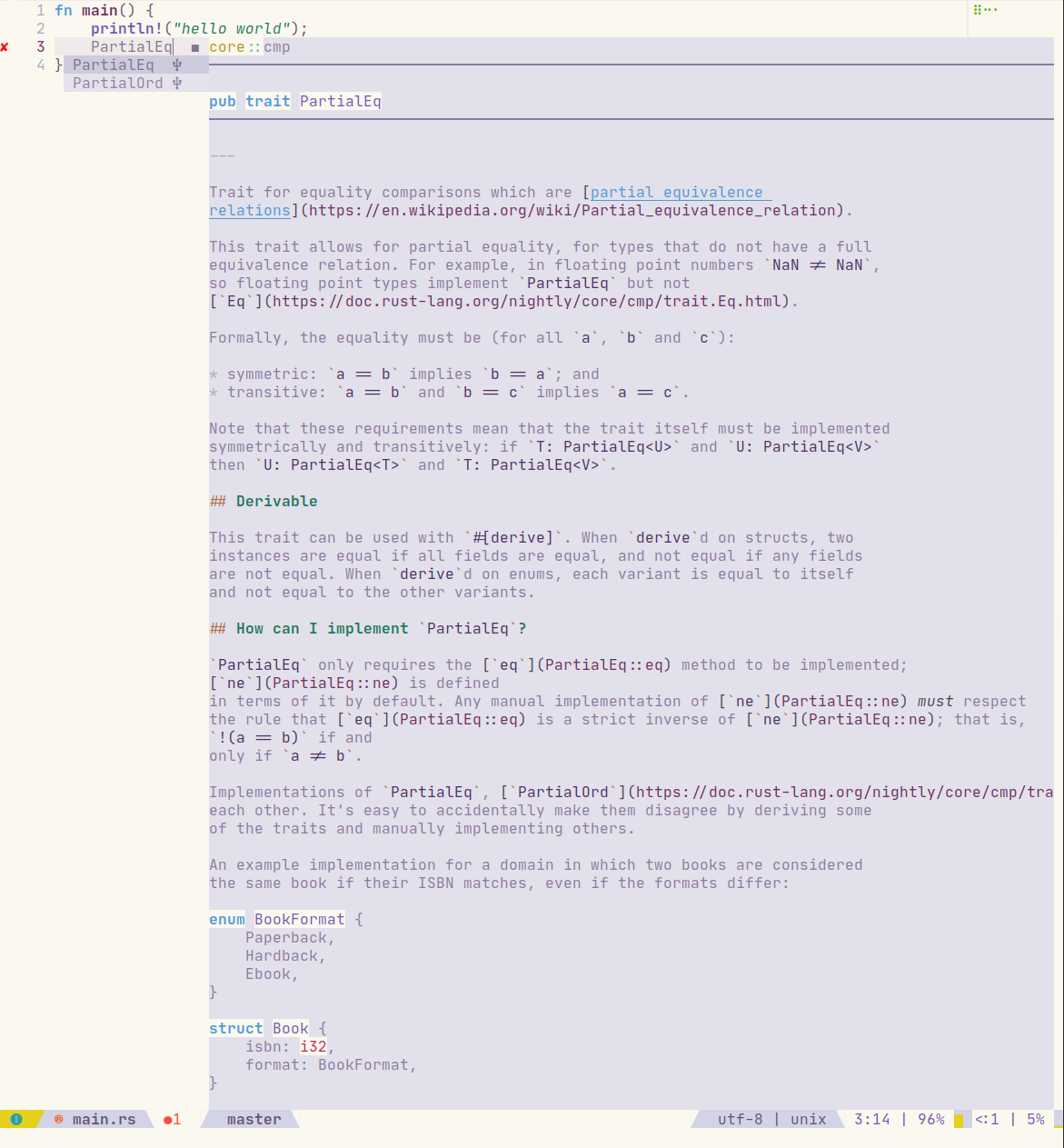
However as you can see somethings are not able to highlighted with markdown highlights
I am using this in my after/ftplugin/rust.vim
function s:rustdoclsphilight()
	if &background ==# 'dark'
		let l:color = '#5d4d7a'
	else
		let l:color = '#e2e0ea'
	endif
	exec 'hi markdownItalic guibg='.l:color
	exec 'hi markdownAutomaticLink guibg='.l:color
	exec 'hi markdownBlockquote guibg='.l:color
	exec 'hi markdownBold guibg='.l:color
	exec 'hi markdownBoldDelimiter guibg='.l:color
	exec 'hi markdownBoldItalic guibg='.l:color
	exec 'hi markdownBoldItalicDelimiter guibg='.l:color
	exec 'hi markdownCode guibg='.l:color
	exec 'hi markdownCodeBlock guibg='.l:color
	exec 'hi markdownCodeDelimiter guibg='.l:color
	exec 'hi markdownError guibg='.l:color
	exec 'hi markdownEscape guibg='.l:color
	exec 'hi markdownFootnote guibg='.l:color
	exec 'hi markdownFootnoteDefinition guibg='.l:color
	exec 'hi markdownH1 guibg='.l:color
	exec 'hi markdownH2 guibg='.l:color
	exec 'hi markdownH3 guibg='.l:color
	exec 'hi markdownH4 guibg='.l:color
	exec 'hi markdownH5 guibg='.l:color
	exec 'hi markdownH6 guibg='.l:color
	exec 'hi markdownHeadingDelimiter guibg='.l:color
	exec 'hi markdownHeadingRule guibg='.l:color
	exec 'hi markdownId guibg='.l:color
	exec 'hi markdownIdDeclaration guibg='.l:color
	exec 'hi markdownIdDelimiter guibg='.l:color
	exec 'hi markdownItalic guibg='.l:color
	exec 'hi markdownItalicDelimiter guibg='.l:color
	exec 'hi markdownLineBreak guibg='.l:color
	exec 'hi markdownLineStart guibg='.l:color
	exec 'hi markdownLink guibg='.l:color
	exec 'hi markdownLinkDelimiter guibg='.l:color
	exec 'hi markdownLinkText guibg='.l:color
	exec 'hi markdownLinkTextDelimiter guibg='.l:color
	exec 'hi markdownListMarker guibg='.l:color
	exec 'hi markdownOrderedListMarker guibg='.l:color
	exec 'hi markdownRule guibg='.l:color
	exec 'hi markdownUrl guibg='.l:color
	exec 'hi markdownUrlDelimiter guibg='.l:color
	exec 'hi markdownUrlTitle guibg='.l:color
	exec 'hi markdownUrlTitleDelimiter guibg='.l:color
	exec 'hi markdownUrlValid guibg='.l:color
endfunction!

call <SID>rustdoclsphilight()
I have tried adding syn keyword blocks in before/ftplugin/markdown.vim and before/syntax/markdown.vim but it doesn't seem to change anything.
- Vorherrschende Sprache
- Vim Script
- Sterne
- 4.2k
- Forks
- 323
- PR-Merge-Kennzahlen
- Keine gemergten PRs in 30 T.
Entwicklungsumgebung
Dieses Projekt bietet weder Dev-Container noch Dockerfile noch Beitragsleitfaden – die Einrichtung liegt bei Ihnen. Beginnen Sie mit der README; die allgemeinen Schritte stehen in unserem Leitfaden für den ersten Beitrag.
Erste Schritte
- Lesen Sie das ganze Issue und danach den Beitragsleitfaden des Projekts.
- Schreiben Sie ins Issue, dass Sie es übernehmen — das erspart doppelte Arbeit.
- Forken Sie das Repository und arbeiten Sie in einem Branch.
- Öffnen Sie einen Pull Request, der die Issue-Nummer nennt.
Mehr aus rust-lang/rust.vim
-
Schwierigkeit 1/5 1-3 Stunden Anfängerfreundlichkeit 76/100
-
It's Dead, Jim!Offen
Schwierigkeit 5/5 Über eine Woche Anfängerfreundlichkeit 15/100
-
Remove hard coded edition fallbackEvtl. vergeben @alerque hat das vor 231 Tagen übernommen. Offen
Schwierigkeit 1/5 Unter einer Stunde Anfängerfreundlichkeit 35/100
-
Schwierigkeit 1/5 Unter einer Stunde Anfängerfreundlichkeit 55/100
-
Schwierigkeit 3/5 1-2 Tage Anfängerfreundlichkeit 45/100