“Button Background Active” and “Button background Hover” are reversed for Back Button
Dieses Issue hat noch niemand übernommen.
Bewertung
- Schwierigkeit
- 3/5
- Geschätzter Aufwand
- 1-2 Tage
- Anfängerfreundlichkeit
- 38/100
- Issue-Typ
- Bug
- Klarheit
- Klar beschrieben
- Aktivitätsstatus
- Veraltet
- Tech-Stack
- javascript
- Bereich
- frontend
Rechercherichtung
Beginne damit, das Problem unter https://color.stage.mozaws.net/ über den Tab Advanced colors und das Firefox Color-Add-on mit den angegebenen Werten für Yellow und Red zu reproduzieren. Verfolge die Verarbeitung der aktiven und der Hover-Farbe des Back Button; abgeschlossen ist die Aufgabe, wenn die Schaltfläche im Ruhezustand die aktive Farbe und beim Darüberfahren die Hover-Farbe anzeigt, mit Abdeckung beider Zustände, falls das Projekt über entsprechende Tests verfügt.
Vom Indexierungsmodell aus dem Issue-Text verfasst.
Beschreibung
Preconditions:
- Go to about:config and change the “xpinstall.signatures.required” pref to “false”
- Access https://color.stage.mozaws.net/
- Click on the “Advanced colors” tab
- Click on “Firefox Color Extension” link from the right side panel
- On the newly opened page, click on “Unsigned add-on for color.stage.mozaws.net “
- Follow the instructions on the doorhangers and install the Firefox Color add-on
Steps to reproduce:
- Access https://color.stage.mozaws.net/
- Click on the “Advanced colors” tab
- Set a color for the “Button Background Active” property, for example Yellow
- Set a color for the “Button Background Hover” property, for example Red
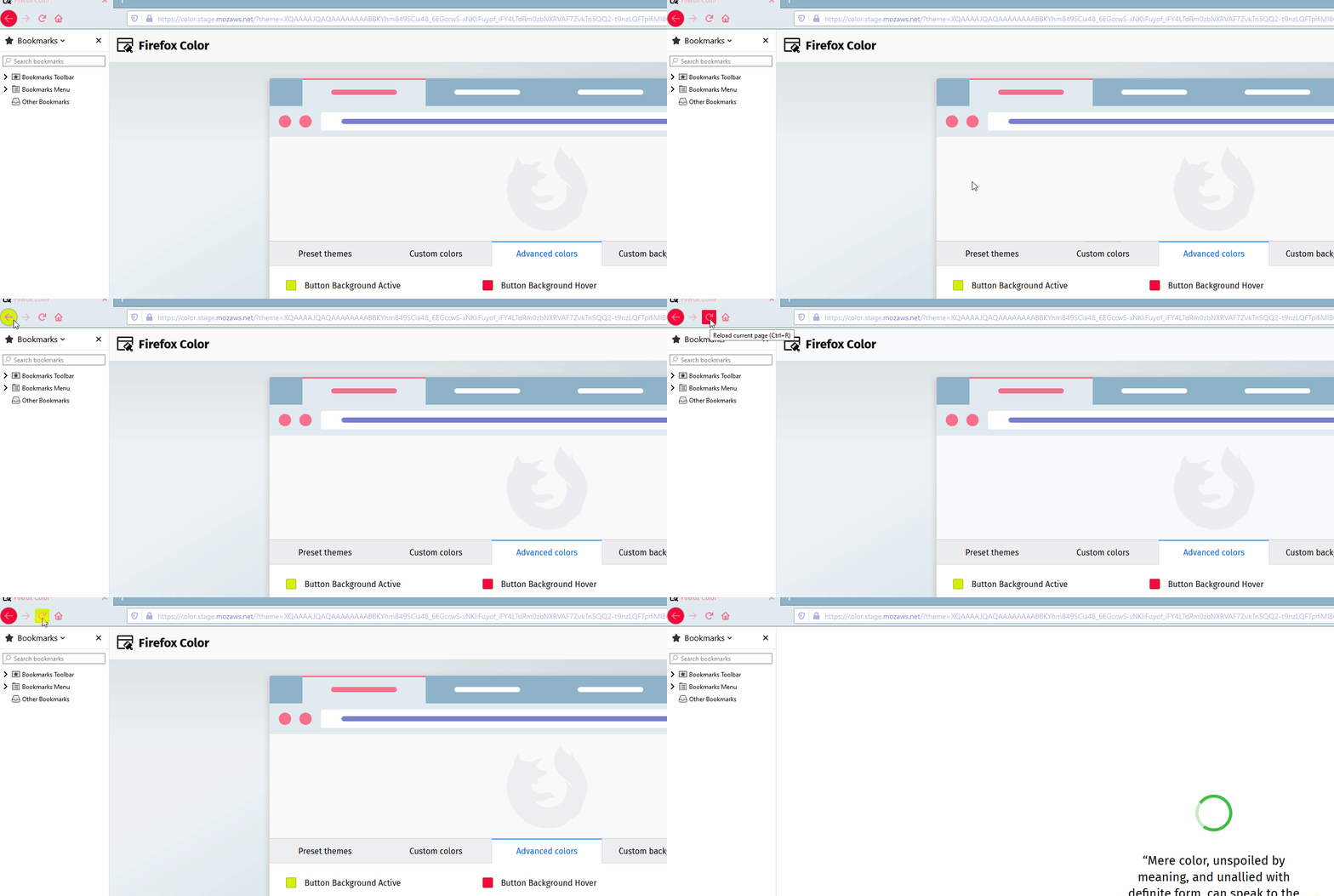
- Observe that the Back Button is colored in red
- Hover over the Back Button
- Observe that the Back Button will become colored in yellow
Expected results:
The “Button Background Active” and the “Button Background Hover” properties should be reversed for the Back Button.
Example:
In the case mentioned above, the “Button Background Active” property is set to Yellow and the “Button Background Hover” property is set to Red, as such:
- when not hovering over the Back Button, it should be Yellow
- when hovering over the Back Button, it should turn Red
Actual results:
The “Button Background Active” and the “Button Background Hover” properties are incorrectly reversed for the Back Button.
Example:
In the case mentioned above, the “Button Background Active” property is set to Yellow and the “Button Background Hover” property is set to Red, as such:
- when not hovering over the Back Button, it is Red
- when hovering over the Back Button, it turns Yellow
Affected versions:
- Nightly 79.0b1/20200629224419
- Beta Developer Edition 80.0a1/20200629154604
Affected OSes:
- Windows 10 64-bit
- Ubuntu 16.04 LTS
- Vorherrschende Sprache
- JavaScript
- Sterne
- 512
- Forks
- 101
- PR-Merge-Kennzahlen
- Keine gemergten PRs in 30 T.
Entwicklungsumgebung
- Kein Dockerfile und keine Docker-Compose-Datei
- Keine Pull-Request-Vorlage
- Beitragsleitfaden lesen
Erste Schritte
- Lesen Sie das ganze Issue und danach den Beitragsleitfaden des Projekts.
- Schreiben Sie ins Issue, dass Sie es übernehmen — das erspart doppelte Arbeit.
- Forken Sie das Repository und arbeiten Sie in einem Branch.
- Öffnen Sie einen Pull Request, der die Issue-Nummer nennt.
Mehr aus mozilla/FirefoxColor
-
Schwierigkeit 2/5 1-3 Stunden Anfängerfreundlichkeit 68/100
mozilla/FirefoxColor#1081 · 1 Kommentar ·
-
Schwierigkeit 4/5 3-5 Tage Anfängerfreundlichkeit 35/100
mozilla/FirefoxColor#1088 ·
-
does not see browserOffen
Schwierigkeit 3/5 1-2 Tage Anfängerfreundlichkeit 35/100
mozilla/FirefoxColor#1087 · 1 Kommentar ·
-
Schwierigkeit 5/5 Über eine Woche Anfängerfreundlichkeit 35/100
mozilla/FirefoxColor#1085 · 1 Kommentar ·
-
Schwierigkeit 3/5 1-2 Tage Anfängerfreundlichkeit 68/100
mozilla/FirefoxColor#1084 · 1 Kommentar ·
Alle Issues in mozilla/FirefoxColor
Ähnliche Issues
-
Schwierigkeit 2/5 1-3 Stunden Anfängerfreundlichkeit 82/100
AOSSIE-Org/BabyNest#284 ·
Maintainer antworten meist innerhalb von 1 Tag
-
Schwierigkeit 1/5 Unter einer Stunde Anfängerfreundlichkeit 85/100
seek4science/seek#2762 ·
Maintainer antworten meist innerhalb von 5 Tagen
-
feedback simulation workshop
Schwierigkeit 2/5 1-3 Stunden Anfängerfreundlichkeit 64/100
githubnext/gh-aw-workshop#5009 ·
Maintainer antworten meist innerhalb von 1 Tag
-
Clinic sharing: fast sync refusal message suggests Delete Data, which only developer builds haveOffenbug
Schwierigkeit 2/5 1-3 Stunden Anfängerfreundlichkeit 78/100
avniproject/avni-client#2228 ·
-
Add: K+ Sport 2 LogoOffencheck:passed logos:add
Schwierigkeit 1/5 Unter einer Stunde Anfängerfreundlichkeit 85/100
Maintainer antworten meist innerhalb von 6 Tagen