Memory leak with custom style
Dieses Issue hat noch niemand übernommen.
Bewertung
- Schwierigkeit
- 4/5
- Geschätzter Aufwand
- 3-5 Tage
- Anfängerfreundlichkeit
- 35/100
- Issue-Typ
- Bug
- Klarheit
- Größtenteils klar
- Aktivitätsstatus
- Veraltet
- Tech-Stack
- cpp, objective-c
- Bereich
- devtools
Rechercherichtung
Reproduziere den Fehler im XcodeClangFormat-Projekt mit dem Blender .clang-format-Stil und dem 18-zeiligen C++-Beispiel und untersuche anschließend den Extension-Pfad sowie den im Trace genannten ClangFormatCommand-Einstiegspunkt. Als erledigt gilt die Aufgabe, wenn das Formatieren der Datei ein zweites Mal nicht mehr fehlschlägt, die Extension nicht ungefähr 500 MB ansammelt und die XPC-Verbindung weiterhin nutzbar bleibt.
Vom Indexierungsmodell aus dem Issue-Text verfasst.
Beschreibung
- Setup the Xcode project for XcodeClangFormat for debugging.
- Build the app and set the style to https://github.com/blender/blender/blob/master/.clang-format
- Run Extension this time and Xcode launches. Wait for the debugger to attach to the extension.
- New Xcode command line tool project of C++ language.
- In the C++ file, select all, paste the code given in the summary. [1] it's total 18 lines.
- Editor > clang format > format entire file. It will format it correctly.
- Select all again, paste the code still in your clipboard.
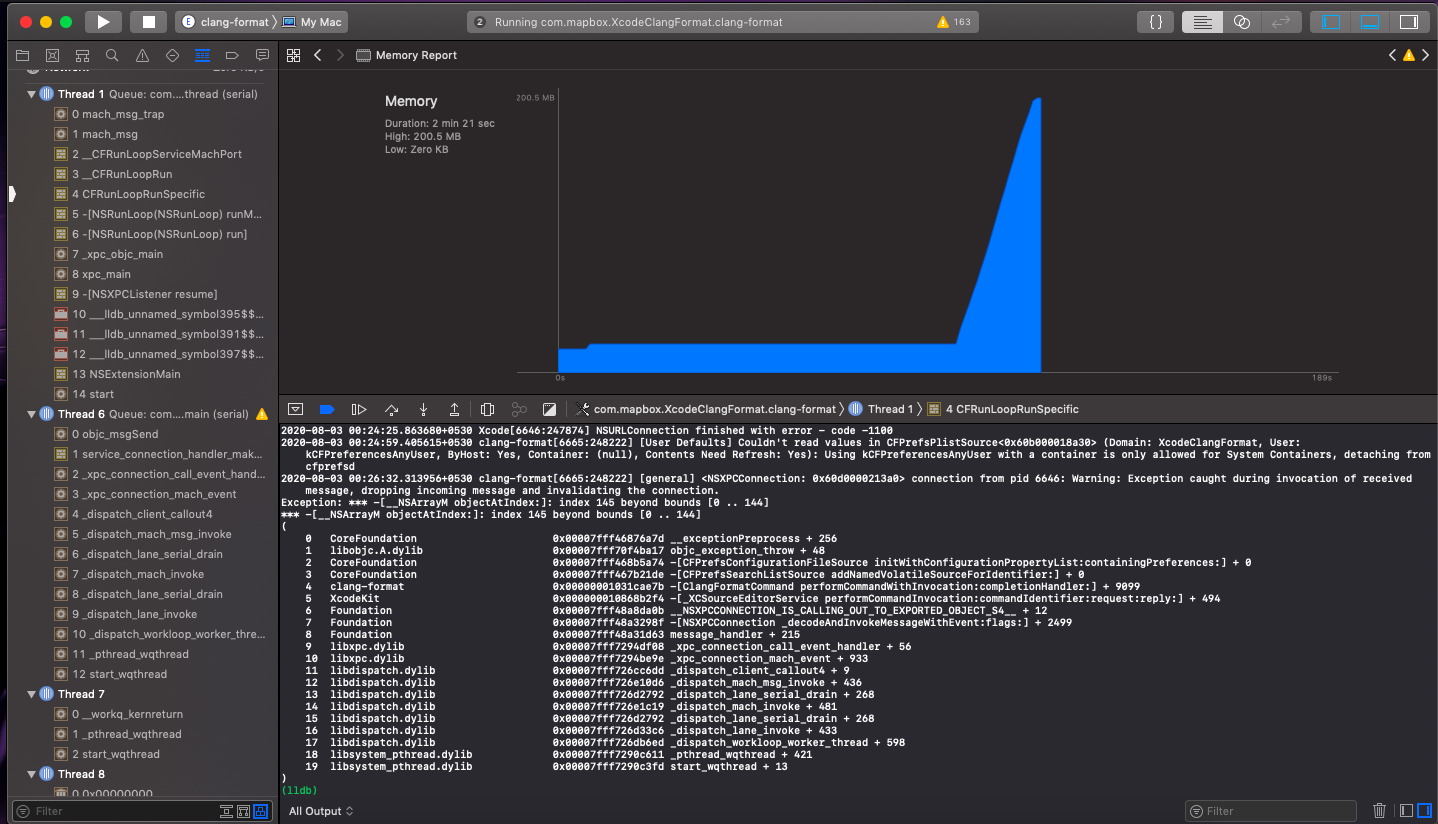
- Editor > clang format > format entire file. It will fail & the original Xcode instance shows memory increase that settles around 500 MB. The trace appears in the console [2] & UI looks like this [3].
[1] Code to copy
//
//  main.cpp
//  clang-format-test
//
//  Copyright © 2020 ak. All rights reserved.
//

#include <iostream>
#include "main.hh"

int main(int argc, const char *argv[])
{
  // Long comment that must be broken down in multiple lines.
  // insert code here... insert code here... insert code here... insert code here... insert code here... insert code here...
  std::cout << "Hello, World!\n";
  return 0;
}
[2] Trace in console
2020-08-03 00:39:49.395275+0530 clang-format[6941:258937] [User Defaults] Couldn't read values in CFPrefsPlistSource<0x60b000012c00> (Domain: XcodeClangFormat, User: kCFPreferencesAnyUser, ByHost: Yes, Container: (null), Contents Need Refresh: Yes): Using kCFPreferencesAnyUser with a container is only allowed for System Containers, detaching from cfprefsd
2020-08-03 00:40:00.626852+0530 clang-format[6941:258937] [general] <NSXPCConnection: 0x60d000017bb0> connection from pid 6924: Warning: Exception caught during invocation of received message, dropping incoming message and invalidating the connection.
Exception: *** -[__NSArrayM objectAtIndex:]: index 18 beyond bounds [0 .. 17]
*** -[__NSArrayM objectAtIndex:]: index 18 beyond bounds [0 .. 17]
(
	0   CoreFoundation                      0x00007fff46876a7d __exceptionPreprocess + 256
	1   libobjc.A.dylib                     0x00007fff70f4ba17 objc_exception_throw + 48
	2   CoreFoundation                      0x00007fff468b5a74 -[CFPrefsConfigurationFileSource initWithConfigurationPropertyList:containingPreferences:] + 0
	3   CoreFoundation                      0x00007fff467b21de -[CFPrefsSearchListSource addNamedVolatileSourceForIdentifier:] + 0
	4   clang-format                        0x0000000105a5ce7b -[ClangFormatCommand performCommandWithInvocation:completionHandler:] + 9099
	5   XcodeKit                            0x000000010ae192f4 -[_XCSourceEditorService performCommandInvocation:commandIdentifier:request:reply:] + 494
	6   Foundation                          0x00007fff48a8da0b __NSXPCCONNECTION_IS_CALLING_OUT_TO_EXPORTED_OBJECT_S4__ + 12
	7   Foundation                          0x00007fff48a3298f -[NSXPCConnection _decodeAndInvokeMessageWithEvent:flags:] + 2499
	8   Foundation                          0x00007fff48a31d63 message_handler + 215
	9   libxpc.dylib                        0x00007fff7294df08 _xpc_connection_call_event_handler + 56
	10  libxpc.dylib                        0x00007fff7294be9e _xpc_connection_mach_event + 933
	11  libdispatch.dylib                   0x00007fff726cc6dd _dispatch_client_callout4 + 9
	12  libdispatch.dylib                   0x00007fff726e10d6 _dispatch_mach_msg_invoke + 436
	13  libdispatch.dylib                   0x00007fff726d2792 _dispatch_lane_serial_drain + 268
	14  libdispatch.dylib                   0x00007fff726e1c19 _dispatch_mach_invoke + 481
	15  libdispatch.dylib                   0x00007fff726d2792 _dispatch_lane_serial_drain + 268
	16  libdispatch.dylib                   0x00007fff726d33c6 _dispatch_lane_invoke + 433
	17  libdispatch.dylib                   0x00007fff726db6ed _dispatch_workloop_worker_thread + 598
	18  libsystem_pthread.dylib             0x00007fff7290c611 _pthread_wqthread + 421
	19  libsystem_pthread.dylib             0x00007fff7290c3fd start_wqthread + 13
)
[3] UI looks like
- Vorherrschende Sprache
- Objective-C++
- Sterne
- 806
- Forks
- 102
- PR-Merge-Kennzahlen
- Keine gemergten PRs in 30 T.
Entwicklungsumgebung
- Kein Dockerfile und keine Docker-Compose-Datei
- Keine Pull-Request-Vorlage
- Beitragsleitfaden lesen
Erste Schritte
- Lesen Sie das ganze Issue und danach den Beitragsleitfaden des Projekts.
- Schreiben Sie ins Issue, dass Sie es übernehmen — das erspart doppelte Arbeit.
- Forken Sie das Repository und arbeiten Sie in einem Branch.
- Öffnen Sie einen Pull Request, der die Issue-Nummer nennt.
Mehr aus mapbox/XcodeClangFormat
-
Schwierigkeit 3/5 1-2 Tage Anfängerfreundlichkeit 20/100
mapbox/XcodeClangFormat#61 ·
-
Clang Format 14 supportOffen
Schwierigkeit 4/5 3-5 Tage Anfängerfreundlichkeit 35/100
mapbox/XcodeClangFormat#60 ·
-
OC怎么自定义代码规范规则?Offen
Schwierigkeit 3/5 1-2 Tage Anfängerfreundlichkeit 25/100
mapbox/XcodeClangFormat#58 · 1 Kommentar ·
-
Schwierigkeit 5/5 Über eine Woche Anfängerfreundlichkeit 25/100
mapbox/XcodeClangFormat#57 ·
-
Not work on Xcode 12Offen
Schwierigkeit 5/5 Über eine Woche Anfängerfreundlichkeit 20/100
mapbox/XcodeClangFormat#53 · 34 Kommentare · 1 Reaktion ·
Alle Issues in mapbox/XcodeClangFormat
Ähnliche Issues
-
documentation enhancement
Schwierigkeit 2/5 1-3 Stunden Anfängerfreundlichkeit 62/100
adorsys/status-list-server#619 ·
Maintainer antworten meist innerhalb von 2 Tagen
-
An empty line splits a signature where an ordinary comment is right above an argument's HaddockOffen
Schwierigkeit 2/5 1-3 Stunden Anfängerfreundlichkeit 68/100
mrkkrp/tilia#213 · 1 Kommentar ·
Maintainer antworten meist innerhalb von 1 Tag
-
[辞書]Offen提案 辞書
Schwierigkeit 2/5 1-3 Stunden Anfängerfreundlichkeit 65/100
Maintainer antworten meist innerhalb von 1 Tag
-
good first issue needs-triage priority: medium
Schwierigkeit 2/5 1-3 Stunden Anfängerfreundlichkeit 72/100
melodic-software/claude-code-plugins#6631 · 1 Kommentar ·
Maintainer antworten meist innerhalb von 1 Tag
-
Schwierigkeit 1/5 Unter einer Stunde Anfängerfreundlichkeit 85/100
Maintainer antworten meist innerhalb von 1 Tag