need global variables for big data to put it on GPU only once
Dieses Issue hat noch niemand übernommen.
Bewertung
- Schwierigkeit
- 5/5
- Geschätzter Aufwand
- Über eine Woche
- Anfängerfreundlichkeit
- 25/100
- Issue-Typ
- Feature
- Klarheit
- Größtenteils klar
- Aktivitätsstatus
- Veraltet
- Tech-Stack
- javascript
- Bereich
- performance
Rechercherichtung
Es werden keine Quelldateien, Tests oder Einstiegspunkte genannt. Beginne damit, die bestehenden APIs für GPU-/Kernel-Eingaben und die Verwaltung von Ergebnissen zu untersuchen, und ermittle anschließend, ob persistente GPU-gestützte Daten und der Zugriff auf Teilergebnisse zur Architektur des Projekts passen; als abgeschlossen gilt die Aufgabe, wenn die angeforderte Datenwiederverwendung ohne wiederholte Transfers oder übergroße Zwischenallokationen funktioniert.
Vom Indexierungsmodell aus dem Issue-Text verfasst.
Beschreibung
What i am working at?
I am developing a program to visualize voxel data by placing many canvases in space, my voxel data is stored as
[ [ Int16Array(2), Int16Array(2) ],[ Int16Array(2), Int16Array(2) ] ] (that is example for 2x2x2px voxel data)
but in real tasks data is often 512x512x512px ( so i need near 256MiB for this data)
let example of voxel data is [[ [0,1], [2,3] ],[ [4,5], [6,7] ]]
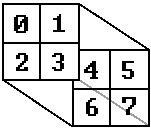
so i have 2 x layers 0: [ [0,4], [2,6] ], 1: [ [1,5], [3,7] ]
so i have 2 y layers 0: [ [0,1], [4,5] ], 1: [ [2,3], [6,7] ]
so i have 2 z layers 0: [ [0,1], [2,3] ], 1: [ [4,5], [6,7] ]
and before placing one layer of voxel data on canvas i need to replace voxel value with color
and for this i have array to replace values to color but in special way:
ColArray example:

(in program it is Uint8Array([r0,g0,b0,a0, r1,g1,b1,a1, ...]) )
What is wrong?
so to get color value i must do next operations for each voxel

which will do next

what i can do with is gpu.js is for example:
(lenM1 = colArray.lenght - 1, delta = max - min)
const calc = gpu.createKernel(function(data,min,delta,lenM1) {
    return Math.round( (data[this.thread.z][this.thread.y][this.thread.x]-min)/delta*lenM1 )
}, { output: [Xsize,Ysize,Zsize] })

const ColArrayIndexes = calc(...)
but if i give data (int16 512x512x512 memory usage 256 MiB)
and i get result (float32 512x512x512 memory usage 512 MiB)
and once i get alocation error when trying to get result (and that is not PC problem it is js memory managment problem)
also i dont need all result for one layer i need only part of it
Another way to solve the problem was to calc and return only one canvas
const render = gpu.createKernel(function( data, __ ) {
    this.color( __ );
}).setOutput([ __ , __ ]).setGraphical(true);

render();
const pixels = render.getPixels();
// and put pixels to canvas
buuuuuut to calc one Canvas i need parts from all data, and if for z layers i can just use js array.slice() method for x and y i need to give all data (i said what are x y and z layers for me near first img)
so when i dive all data (256 MiB) from RAM to GPU memory (if i correctly undarstand how it works) it take some time
and when i want to calc all 512 X layers + all 512 Y layers + all 512 Z layers i give same data (256 MiB) 1536 times and that is not OK and need some time
Where does it happen?
PC:
i7 9700K
RTX 3070
16GB RAM
(but my program also must work normal on mobile and so big memory changes is not good)
Expected solution
i think that my problem can have solution like this
const gpu = new GPU();
gpu.setGlobalVariable( dataName , data ) // put data to GPU memory

const render = gpu.createKernel(function( ___ ) {
  return dataName[] // do some math operations (i need only read, but modify can be also cool and useful)
}).setOutput([ __ , __ ])

gpu.destroyGlobalVariable( dataName ) // delete data from GPU memory
also a little better way
const func = gpu.createKernel(function( data ) {
    return data[this.thread.z][this.thread.y][this.thread.x] // some operations with given values
}).setOutput([ __ , __ ]).setOutputIsGPUglobalVariable(true) // function will save result only in GPU memory, and can return some parts of it when it is needed

const CalcResultID = func(data) //return only link on data or function to get parts

// also it is good if can get result of calculations in another GPU functions

gpu.destroyGlobalVariable( CalcResultID ) // delete data from GPU memory
- Vorherrschende Sprache
- JavaScript
- Sterne
- 15.5k
- Forks
- 666
- PR-Merge-Kennzahlen
- Keine gemergten PRs in 30 T.
Entwicklungsumgebung
- Kein Dockerfile und keine Docker-Compose-Datei
- Keine Pull-Request-Vorlage
- Beitragsleitfaden lesen
Erste Schritte
- Lesen Sie das ganze Issue und danach den Beitragsleitfaden des Projekts.
- Schreiben Sie ins Issue, dass Sie es übernehmen — das erspart doppelte Arbeit.
- Forken Sie das Repository und arbeiten Sie in einem Branch.
- Öffnen Sie einen Pull Request, der die Issue-Nummer nennt.
Mehr aus gpujs/gpu.js
-
Schwierigkeit 1/5 Unter einer Stunde Anfängerfreundlichkeit 65/100
-
WebGL backend silently returns all zeros for long-running kernels (no GL error, no context loss)Offen
Schwierigkeit 5/5 Über eine Woche Anfängerfreundlichkeit 42/100
-
Schwierigkeit 5/5 Über eine Woche Anfängerfreundlichkeit 20/100
-
Schwierigkeit 4/5 3-5 Tage Anfängerfreundlichkeit 25/100
-
Schwierigkeit 4/5 3-5 Tage Anfängerfreundlichkeit 25/100
Ähnliche Issues
-
Schwierigkeit 2/5 1-3 Stunden Anfängerfreundlichkeit 64/100
murdos/musicbrainz-userscripts#1150 ·
Maintainer antworten meist innerhalb von 1 Tag
-
Schwierigkeit 1/5 Unter einer Stunde Anfängerfreundlichkeit 88/100
Maintainer antworten meist innerhalb von 1 Tag
-
Schwierigkeit 2/5 1-3 Stunden Anfängerfreundlichkeit 86/100
sindresorhus/eslint-plugin-unicorn#3921 ·
Maintainer antworten meist innerhalb von 1 Tag
-
bug
Schwierigkeit 2/5 1-3 Stunden Anfängerfreundlichkeit 67/100
web-scrobbler/web-scrobbler#6266 ·
Maintainer antworten meist innerhalb von 1 Tag
-
Schwierigkeit 2/5 1-3 Stunden Anfängerfreundlichkeit 68/100
exa-studio/ApiVault#329 ·