Syntax Highlighting Error - Inconsistent Scoping for Keywords
Nobody has claimed this yet.
Assessment
- Difficulty
- 3/5
- Estimated time
- 1-2 days
- Newbie friendliness
- 35/100
- Issue type
- Bug
- Clarity
- Mostly clear
- Activity status
- Stale
- Tech stack
- javascript, python
- Domain
- tooling
Research direction
Reproduce the reported Python example in Sublime Text 3 with MagicPython 1.1.1 and inspect how the shown operators receive scopes inside and outside function calls. Done means the keyword scopes are consistent in both contexts and the example highlights as intended.
Written by the indexing model from the issue text.
Description
- Editor name and version:
- Sublime Text 3
- Version 3.2.2, Build 3211
- Platform:
- MacOS (Catalina)
- Color scheme:
Link to a repository with my slightly customized color schemes.
They are slight variations to the Material and Materialize color schemes.
-
MagicPython version: 1.1.1 (according to my package.json)
-
A screenshot:
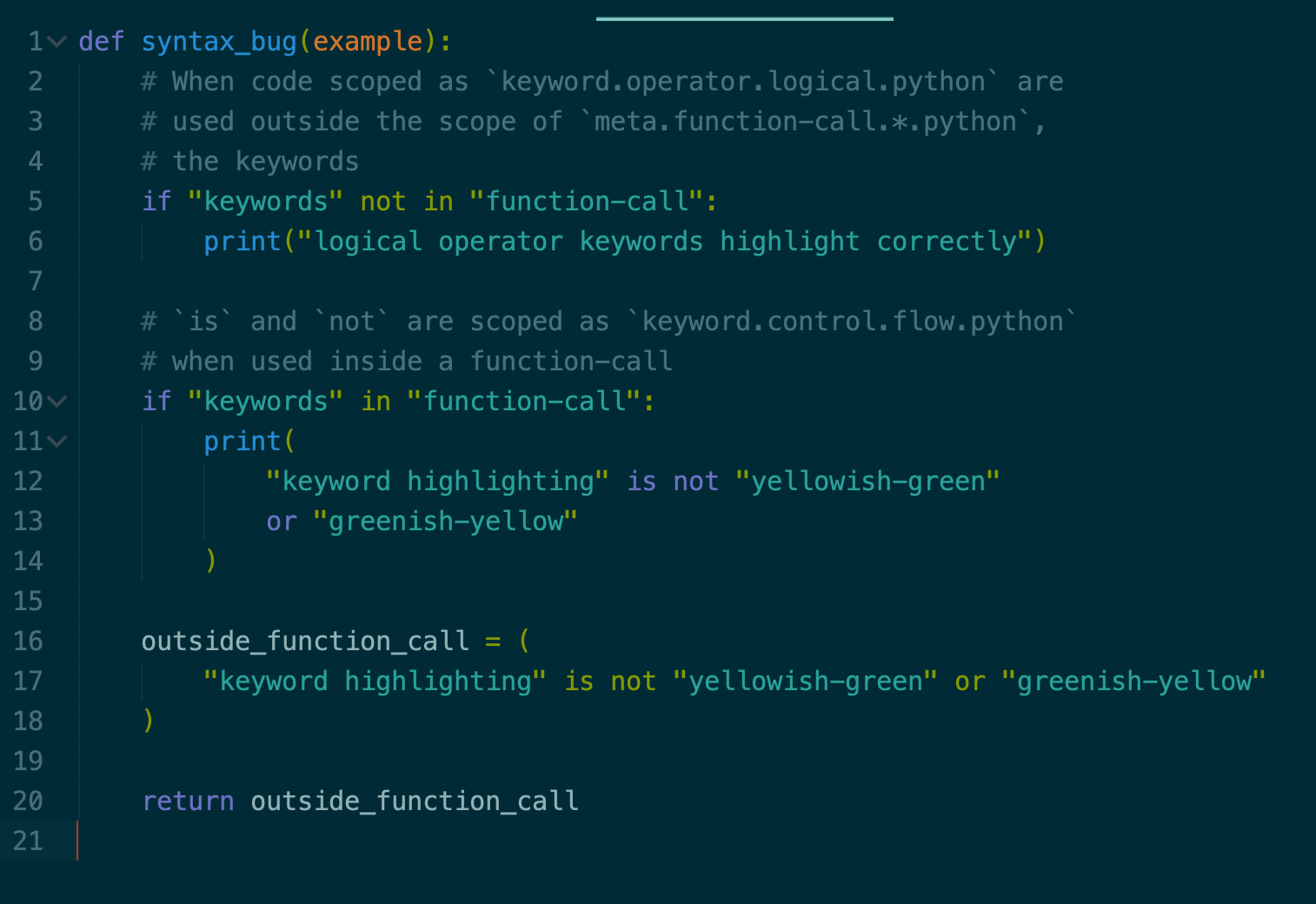
- 5-10 lines of surrounding code:
def syntax_bug(example):
    # When code scoped as `keyword.operator.logical.python` are
    # used outside the scope of `meta.function-call.*.python`,
    # the keywords
    if "keywords" not in "function-call":
        print("logical operator keywords highlight correctly")

    # `is` and `not` are scoped as `keyword.control.flow.python`
    # when used inside a function-call
    if "keywords" in "function-call":
        print(
            "keyword highlighting" is not "yellowish-green"
            or "greenish-yellow"
        )

    outside_function_call = (
        "keyword highlighting" is not "yellowish-green" or "greenish-yellow"
    )

    return outside_function_call
- Dominant language
- JavaScript
- Stars
- 1.4k
- Forks
- 98
- PR merge metrics
- No merged PRs in 30d
Contributor guide
No contributing guide indexed for this repository
First steps
- Read the whole issue, then the project's contributing guide.
- Comment on the issue to say you are picking it up — it saves two people doing the same work.
- Fork the repository and make your change on a branch.
- Open a pull request that references the issue number.
More from MagicStack/MagicPython
-
Difficulty 3/5 1-2 days Newbie friendliness 58/100
MagicStack/MagicPython#275 · 1 reaction ·
-
Difficulty 3/5 1-2 days Newbie friendliness 48/100
MagicStack/MagicPython#273 · 7 reactions ·
-
Difficulty 4/5 3-5 days Newbie friendliness 25/100
MagicStack/MagicPython#269 ·
-
Difficulty 3/5 1-2 days Newbie friendliness 42/100
MagicStack/MagicPython#267 ·
-
Difficulty 3/5 1-2 days Newbie friendliness 42/100
MagicStack/MagicPython#265 · 2 comments ·
All issues in MagicStack/MagicPython
Similar issues
-
Difficulty 2/5 1-3 hours Newbie friendliness 75/100
palladius/rails8-app-on-gcp#145 ·
-
Difficulty 2/5 1-3 hours Newbie friendliness 65/100
dotenvx/dotenv-vscode#139 ·
-
test-change-proposal
Difficulty 2/5 1-3 hours Newbie friendliness 65/100
web-platform-tests/interop#1455 ·
-
Difficulty 2/5 1-3 hours Newbie friendliness 75/100
corsairdev/corsair#1764 ·
-
Difficulty 2/5 1-3 hours Newbie friendliness 75/100