[Enchacment] - wadtex --gui-editor : Right Click Clone Patch inside the texture, or copy to a new texture + Other Stuff
@MTrop is already working on this.
Since Jun 19, 2026.
Assessment
This issue has not been assessed yet.
Description
Some more suggestions for your consideration.
Suggestion 1 : Clone Function for Patches
When editing a patch, you often need many copies of the one patch in the texture, like say adding 8 copies of w108_4 to make a 128 long strip of skulls. At the moment you need to add each patch individually. Add 1 skull, open the patch explorer, add a 2nd skull, etc. This is a little cumbersome and would benefit with a clone patch option like you have in the texture list to the left
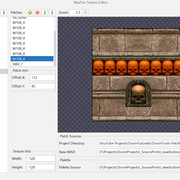
Suggestion 2 : Copy Function for patches between textures
An extension of this functionality would be the ability to select 1 or more patches inside a texture and then paste them (along with the offsets) into a new texture.
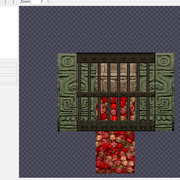
Suggestion 3 : display "outside valid texture space"
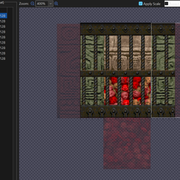
Slade has a great function that could be incorporated into wadtex... basically when you make a texture, you can use patches that exist "outside" of the texture size definition. Only the parts inside the texture size will appear in doom.
A way to easily visualise the "outside" would be great...
This is how it looks in wadtex
This is how it looks in Slade
Suggestion 4 : Add a middle mouse button "drag"
A cool feature would also to be able to drag the image around the preview window, using the middle mouse button or some other hotkey.
Suggestion 5 : load texturex.txt in text application
Add a button to load, form the GUI, the texture1.txt file in wadtex -gui ... dispite how awesome the editor is (already even woth out small QOL stuff), it is still great to just do mass copy and paste and edits in the text file is needed. Now you can of course just use a external text editor... but a button that loads the currently loaded textureX.txt in the editor and then automatically refreshes when closed or saved would be pretty cool.
Thanks for all the work you do
-aJynks
- Dominant language
- Java
- Stars
- 78
- Forks
- 6
- Avg merge
- 17h 32m
- Merged PRs (30d)
- 1
Getting set up
- No Dockerfile or Docker Compose file
- No pull request template
- Read the contributing guide
First steps
- Read the whole issue, then the project's contributing guide.
- Comment on the issue to say you are picking it up — it saves two people doing the same work.
- Fork the repository and make your change on a branch.
- Open a pull request that references the issue number.
More from MTrop/DoomTools
-
Difficulty 2/5 1-3 hours Newbie friendliness 78/100
-
enhancement
Difficulty 2/5 1-3 hours Newbie friendliness 72/100
-
enhancement
Difficulty 3/5 Half a day Newbie friendliness 62/100
-
help wanted
Difficulty 3/5 1-2 days Newbie friendliness 50/100
-
enhancement low priority
Difficulty 4/5 3-5 days Newbie friendliness 43/100
Similar issues
-
approved
Difficulty 2/5 1-3 hours Newbie friendliness 67/100
checkstyle/checkstyle#22129 ·
Maintainers usually reply within 1 day
-
Difficulty 2/5 1-3 hours Newbie friendliness 78/100
Maintainers usually reply within 1 day
-
Difficulty 2/5 1-3 hours Newbie friendliness 80/100
objectionary/lints#1577 ·
Maintainers usually reply within 2 days
-
ChaosEngine: backup-remote doctor row passes while consumer mode hides bot memory from gitPossibly taken @MohabMohie claimed this today. Openagentic
Difficulty 2/5 1-3 hours Newbie friendliness 76/100
ShaftHQ/SHAFT_ENGINE#7263 ·
Maintainers usually reply within 1 day
-
Difficulty 2/5 1-3 hours Newbie friendliness 82/100