Validation page says "This document is valid" for a document with no signature
Maintainers usually reply within 1 day
Assessment
- Difficulty
- 2/5
- Estimated time
- 1-3 hours
- Newbie friendliness
- 82/100
- Issue type
- Bug
- Clarity
- Clearly specified
- Activity status
- Active
- Tech stack
- javascript
- Domain
- frontend
Research direction
Start in src/views/Validation.vue at getDocumentValidationSummary(), which currently bases the summary on the signer list. Check the unsigned and canceled-document scenarios described in the issue, then verify that documents with no applied signatures show the existing no-signatures message while signed documents retain the current validation checks.
Written by the indexing model from the issue text.
Description
Describe the bug
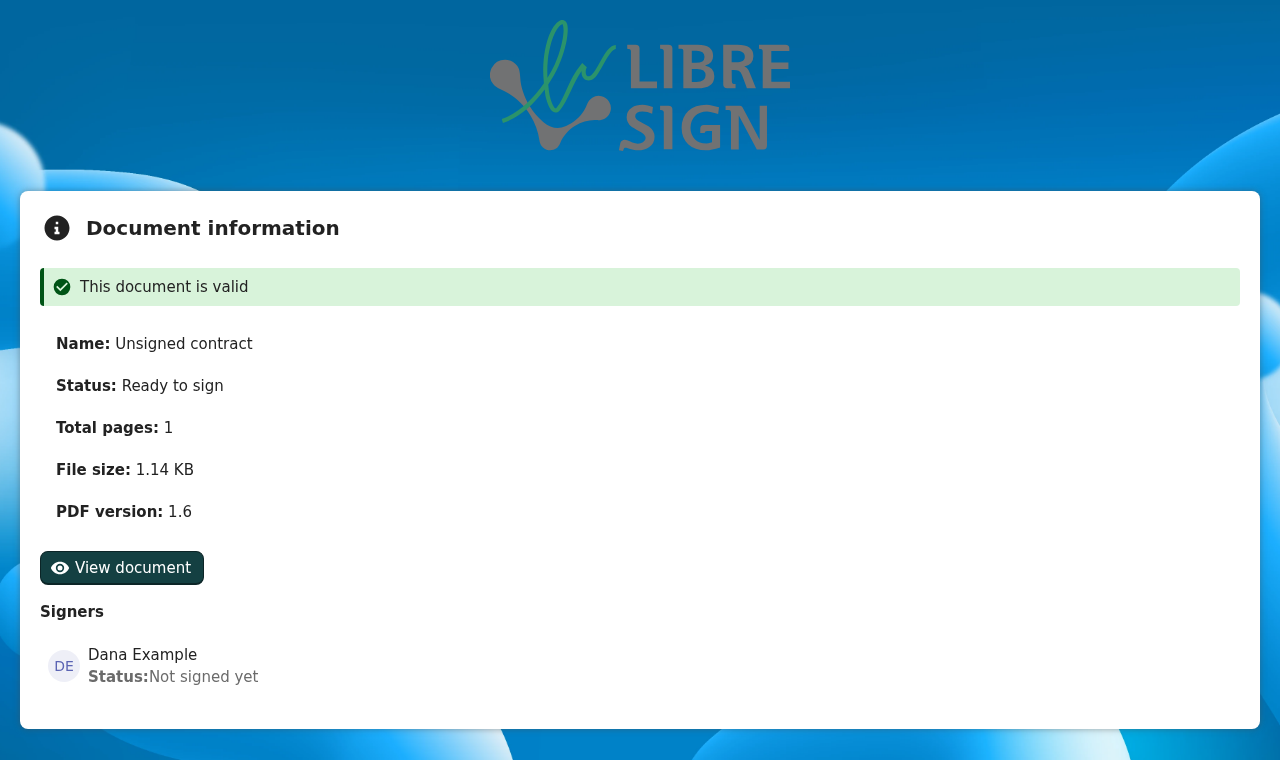
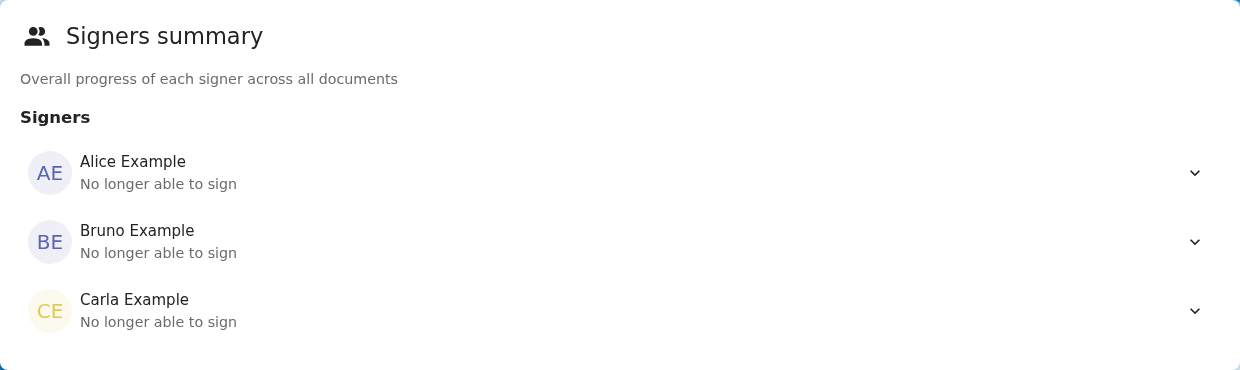
The validation page shows the green note "This document is valid" for a document that has no signature at all, for example a request that was just sent and nobody has signed yet. It also shows it for a canceled envelope where nobody signed.
getDocumentValidationSummary() in src/views/Validation.vue decides on the list of signers, not on the signatures actually applied:
- it returns "No digital signatures were found in this document" only when the
signersarray is empty; - otherwise, when no integrity problem is found among the signers, it returns "This document is valid".
A signer who has not signed carries no signature_validation, modification_validation or document_modification_state, so none of the error or warning branches match and the summary falls through to "valid". The same logic is on stable35 and main.
To reproduce
- Request a signature on any PDF from one signer.
- Before anybody signs, open
/apps/libresign/p/validation/<uuid>(logged out or as the requester). - The page says This document is valid, with the status Ready to sign and the signer Not signed yet right below it.
Expected behavior
The summary should be based on the signatures that were actually applied:
- no signature applied → the existing "No digital signatures were found in this document" (info), whatever the number of signers;
- at least one signature → the current checks, evaluated on the signed signers only.
The file status (ready to sign, partially signed, canceled) is already shown in the details below the note, so I don't think the note needs to repeat it. Open to a different wording if you prefer one for pending documents.
Screenshots
Unsigned document:
Canceled envelope where nobody signed: the header above this summary also reads "This document is valid".
Operational System
Linux (devcontainer)
Browser Type and Version
Chromium (Playwright)
Libresign Version
16.0.0-dev (main); same logic on stable35
Nextcloud Server Version
36 (dev)
Logs from Nextcloud Server
None; this is frontend-only.
- Dominant language
- PHP
- Stars
- 828
- Forks
- 159
- Avg merge
- 7h 50m
- Merged PRs (30d)
- 515
Getting set up
Starts the project's dev container in your browser, under your own GitHub account.
- No Dockerfile or Docker Compose file
- Has a pull request template
- Read the contributing guide
First steps
- Read the whole issue, then the project's contributing guide.
- Comment on the issue to say you are picking it up — it saves two people doing the same work.
- Fork the repository and make your change on a branch.
- Open a pull request that references the issue number.
More from LibreSign/libresign
-
Difficulty 1/5 Under an hour Newbie friendliness 83/100
LibreSign/libresign#9007 · 1 reaction ·
Maintainers usually reply within 1 day
-
backend enhancement php
Difficulty 2/5 1-3 hours Newbie friendliness 78/100
Maintainers usually reply within 1 day
-
good first issue
Difficulty 2/5 1-3 hours Newbie friendliness 78/100
LibreSign/libresign#8284 · 5 comments ·
Maintainers usually reply within 1 day
-
enhancement javascript
Difficulty 5/5 Over a week Newbie friendliness 12/100
Maintainers usually reply within 1 day
-
backend enhancement php
Difficulty 4/5 3-5 days Newbie friendliness 38/100
Maintainers usually reply within 1 day
All issues in LibreSign/libresign
Similar issues
-
Difficulty 2/5 1-3 hours Newbie friendliness 62/100
scanaislop/aislop#482 ·
Maintainers usually reply within 1 day
-
Difficulty 2/5 1-3 hours Newbie friendliness 62/100
Maintainers usually reply within 1 day
-
documentation
Difficulty 2/5 1-3 hours Newbie friendliness 62/100
Maintainers usually reply within 1 day
-
Difficulty 2/5 1-3 hours Newbie friendliness 82/100
humanmade/publication-checklist#73 · 1 comment ·
-
Difficulty 2/5 1-3 hours Newbie friendliness 70/100
Werkstattl/OpenBlogware#92 ·