Validation page says "This document is valid" for a document with no signature
I maintainer di solito rispondono entro 1 giorno
Valutazione
- Difficoltà
- 2/5
- Tempo stimato
- 1-3 ore
- Idoneità per principianti
- 82/100
- Tipo di issue
- Bug
- Chiarezza
- Specificata chiaramente
- Stato di attività
- Attiva
- Stack tecnologico
- javascript
- Ambito
- frontend
Direzione di ricerca
Inizia in src/views/Validation.vue, in getDocumentValidationSummary(), che attualmente basa il riepilogo sull’elenco dei firmatari. Verifica gli scenari relativi ai documenti non firmati e ai documenti annullati descritti nell’issue, quindi verifica che i documenti senza firme applicate mostrino il messaggio esistente relativo all’assenza di firme, mentre i documenti firmati mantengano gli attuali controlli di convalida.
Scritto dal modello di indicizzazione a partire dal testo della issue.
Descrizione
Describe the bug
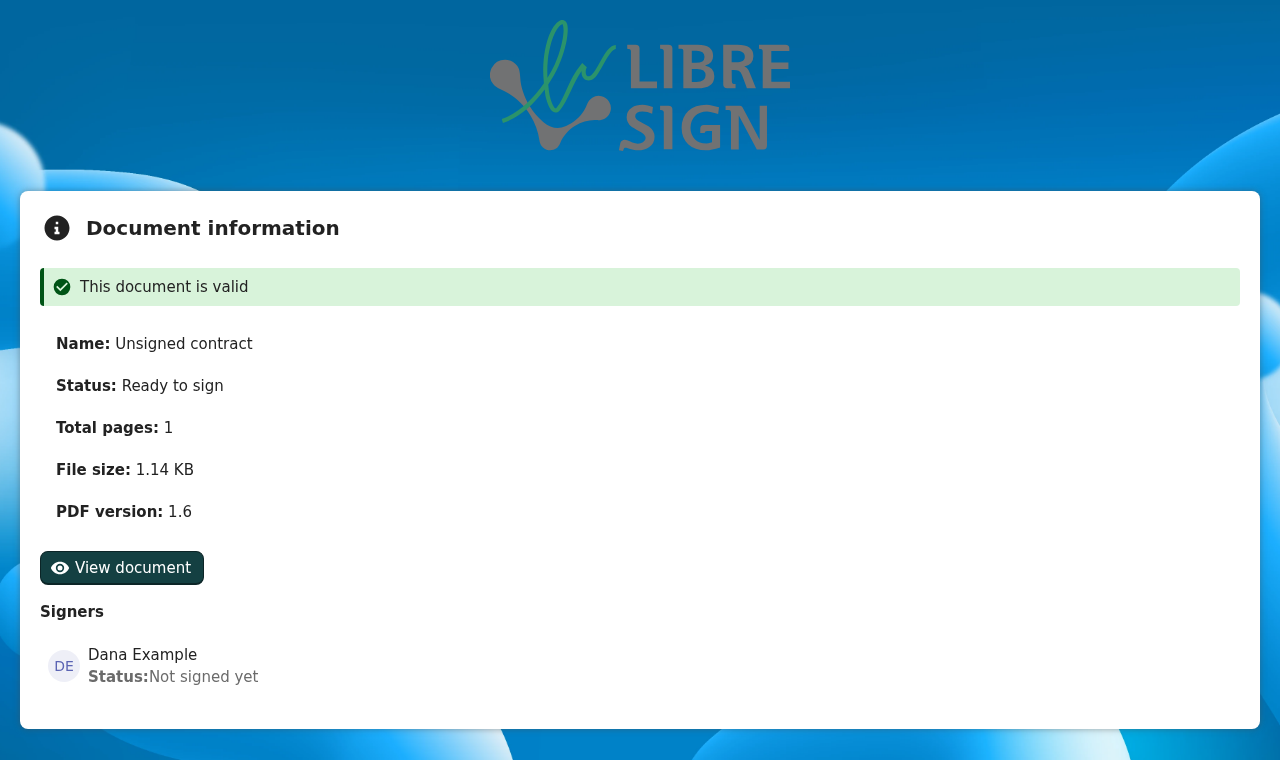
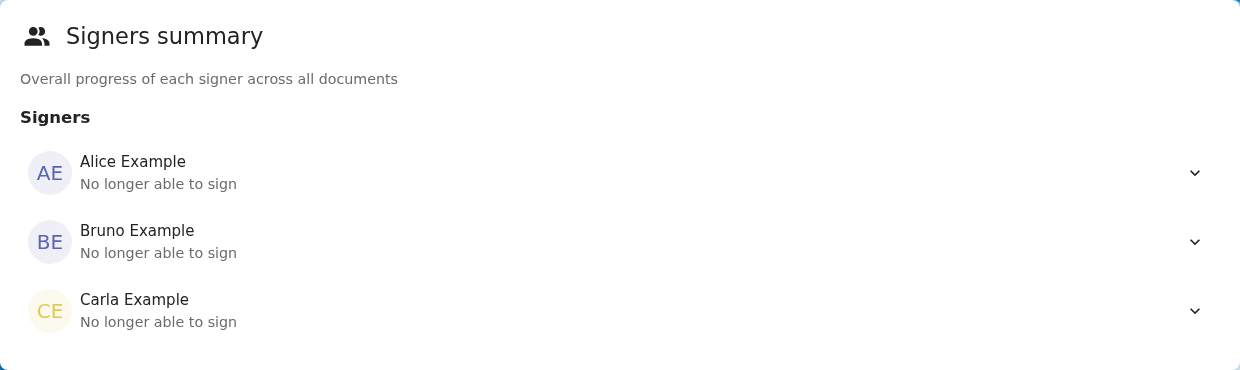
The validation page shows the green note "This document is valid" for a document that has no signature at all, for example a request that was just sent and nobody has signed yet. It also shows it for a canceled envelope where nobody signed.
getDocumentValidationSummary() in src/views/Validation.vue decides on the list of signers, not on the signatures actually applied:
- it returns "No digital signatures were found in this document" only when the
signersarray is empty; - otherwise, when no integrity problem is found among the signers, it returns "This document is valid".
A signer who has not signed carries no signature_validation, modification_validation or document_modification_state, so none of the error or warning branches match and the summary falls through to "valid". The same logic is on stable35 and main.
To reproduce
- Request a signature on any PDF from one signer.
- Before anybody signs, open
/apps/libresign/p/validation/<uuid>(logged out or as the requester). - The page says This document is valid, with the status Ready to sign and the signer Not signed yet right below it.
Expected behavior
The summary should be based on the signatures that were actually applied:
- no signature applied → the existing "No digital signatures were found in this document" (info), whatever the number of signers;
- at least one signature → the current checks, evaluated on the signed signers only.
The file status (ready to sign, partially signed, canceled) is already shown in the details below the note, so I don't think the note needs to repeat it. Open to a different wording if you prefer one for pending documents.
Screenshots
Unsigned document:
Canceled envelope where nobody signed: the header above this summary also reads "This document is valid".
Operational System
Linux (devcontainer)
Browser Type and Version
Chromium (Playwright)
Libresign Version
16.0.0-dev (main); same logic on stable35
Nextcloud Server Version
36 (dev)
Logs from Nextcloud Server
None; this is frontend-only.
- Lingua principale
- PHP
- Stelle
- 830
- Fork
- 161
- Merge medio
- 15h 28m
- PR unite (30g)
- 490
Preparare l'ambiente
Avvia il container di sviluppo del progetto nel browser, con il tuo account GitHub.
- Nessun Dockerfile né file Docker Compose
- Ha un modello di pull request
- Leggi la guida per i contributori
Come iniziare
- Leggi tutta la issue e poi la guida ai contributi del progetto.
- Commenta sulla issue per dire che te ne occupi tu — evita che due persone facciano lo stesso lavoro.
- Fai un fork del repository e lavora su un branch.
- Apri una pull request che faccia riferimento al numero della issue.
Altre issue di LibreSign/libresign
-
Difficoltà 1/5 Meno di un'ora Idoneità per principianti 83/100
LibreSign/libresign#9007 · 1 reazione ·
I maintainer di solito rispondono entro 1 giorno
-
backend enhancement php
Difficoltà 2/5 1-3 ore Idoneità per principianti 78/100
I maintainer di solito rispondono entro 1 giorno
-
good first issue
Difficoltà 2/5 1-3 ore Idoneità per principianti 78/100
LibreSign/libresign#8284 · 5 commenti ·
I maintainer di solito rispondono entro 1 giorno
-
A signer custom message can't be removed once it has been savedForse già presa @oPeras1 l’ha presa oggi. Aperta
Difficoltà 2/5 1-3 ore Idoneità per principianti 20/100
I maintainer di solito rispondono entro 1 giorno
-
"Open file" on the validation page fails when Euro-Office/ONLYOFFICE is the default PDF viewerForse già presa @oPeras1 l’ha presa 4 giorni fa. Aperta
Difficoltà 3/5 1-2 giorni Idoneità per principianti 25/100
I maintainer di solito rispondono entro 1 giorno
Tutte le issue di LibreSign/libresign
Issue simili
-
Difficoltà 1/5 Meno di un'ora Idoneità per principianti 85/100
lorisleiva/laravel-docker#166 ·
-
Difficoltà 2/5 1-3 ore Idoneità per principianti 64/100
kanboard/kanboard#5929 · 1 commento · 3 reazioni ·
I maintainer di solito rispondono entro 5 giorni
-
Rebuild 6.2.3 images on PHP 8.5.12 / 8.4.27 / 8.3.36 / 8.2.35 (CVE-2026-109618, CVE-2026-109619)Aperta
Difficoltà 2/5 1-3 ore Idoneità per principianti 66/100
swoole/docker-swoole#65 · 2 commenti ·
-
Difficoltà 2/5 1-3 ore Idoneità per principianti 79/100
PHP-CS-Fixer/PHP-CS-Fixer#9899 ·
I maintainer di solito rispondono entro 1 giorno
-
Difficoltà 2/5 1-3 ore Idoneità per principianti 68/100
backdrop-contrib/rules#257 ·