CustomRequest Style won't change no matter if the file is uploaded or not. It will always show file uploading style
还没有人认领这个 Issue。
评估
- 难度
- 3/5
- 预计耗时
- 1-2 天
- 新手友好度
- 35/100
- Issue 类型
- 缺陷
- 描述清晰度
- 需要澄清
- 活跃度
- 停滞
- 技术栈
- javascript, react
- 领域
- frontend
调研方向
从 Upload 组件的 customRequest 和 fileList 处理入手,使用提供的 customUpload 和 handleChange 回调作为复现方式。验证上传成功和失败如何反映在显示文件的样式中,并在成功上传和失败上传的样式正确区分时,视为问题已解决。
由索引模型根据 Issue 内容生成。
描述
Please see the response here. The first one is with success, the second is with failure.
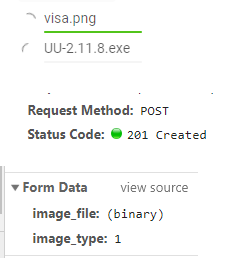
Here is my code.
 state = {
    previewVisible: false,
    previewImage: "",
    fileList: []
  };

handleChange = ({ fileList }) => {
    this.setState({
      fileList: fileList
    });
    console.log(this.state.fileList);
  };

  customUpload = ({
    file,
    onProgress,
    headers,
  }) => {
    const { onSuccess, onError, image_type } = this.props;

    if (file.size / 1024 / 1024 > 5) return false;
    else if (imageTypes.indexOf(file.type) < 0) return false;
    else if (!imageTypes) return false;
    else {
      let data = new FormData();
      data.append('image_file',file)
      data.append("image_type", image_type);
      console.log(data);

      Axios.post(URL + "image_upload/",
      data,
      {
       headers,
        onUploadProgress:({total,loaded}) =>{
          onProgress({ percent: Math.round(loaded / total * 100) }, file)
        }
      })
      .then((res) => {
        onSuccess && onSuccess(res)
      })
      .catch( err=> {
        onError && onError(err)
      });
    }
  }


return (
<Upload
          //listType="picture"
          fileList={fileList}
          headers={headers}
          accept={"image/*"}
          customRequest={this.customUpload}
          onPreview={this.handlePreview}
          onChange={this.handleChange}
        >
        </Upload>
)
- 主要语言
- TypeScript
- 星标
- 804
- 派生
- 323
- 平均合并
- 12 分钟
- 30 天内合并 PR
- 1
贡献指南
这个仓库没有索引到贡献指南
从这里开始
- 先读完整个 Issue,再读项目的贡献指南。
- 在 Issue 下留言说明你要接手 —— 这能避免两个人做同样的事。
- Fork 仓库,在一个分支上完成修改。
- 提交 Pull Request,并在描述里引用这个 Issue 编号。
react-component/upload 的其他 Issue
-
难度 2/5 1-3 小时 新手友好度 62/100
react-component/upload#170 ·
-
HVAC website 未关闭
难度 5/5 一周以上 新手友好度 10/100
react-component/upload#697 ·
-
难度 2/5 1-3 小时 新手友好度 15/100
react-component/upload#615 ·
-
难度 4/5 3-5 天 新手友好度 35/100
react-component/upload#522 · 2 条评论 ·
-
难度 4/5 3-5 天 新手友好度 25/100
react-component/upload#515 ·
查看 react-component/upload 的全部 Issue
相似的 Issue
-
难度 2/5 1-3 小时 新手友好度 84/100
copse-dev/agent-pane#2953 ·
-
难度 2/5 1-3 小时 新手友好度 84/100
Eynzof/Hermes-CN-Desktop#610 ·
-
bug clawsweeper:linked-pr-open clawsweeper:needs-live-repro clawsweeper:no-new-fix-pr impact:message-loss issue-rating: 🐚 platinum hermit P2 regression
难度 2/5 1-3 小时 新手友好度 78/100
-
enhancement
难度 2/5 1-3 小时 新手友好度 68/100
-
calcite-components needs triage refactor
难度 2/5 1-3 小时 新手友好度 75/100
Esri/calcite-design-system#15203 ·