Suggestion: List supported Zig versions in the README
还没有人认领这个 Issue。
评估
- 难度
- 4/5
- 预计耗时
- 3-5 天
- 新手友好度
- 52/100
- Issue 类型
- 文档
- 描述清晰度
- 基本清楚
- 活跃度
- 冷清
- 技术栈
- zig
调研方向
首先检查每个 repository 的 README 及其对应的 build.zig.zon 文件,将文档中说明的 Zig 支持情况与最低版本进行比较。决定应列出哪些已知 release,以及是否应列出可选的 Zig master,然后向相关的 README 文件添加一致的兼容性部分或 badge。完成标准是用户能够一眼看到受支持的 Zig 版本。
由索引模型根据 Issue 内容生成。
描述
Suggestion: List supported Zig versions in the README
Recently, while using some packages from allyourcodebase, I found that it’s sometimes difficult to quickly determine which Zig versions the current branch supports.
The build.zig.zon file usually includes a minimum_zig_version, but this only tells users the minimum requirement and doesn’t clearly show:
- Which Zig releases the current branch is known to work with;
- Whether it’s still compatible with slightly older Zig releases;
- Whether it also works with Zig master.
I was wondering if it would make sense to add a small Zig compatibility / support section to each repository’s README, so this information is immediately visible.
I’m not suggesting that every repository should track Zig master. Since allyourcodebase targets the latest tagged Zig version, master could simply be optional and only listed when it is known to work.
I created a small SVG badge service as a prototype for this purpose:
https://github.com/KercyDing/zig-support
It embeds the supported versions directly into the URL path, for example:
[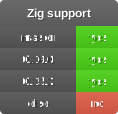](https://ziglang.org/download/)
Result:

This way, when updating compatibility information, you only need to change the URL in the README.
I think this could make Zig compatibility much easier to understand at a glance and be helpful for users!
- 主要语言
- 没有语言数据
- 星标
- 1
- 派生
- 0
- PR 合并指标
- 30 天内没有已合并 PR
环境准备
我们还没有检查这个项目的环境配置文件。先看它的 README,通用步骤见我们的新手贡献指南。
从这里开始
- 先读完整个 Issue,再读项目的贡献指南。
- 在 Issue 下留言说明你要接手 —— 这能避免两个人做同样的事。
- Fork 仓库,在一个分支上完成修改。
- 提交 Pull Request,并在描述里引用这个 Issue 编号。
相似的 Issue
-
docs pydanty:is-working
难度 2/5 1-3 小时 新手友好度 75/100
pydantic/pydantic-ai#8863 ·
维护者通常 1 天内回复
-
documentation from-review-extraction github-actions priority: low severity:nit
难度 1/5 1 小时以内 新手友好度 92/100
LearningCircuit/local-deep-research#6946 ·
维护者通常 1 天内回复
-
enhancement
难度 1/5 1 小时以内 新手友好度 88/100
esphome/device-builder#2856 ·
维护者通常 1 天内回复
-
documentation good first issue
难度 1/5 1 小时以内 新手友好度 95/100
-
难度 1/5 1-3 小时 新手友好度 78/100
mantinedev/mantine#9223 ·
维护者通常 6 天内回复