[Question] Additional window opens behind main window, without focus
还没有人认领这个 Issue。
评估
调研方向
该报告没有提供可复现的代码示例、具名源文件或测试。首先缩减围绕 Window 创建、finalize=True、update() 和 read() 的表格编辑器场景,然后追踪 macOS 上 tkinter 的窗口和焦点行为。要视为完成,必须确认原因并得到可复现的修复。
由索引模型根据 Issue 内容生成。
描述
Type of Issue (Enhancement, Error, Bug, Question): Question
Operating System
MacOS Ventura 13.1
PySimpleGUI Port (tkinter, Qt, Wx, Web)
tkinter
Versions
Version information can be obtained by calling sg.main_get_debug_data()
Or you can print each version shown in ()
Python version: 3.10.5
Platform: Mac (M1 MacBook Pro)
Platform version: ('13.1', ('', '', ''), 'arm64')
Port: PySimpleGUI
tkinter version: 8.6.12
PySimpleGUI version: 4.60.4.112
Your Experience In Months or Years (optional)
Years Python programming experience: 8
Years Programming experience overall: 20+
Have used another Python GUI Framework? (tkinter, Qt, etc) (yes/no is fine) no, I'm a back-end guy
Anything else you think would be helpful?
This is the same application that was exhibiting the Alpha Channel issues (thank you for the help on that!)
Troubleshooting
These items may solve your problem. Please check those you've done by changing - [ ] to - [X]
- [ x] Searched main docs for your problem www.PySimpleGUI.org
- [ x] Looked for Demo Programs that are similar to your goal. It is recommend you use the Demo Browser! Demos.PySimpleGUI.org
- If not tkinter - looked for Demo Programs for specific port
- For non tkinter - Looked at readme for your specific port if not PySimpleGUI (Qt, WX, Remi)
- [ x] Run your program outside of your debugger (from a command line)
- [ x] Searched through Issues (open and closed) to see if already reported Issues.PySimpleGUI.org
- [ x] Have upgraded to the latest release of PySimpleGUI on PyPI (lastest official version)
- [ x] Tried using the PySimpleGUI.py file on GitHub. Your problem may have already been fixed but not released
Detailed Description
Ok, I wish I could give you code to reproduce but this is in a set of dataframe / table editor classes that's 1,200 lines long and I haven't found a small set of code to reproduce the issue. I've been chasing this on my own for several weeks, and haven't posted here since I don't have a succinct code fragment to share. Finally decided to see if you could suggest an area to focus on my debugging.
Here's the situation:
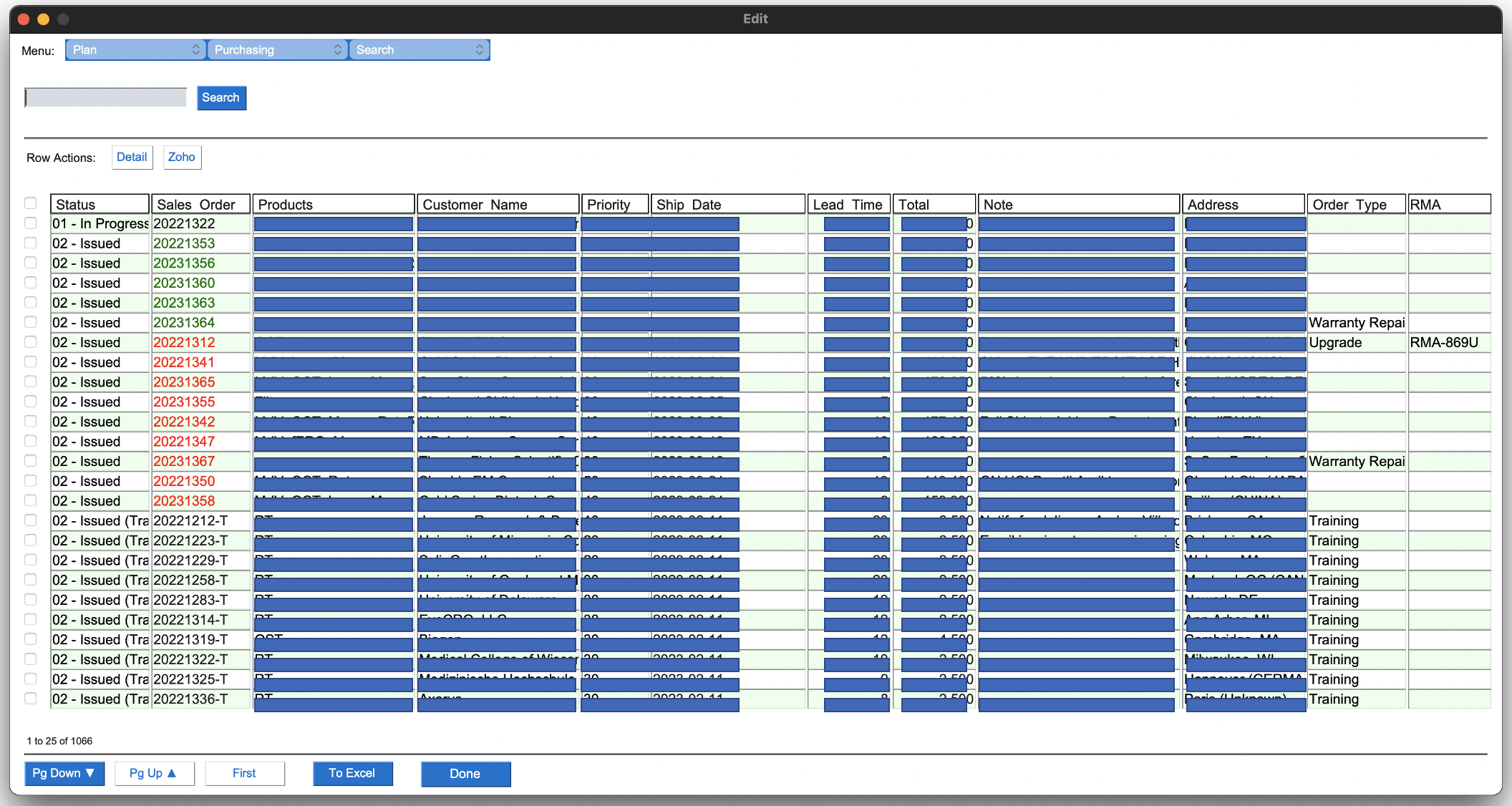
- Create a table layout made out of Text for headers, Checkbox elements at the start of each row, and Input elements for each cell of the table. The table also includes navigation and action Button elements
- The Window is finalized (finalize=True in call to the Window constructor) before any updates are made Window elements
- Values are populated into the table with a sequence of update() calls
- I'm not calling any of the focus setting methods
- The event loop uses a normal blocking call to read()
Here's the problem:
- The main Window draws and behaves fine
- However, when an event (usually a button press) causes a second window to be created, that window is created without focus and behind the main window.
- I see the new window get drawn, and then a flash as the original window is redrawn on top.
- Focus remains on the main table window, not the newly created window, even though the next call to read() is on the newly created window.
- Meaning, this is not multi-threaded. The event loop for the main window is blocked waiting for the actions on the newly created window to complete.
I've messed with trying to set focus on the new window when it's created. The best I get when chasing down that path is that the new window draws on top as expected, but as soon as I move the cursor (mouse movement) the initial main window pops back to the top.
Now, if I toggle active windows (Cmd-` on a Mac), the new window stays on top and behaves as expected.
Thoughts on paths I can chase down to find what I'm doing wrong? Or thoughts on places in the the PySimpleGUI source that I could breakpoint to chase down what's up?
Code To Duplicate
A short program that isolates and demonstrates the problem (Do not paste your massive program, but instead 10-20 lines that clearly show the problem)
This pre-formatted code block is all set for you to paste in your bit of code:
# Paste your code here
Screenshot, Sketch, or Drawing
This is a screenshot of the main window, with data redacted for confidentiality.
Watcha Makin?
If you care to share something about your project, it would be awesome to hear what you're building.
- 主要语言
- Python
- 星标
- 13.8k
- 派生
- 1.8k
- PR 合并指标
- 30 天内没有已合并 PR
贡献指南
从这里开始
- 先读完整个 Issue,再读项目的贡献指南。
- 在 Issue 下留言说明你要接手 —— 这能避免两个人做同样的事。
- Fork 仓库,在一个分支上完成修改。
- 提交 Pull Request,并在描述里引用这个 Issue 编号。
PySimpleGUI/PySimpleGUI 的其他 Issue
-
Bug Done - Install Dev Build (see docs for how) Platform Specific Issue - Linux Port - TK
难度 2/5 1-3 小时 新手友好度 68/100
PySimpleGUI/PySimpleGUI#6904 · 15 条评论 ·
-
Bug Demo Programs Done - Install Dev Build (see docs for how) Interoperability Port - TK workaround available
难度 2/5 1-3 小时 新手友好度 68/100
PySimpleGUI/PySimpleGUI#6900 · 1 条评论 ·
-
Done - Install Dev Build (see docs for how) enhancement
难度 2/5 1-3 小时 新手友好度 62/100
PySimpleGUI/PySimpleGUI#3251 · 12 条评论 ·
-
难度 3/5 1-2 天 新手友好度 74/100
PySimpleGUI/PySimpleGUI#6906 · 1 条评论 · 1 个 reaction ·
-
Bug Done - Install Dev Build (see docs for how) Port - TK
难度 3/5 1-2 天 新手友好度 45/100
PySimpleGUI/PySimpleGUI#6902 · 1 条评论 ·
查看 PySimpleGUI/PySimpleGUI 的全部 Issue
相似的 Issue
-
难度 2/5 1-3 小时 新手友好度 75/100
anthropics/skills#1811 · 1 条评论 ·
-
难度 2/5 1-3 小时 新手友好度 75/100
speaches-ai/speaches#678 ·
-
bug
难度 2/5 1-3 小时 新手友好度 75/100
datalayer/mcp-compose#42 ·
-
难度 2/5 1-3 小时 新手友好度 75/100
conda-forge/spacy-feedstock#177 ·
-
难度 2/5 1-3 小时 新手友好度 70/100
UKGovernmentBEIS/inspect_evals#2523 ·