[Bug] Tooltips are behind window when keep_on_top=True
还没有人认领这个 Issue。
评估
调研方向
首先,在 macOS 12.1 上使用 Python 3.10.5、PySimpleGUI 4.60.1.56 和 tkinter 8.6.12 运行提供的 sg.Window 重现代码。检查 modal=True 和 keep_on_top=True 时的工具提示行为;当问号工具提示出现在窗口上方,同时窗口保留类似模态的行为时,即表示完成。
由索引模型根据 Issue 内容生成。
描述
Type of Issue (Enhancement, Error, Bug, Question)
Bug
Operating System
Mac version 12.1
PySimpleGUI Port (tkinter, Qt, Wx, Web)
tkinter
Versions
Version information can be obtained by calling sg.main_get_debug_data()
Or you can print each version shown in ()
Python version (sg.sys.version)
3.10.5 (main, Jun 23 2022, 17:15:25) [Clang 13.1.6 (clang-1316.0.21.2.5)]
PySimpleGUI Version (sg.__version__)
4.60.1.56
GUI Version (tkinter (sg.tclversion_detailed), PySide2, WxPython, Remi)
8.6.12
Your Experience In Months or Years (optional)
2 Years Python programming experience
3 Years Programming experience overall
No Have used another Python GUI Framework? (tkinter, Qt, etc) (yes/no is fine)
Troubleshooting
These items may solve your problem. Please check those you've done by changing - [ ] to - [X]
- Searched main docs for your problem www.PySimpleGUI.org
- Looked for Demo Programs that are similar to your goal Demos.PySimpleGUI.org
- If not tkinter - looked for Demo Programs for specific port
- For non tkinter - Looked at readme for your specific port if not PySimpleGUI (Qt, WX, Remi)
- Run your program outside of your debugger (from a command line)
- Searched through Issues (open and closed) to see if already reported Issues.PySimpleGUI.org
- Tried using the PySimpleGUI.py file on GitHub. Your problem may have already been fixed but not released
Detailed Description
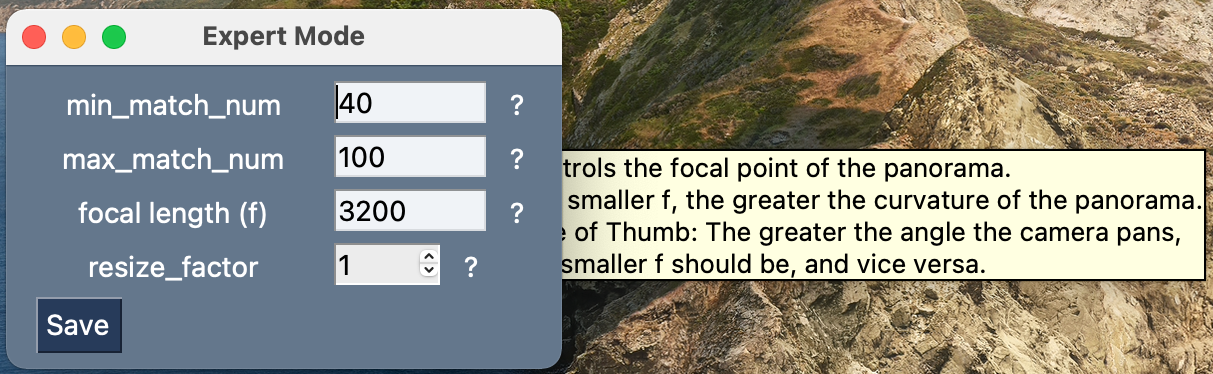
When setting the window to keep_on_top=True the tooltips (on the question marks) appear to only display behind the window.
This window is provoked by pressing a button and it is important that it will be modal-like, not disapear without saving or closing.
The given inputs are then fed into an object and run through a stitching algorithm, but I removed that from the code as it has nothing to do eith the bug.
Code To Duplicate
A short program that isolates and demonstrates the problem (Do not paste your massive program, but instead 10-20 lines that clearly show the problem)
This pre-formatted code block is all set for you to paste in your bit of code:
layout = [[sg.Text('min_match_num', size=(15,1), font='_ 14'), sg.Input(default_text='40', size=(8,1), k='-MIN-', enable_events=True, font='_ 14'),
               sg.Text('?', font='_ 14', size=(1,1), tooltip='Controls the minimum amount of overlap between stitched frames of the panorama. The smaller min_match_num is, the lesser the overlap. IT\'S BETTER TO TINKER WITH max_match_num!')],
              [sg.Text('max_match_num', size=(15,1), font='_ 14'), sg.Input(default_text='100', size=(8,1), k='-MAX-', enable_events=True, font='_ 14'),
               sg.Text('?', font='_ 14', size=(1,1), tooltip='Controls the maximum amount of overlap between stitched frames of the panorama. The larger max_match_num is, the greater the overlap.')],
              [sg.Text('focal length (f)', size=(15,1), font='_ 14'), sg.Input(default_text='3200', size=(8,1), k='-F-', enable_events=True, font='_ 14'),
               sg.Text('?', font='_ 14', size=(1,1), tooltip='Controls the focal point of the panorama. The smaller f, the greater the curvature of the panorama. Rule of Thumb: The greater the angle the camera pans, the smaller f should be, and vice versa.')],
              [sg.Text('resize_factor', size=(15,1), font='_ 14'), sg.Spin([1,2,3,4,5], initial_value=1, size=(4,1), k='-RESIZE-', enable_events=True, readonly=True, background_color='white', font='_ 14'),
               sg.Text('?', font='_ 14', size=(1,1), tooltip='Controls the amount by which the quality decreases. Best for debuging and perfecting the appropriate parameters for a given video.')],
              [sg.B('Save', font='_ 14')]]

window = sg.Window('Expert Mode', layout, text_justification='c', finalize=True, resizable=True, modal=True, keep_on_top=True)

while True:
    event, values = window.read()

    if event in ('Save', None):
        break

    if event in ('-MIN-', '-MAX-', '-F-'):
        try:
            int(values[event])
        except ValueError:
            window[event].update(values[event][:-1])

window.close()
del window
Sorry the layout seems a bit messy, it looks much better in VScode.
Screenshot, Sketch, or Drawing
- 主要语言
- Python
- 星标
- 13.8k
- 派生
- 1.8k
- PR 合并指标
- 30 天内没有已合并 PR
贡献指南
从这里开始
- 先读完整个 Issue,再读项目的贡献指南。
- 在 Issue 下留言说明你要接手 —— 这能避免两个人做同样的事。
- Fork 仓库,在一个分支上完成修改。
- 提交 Pull Request,并在描述里引用这个 Issue 编号。
PySimpleGUI/PySimpleGUI 的其他 Issue
-
Bug Done - Install Dev Build (see docs for how) Platform Specific Issue - Linux Port - TK
难度 2/5 1-3 小时 新手友好度 68/100
PySimpleGUI/PySimpleGUI#6904 · 15 条评论 ·
-
Bug Demo Programs Done - Install Dev Build (see docs for how) Interoperability Port - TK workaround available
难度 2/5 1-3 小时 新手友好度 68/100
PySimpleGUI/PySimpleGUI#6900 · 1 条评论 ·
-
Done - Install Dev Build (see docs for how) enhancement
难度 2/5 1-3 小时 新手友好度 62/100
PySimpleGUI/PySimpleGUI#3251 · 12 条评论 ·
-
难度 3/5 1-2 天 新手友好度 74/100
PySimpleGUI/PySimpleGUI#6906 · 1 条评论 · 1 个 reaction ·
-
Bug Done - Install Dev Build (see docs for how) Port - TK
难度 3/5 1-2 天 新手友好度 45/100
PySimpleGUI/PySimpleGUI#6902 · 1 条评论 ·
查看 PySimpleGUI/PySimpleGUI 的全部 Issue
相似的 Issue
-
essnmx good first issue
难度 1/5 1 小时以内 新手友好度 95/100
-
难度 2/5 1-3 小时 新手友好度 65/100
syfoud/Simulated_Scepter#174 ·
-
难度 2/5 1-3 小时 新手友好度 75/100
Giskard-AI/giskard-oss#2840 · 1 条评论 ·
-
A claim comment carrying the issue number is silently declined while the workflow reports success 未关闭area: repo bug perceived difficulty: 2
难度 2/5 1-3 小时 新手友好度 70/100
-
难度 2/5 1-3 小时 新手友好度 75/100
yeti-platform/yeti#1380 ·