[Windows]: Steam and EA app (EA Desktop)
还没有人认领这个 Issue。
评估
- 难度
- 4/5
- 预计耗时
- 3-5 天
- 新手友好度
- 43/100
- Issue 类型
- 缺陷
- 描述清晰度
- 基本清楚
- 活跃度
- 活跃
- 领域
- networking
调研方向
Start by reproducing the Steam and EA app failures with AdGuard for Windows 8.0.5595 and the experimental SockFilter driver, then compare behavior with AdGuard removed. Review the AdGuard service log entry about resolving steamwebhelper.exe's application path and the supplied Steam crash dump showing a blocked UDP send. Done means identifying the cause and confirming a fix restores both apps; the issue does not name source files or tests.
由索引模型根据 Issue 内容生成。
描述
Application Name
Steam and EA app (EA Desktop)
Application Executable Name
steam.exe, steamwebhelper.exe, EADesktop.exe
Troubleshooting Result
- None of the above helped
Suggested Configuration List
I am not sure, please investigate
Description of the Problem
- App won’t start or keeps crashing
- App can’t connect to the Internet
- App lags, freezes, or disconnects
What changed: AdGuard for Windows updated to 8.0.5595 on Nov 8, 2026. Steam and the EA app stopped working right after; uninstalling AdGuard fixed both.
Summary
After AdGuard for Windows updated to 8.0.5595 (Nov 8, 2026), the Steam client and the EA app stopped working. Excluding the apps, pausing protection and restarting did not help. Uninstalling AdGuard and rebooting fixed both immediately.
Environment
- Windows 11 Home, build 26340
- AdGuard for Windows 8.0.5595, network driver: SockFilter (Experimental)
- Steam client build 1792618285, installed on a secondary drive (
F:\Steam)- EA app (
EADesktop.exe) 13.822- NordVPN 8.15.2 also installed (Steam and EA work fine with it once AdGuard is removed)
Symptoms
Steam: login completes on the server side (logon response
OK), but the client stays on "Sign in to Steam" (QR code never loads). About 3 minutes later Steam's watchdog terminates the client. Happened on every launch (30+ times over two days). Last good launch was before the AdGuard update.EA app: also failed to work during the same period and recovered at the same time once AdGuard was uninstalled.
Crash dump analysis (Steam)
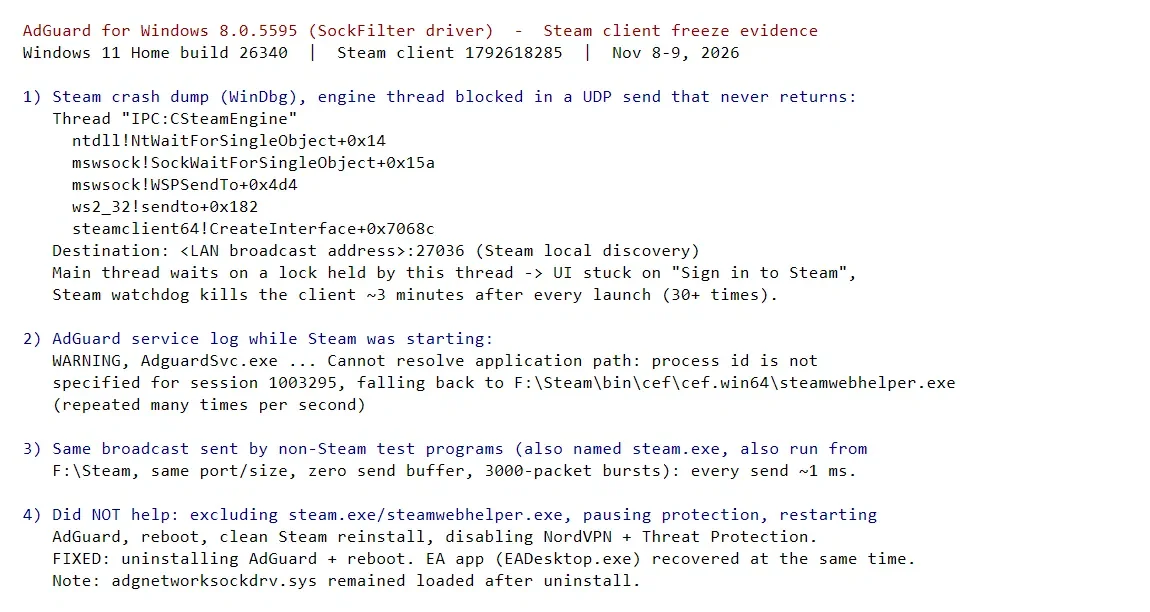
Steam's own minidumps, opened in WinDbg, show the engine thread blocked in a UDP send that never returns:
Thread "IPC:CSteamEngine"
ntdll!NtWaitForSingleObject+0x14
mswsock!SockWaitForSingleObject+0x15a
mswsock!WSPSendTo+0x4d4
ws2_32!sendto+0x182
steamclient64!CreateInterface+0x7068c
The destination was Steam's LAN discovery broadcast (
<LAN broadcast>:27036); on one run it was a Valve CM server viaWSASendTo(162.254.197.39:27017). The main thread waits on a lock held by this thread, so the client freezes and the watchdog kills it.The same broadcast sent from non-Steam test programs went through in ~1 ms every time, including: same source port and packet size, zero send buffer, 3000-packet bursts, the test exe renamed to
steam.exe, and run from insideF:\Steam. Only the real Steam client was blocked.AdGuard log
While Steam was starting, the AdGuard service log repeatedly showed:
WARNING, AdguardSvc.exe ... Cannot resolve application path: process id is not specified for session 1003295, falling back to F:\Steam\bin\cef\cef.win64\steamwebhelper.exeWhat did NOT help
- Excluding
steam.exeandsteamwebhelper.exefrom filtering- Pausing AdGuard protection
- Restarting AdGuard and rebooting
- Clean Steam reinstall, clearing caches, fresh login, disabling Remote Play, forcing TCP mode
- Disconnecting NordVPN and disabling its Threat Protection
What fixed it
Uninstalling AdGuard and rebooting. Steam then logged in and loaded normally; the EA app recovered as well.
Note: after uninstalling,
adgnetworksockdrv.syswas still present and loaded.Steam crash dumps and AdGuard logs are available on request.
Final Checks
- I have confirmed that disabling the Tracking Protection or specific filters did NOT fix the issue.
Screenshots
Screenshot 1
System configuration
| Information | Value |
|---|---|
| AdGuard product: | AdGuard for Windows v8.0.5595 |
| System version: | Windows 11 Home, build 26340 |
| AdGuard driver: | SOCKFILTER |
| Filters: | Ad blocking: AdGuard Base Privacy: AdGuard Tracking Protection Social widgets: AdGuard Social Media Annoyances: AdGuard Widgets, AdGuard Cookie Notices, AdGuard Popups, AdGuard Mobile App Banners, AdGuard Other Annoyances |
| Tracking protection: | disabled |
| DNS filtering: | server: Default, (system, DNS)filters: AdGuard DNS filter |
| Browsing Security: | disabled |
| Browsing Security statistics: | disabled |
| Userscripts: | AdGuard Extra<br>AdGuard Popup Blocker |
| Userstyles: | disabled |
Issue configuration
- 主要语言
- 没有语言数据
- 星标
- 10
- 派生
- 4
- 平均合并
- 1 小时 20 分钟
- 30 天内合并 PR
- 6
环境准备
这个项目没有提供开发容器、Dockerfile 或贡献指南,环境需要你自己搭建:先看它的 README,通用步骤见我们的新手贡献指南。
从这里开始
- 先读完整个 Issue,再读项目的贡献指南。
- 在 Issue 下留言说明你要接手 —— 这能避免两个人做同样的事。
- Fork 仓库,在一个分支上完成修改。
- 提交 Pull Request,并在描述里引用这个 Issue 编号。
AdguardTeam/CompatibilityIssues 的其他 Issue
-
Compatibility Priority: P4 Windows
难度 2/5 1-3 小时 新手友好度 45/100
-
Compatibility Priority: P4 Windows
难度 4/5 3-5 天 新手友好度 28/100
-
Compatibility Priority: P4 Windows
难度 4/5 3-5 天 新手友好度 45/100
-
Compatibility Priority: P4 Windows
难度 4/5 3-5 天 新手友好度 30/100
-
Compatibility Priority: P4 Windows
难度 4/5 3-5 天 新手友好度 20/100
查看 AdguardTeam/CompatibilityIssues 的全部 Issue
相似的 Issue
-
难度 2/5 1-3 小时 新手友好度 78/100
smartcontractkit/external-adapters-js#5651 ·
维护者通常 1 天内回复
-
needs-info
难度 2/5 1-3 小时 新手友好度 78/100
-
难度 2/5 1-3 小时 新手友好度 82/100
维护者通常 1 天内回复
-
good first issue help wanted
难度 2/5 1-3 小时 新手友好度 85/100
vishwagw/Sky-Sim-drone-simulator-3.0#46 ·
维护者通常 1 天内回复
-
难度 2/5 1-3 小时 新手友好度 76/100
NuSkooler/enigma-bbs#1213 ·
维护者通常 1 天内回复