Enable references to Tabs
Chưa có ai nhận issue này.
Đánh giá
- Độ khó
- 4/5
- Thời gian dự kiến
- 3-5 ngày
- Mức phù hợp với người mới
- 35/100
- Loại issue
- Tính năng
- Độ rõ ràng
- Khá rõ ràng
- Mức độ hoạt động
- Đình trệ
- Công nghệ
- javascript, react
- Lĩnh vực
- frontend
Hướng nghiên cứu
Bắt đầu bằng cách xem xét UncontrolledTabs.js, đặc biệt là getChildren và cách xử lý tabRef, cùng với thuộc tính domRef của component Tabs. Xác định API tham chiếu nào nên được hỗ trợ để truy cập các phần tử tab, sau đó kiểm tra rằng consumer có thể sử dụng API đó để đưa một tab đã chọn đang nằm ngoài vùng hiển thị vào vùng hiển thị.
Do mô hình lập chỉ mục viết ra từ nội dung của issue.
Mô tả
The Problem
I am using react tabs to create a simple tab view stepper where the user has to fill in a form in each of the steps.
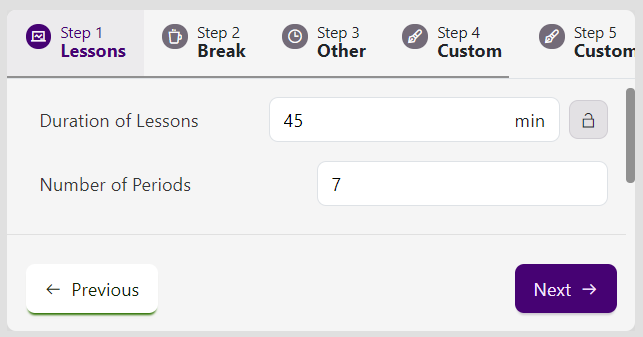
While developing the UI, I tried to make the tabs responsive by allowing for scrolling which I am still busy developing, but seems to be working fairly well at the moment. My only problem is that if I set selectedIndex to a tab that is not within view, the TabList will not update to show that Tab heading.
Current design:
I decided that to fix this problem I would make use of useEffect, React refs and some javascript document manipulation (ie document.scrollToView), unfortunately, I am unable to get an instance of the tab elements so that I can call scrollIntoView; I have also considered accessing the scrollLeft property of the containing element (ie TabList), but there is ref function available for that element and I would still need access to the child Tab element to tell how much the TabList should scroll.
The Solutions
After realising the problem, I went straight to your code to see if there was any way to accomplish what I set out to do. This led to me creating my own types for the package because the version of @types/react-tabs currently available is made for react-tabs 2.3 (or something like that) while the latest version of react-tabs is version 3.2.3.
I then looked throughout the codebase and realised that there was a perfect infrastructure for getting access to the tab inside the UncontrolledTabs.js file, with the only problem being that there was no way of actually getting access to the particular instance of UncontrolledTabs that was being rendered. An alternative to using the instance of the UncontrolledTabs class would be to have direct ref access to the tabs themselves, which is possible and would be a very simple change to make.
Option 1: Getting access to the UncontrolledTabs instance.
Option 1.1: Getting instance using domRef
In the code for the Tabs component, there is a property called domRef which is a function that gets passed directly to UncontrolledTabs and which gets called when creating the dom element for the UncontrolledTabs component.
UncontrolledTabs.js (lines 374 - 397)
      selectedTabClassName, // unused
      selectedTabPanelClassName, // unused
      environment, // unused
      disableUpDownKeys, // unused
      ...attributes
    } = this.props;

    return (
      <div
        {...attributes}
        className={cx(className)}
        onClick={this.handleClick}
        onKeyDown={this.handleKeyDown}
        ref={(node) => {
          this.node = node;
          *** if (domRef) domRef(node);
        }}
        data-rttabs
      >
        {this.getChildren()}
      </div>
    );
  }
}
Inside UncontrolledTabs, you can add a static function, e.g. getInstanceFromDomRef(node: HTMLDivElement), this function would basically see if the supplied node is the same as the node of that instance and would then return that instance of the component.
Basically, you would add the following as a function to the UncontrolledTabs class:
static getInstanceFromDomRef(node) {
    if (node === this.node) return this;
    return null;
}
Option 1.2: Adding componentRef property
This option is self-explanatory, you would include a componentRef property to the Tabs component which would lead to an instance of either the Tabs or UncontrolledTabs components which could then be used to access the necessary methods.
Option 2: Allow custom tabRef functions to be passed to Tabs that are children of UncontrolledTabs
In the UncontrolledTabs file, there is a function called getChildren which loops through all of the children passed to the UncontrolledTabs component and ensures that they meet certain criteria while also modifying them slightly. For the Tab component, UncontrolledTabs takes the supplied Tab component and changes the tabRef function to a custom one used by UncontrolledTabs, thus removing the tabRef function supplied by the developer, to fix this would be as simple as the following:
UncontrolledTabs.js (lines 222 - 246)
        result = cloneElement(child, {
          children: deepMap(child.props.children, (tab) => {
            const key = `tabs-${listIndex}`;
            const selected = selectedIndex === listIndex;

            const props = {
              tabRef: (node) => {
                this.tabNodes[key] = node;
+++             if (tab.props.tabRef) tab.props.tabRef(node)
              },
              id: this.tabIds[listIndex],
              panelId: this.panelIds[listIndex],
              selected,
              focus: selected && (focus || wasTabFocused),
            };

            if (selectedTabClassName)
              props.selectedClassName = selectedTabClassName;
            if (disabledTabClassName)
              props.disabledClassName = disabledTabClassName;

            listIndex++;

            return cloneElement(tab, props);
          }),
        });
Those are my suggested solutions which should be a partial fix to the problem of programmatically managing the scroll of the TabList container.
This is a great package and is really useful for quickly creating tabs.
- Ngôn ngữ chính
- JavaScript
- Star
- 3.1k
- Fork
- 455
- Merge trung bình
- 5 giờ 9 phút
- Pull request đã merge (30 ngày)
- 2
Hướng dẫn đóng góp
Chưa lập chỉ mục được hướng dẫn đóng góp cho kho mã nguồn này
Bắt đầu từ đâu
- Đọc hết issue, rồi đọc hướng dẫn đóng góp của dự án.
- Bình luận trên issue rằng bạn sẽ nhận — tránh hai người làm cùng một việc.
- Fork repository và làm thay đổi trên một nhánh.
- Mở pull request có tham chiếu số hiệu của issue.
Issue khác của reactjs/react-tabs
-
Độ khó 3/5 1-2 ngày Mức phù hợp với người mới 25/100
reactjs/react-tabs#584 ·
-
Độ khó 2/5 1-3 giờ Mức phù hợp với người mới 45/100
reactjs/react-tabs#581 · 3 bình luận ·
-
Độ khó 3/5 1-2 ngày Mức phù hợp với người mới 35/100
reactjs/react-tabs#571 ·
-
Support hiding of all TabPanels Đang mở
Độ khó 4/5 3-5 ngày Mức phù hợp với người mới 35/100
reactjs/react-tabs#525 · 1 bình luận · 1 reaction ·
-
Độ khó 3/5 1-2 ngày Mức phù hợp với người mới 35/100
reactjs/react-tabs#521 · 3 bình luận ·
Tất cả issue của reactjs/react-tabs
Issue tương tự
-
awaiting triage bug Causes friction Hop Gui P1 P2 Transforms
Độ khó 2/5 1-3 giờ Mức phù hợp với người mới 75/100
-
Độ khó 2/5 1-3 giờ Mức phù hợp với người mới 75/100
-
Độ khó 2/5 1-3 giờ Mức phù hợp với người mới 75/100
-
Improve Title Support Đang mở
Độ khó 2/5 1-3 giờ Mức phù hợp với người mới 70/100
georgestephanis/p2026#40 ·
-
Enatega Customer and Rider app: Add-ons price is not visible to customer after order is placed. Đang mở
Độ khó 2/5 1-3 giờ Mức phù hợp với người mới 75/100
Margaret-Petersen/food-delivery-app-clone-react-native#1981 ·