get-display-left-top-inset returns non-zero offset for monitor 0 on linux
Chưa có ai nhận issue này.
Đánh giá
- Độ khó
- 4/5
- Thời gian dự kiến
- 3-5 ngày
- Mức phù hợp với người mới
- 35/100
- Loại issue
- Lỗi
- Độ rõ ràng
- Cần làm rõ
- Mức độ hoạt động
- Đình trệ
- Công nghệ
- linux
- Lĩnh vực
- desktop, operating-systems
Hướng nghiên cứu
Bắt đầu với API racket/gui get-display-left-top-inset và tái hiện trên Linux đầu ra monitor-0 được cung cấp bằng snippet get-display-info. So sánh kết quả với tài liệu được liên kết và bố cục màn hình, sau đó xác nhận rằng offset khác không được báo cáo được xử lý nhất quán cho monitor 0.
Do mô hình lập chỉ mục viết ra từ nội dung của issue.
Mô tả
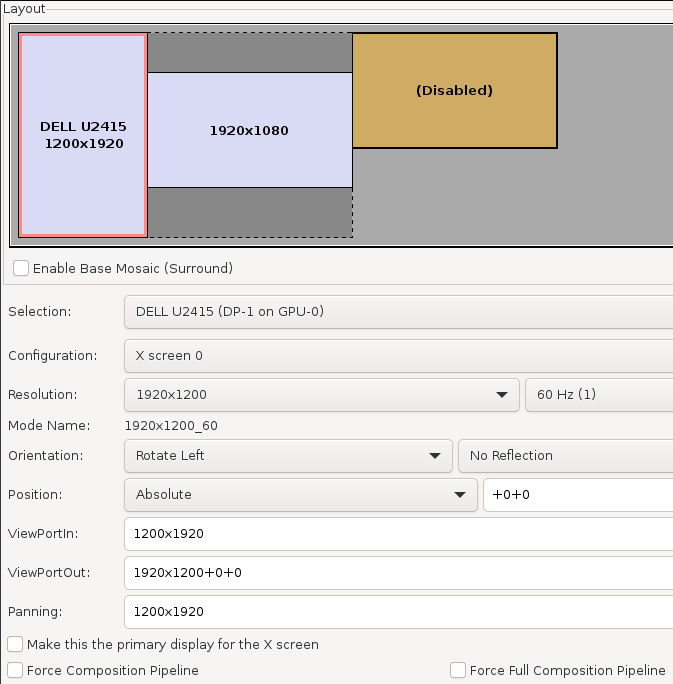
Following and investigation into tooltips being misplaced in https://github.com/alex-hhh/gui-widget-mixins/issues/3, we determined that the underlying issue is that for some reason on my system I have a non-zero offsets when calling get-display-left-top-inset for monitor zero. This is at variance with the docs.
(require racket/gui)
(get-display-left-top-inset #:monitor 0)
-1200
-370
The full display info is '(linux cs "8.0.0.11" 2 (0 1920 1080 -1200 -370) (1 1200 1920 0 0)) when running
(begin
  (require racket/gui)
  (define (get-display-info)
    (append (list (system-type 'os*) (system-type 'gc) (version) (get-display-count))
            (for/list ([monitor (in-range (get-display-count))])
              (let-values ([(x y) (get-display-size #:monitor monitor)]
                           [(dx dy) (get-display-left-top-inset #:monitor monitor)])
                (list
                 monitor
                 x y dx dy)))))
  (get-display-info))
See also this thread in slack https://racket.slack.com/archives/C06V96CKX/p1618503646014800.
Here is the monitor layout if it helps.

- Ngôn ngữ chính
- Racket
- Star
- 68
- Fork
- 83
- Merge trung bình
- 9 ngày 8 giờ
- Pull request đã merge (30 ngày)
- 4
Chuẩn bị môi trường
- Không có Dockerfile hay tệp Docker Compose
- Không có mẫu pull request
- Đọc hướng dẫn đóng góp
Bắt đầu từ đâu
- Đọc hết issue, rồi đọc hướng dẫn đóng góp của dự án.
- Bình luận trên issue rằng bạn sẽ nhận — tránh hai người làm cùng một việc.
- Fork repository và làm thay đổi trên một nhánh.
- Mở pull request có tham chiếu số hiệu của issue.
Issue khác của racket/gui
-
Độ khó 2/5 1-3 giờ Mức phù hợp với người mới 65/100
-
Độ khó 4/5 3-5 ngày Mức phù hợp với người mới 35/100
-
Độ khó 4/5 3-5 ngày Mức phù hợp với người mới 45/100
-
Độ khó 4/5 3-5 ngày Mức phù hợp với người mới 45/100
-
Độ khó 4/5 3-5 ngày Mức phù hợp với người mới 35/100
Issue tương tự
-
[Bug]: IME confirmation Enter can submit the SSH port-forward dialogCó thể đã có người làm @seijikohara đã nhận hôm nay. Đang mở
Độ khó 2/5 1-3 giờ Mức phù hợp với người mới 88/100
Maintainer thường phản hồi trong vòng 1 ngày
-
Desktop App QA
Độ khó 2/5 1-3 giờ Mức phù hợp với người mới 67/100
cline/cline#15372 · 1 bình luận ·
Maintainer thường phản hồi trong vòng 1 ngày
-
good first issue help wanted
Độ khó 2/5 1-3 giờ Mức phù hợp với người mới 65/100
-
bug
Độ khó 2/5 1-3 giờ Mức phù hợp với người mới 84/100
ch-bas/threejs-sims-house-builder#692 ·
Maintainer thường phản hồi trong vòng 1 ngày
-
Độ khó 2/5 1-3 giờ Mức phù hợp với người mới 68/100
projectbluefin/testsuite#1019 ·
Maintainer thường phản hồi trong vòng 1 ngày