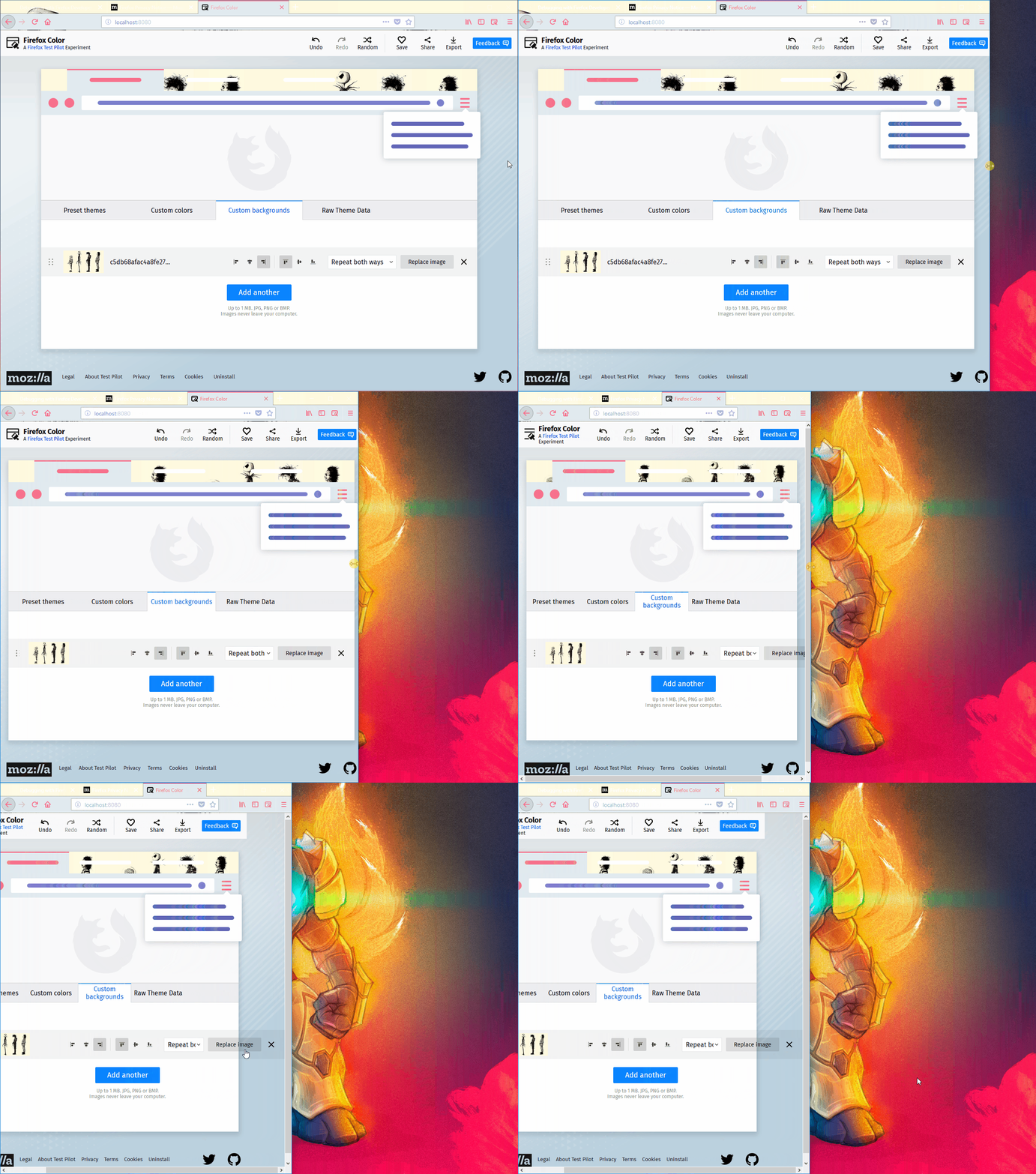
The "Replace image" and "X" buttons are wrongly exceeding the "Custom backgrounds" area at browser resize
Chưa có ai nhận issue này.
Đánh giá
- Độ khó
- 3/5
- Thời gian dự kiến
- 1-2 ngày
- Mức phù hợp với người mới
- 38/100
- Loại issue
- Lỗi
- Độ rõ ràng
- Khá rõ ràng
- Mức độ hoạt động
- Đình trệ
- Công nghệ
- javascript
- Lĩnh vực
- frontend
Hướng nghiên cứu
Bắt đầu bằng cách tái hiện vấn đề từ nút thanh công cụ Firefox Color trong tab Custom backgrounds khi thay đổi kích thước trình duyệt và kéo thanh cuộn. Kiểm tra UI của Custom backgrounds và bố cục responsive của nó; được xem là hoàn tất khi các nút Replace image và X vẫn nằm trong khu vực ở các chiều rộng hẹp.
Do mô hình lập chỉ mục viết ra từ nội dung của issue.
Mô tả
[Affected versions]:
- Firefox 62.0.3 and above
[Affected Platforms]:
- All Windows
- All Mac
- All Linux
[Prerequisites]:
- Have a Firefox profile with the latest version of the "Firefox Color" add-on (2.1.0 local-dev custom built on 10/19/2018) installed.
[Steps to reproduce]:
- Open the browser with the profile from prerequisites.
- Click the "Firefox Color" toolbar button and select the "Custom backgrounds" tab.
- Resize the browser to 1/4 of the screen.
- Drag the scrollbar, from the bottom part of the page, to the right.
- Observe the "Custom backgrounds" area's elements.
[Expected result]:
- All the elements are responsive and correctly rendered.
[Actual result]:
- The "Replace image" and "X" buttons are exceeding the "Custom backgrounds" area.
[Notes]:
- This issue is also reproducible with the TxP version of the "Firefox Color" add-on.
- Attached a screen recording of the issue:
- Ngôn ngữ chính
- JavaScript
- Star
- 506
- Fork
- 100
- Chỉ số merge pull request
- Không có pull request nào được merge trong 30 ngày
Hướng dẫn đóng góp
Bắt đầu từ đâu
- Đọc hết issue, rồi đọc hướng dẫn đóng góp của dự án.
- Bình luận trên issue rằng bạn sẽ nhận — tránh hai người làm cùng một việc.
- Fork repository và làm thay đổi trên một nhánh.
- Mở pull request có tham chiếu số hiệu của issue.
Issue khác của mozilla/FirefoxColor
-
Độ khó 2/5 1-3 giờ Mức phù hợp với người mới 68/100
mozilla/FirefoxColor#1081 · 1 bình luận ·
-
does not see browser Đang mở
Độ khó 3/5 1-2 ngày Mức phù hợp với người mới 35/100
mozilla/FirefoxColor#1087 · 1 bình luận ·
-
Độ khó 5/5 Hơn một tuần Mức phù hợp với người mới 35/100
mozilla/FirefoxColor#1085 · 1 bình luận ·
-
Độ khó 3/5 1-2 ngày Mức phù hợp với người mới 68/100
mozilla/FirefoxColor#1084 · 1 bình luận ·
-
Độ khó 5/5 Hơn một tuần Mức phù hợp với người mới 35/100
mozilla/FirefoxColor#1083 · 1 reaction ·
Tất cả issue của mozilla/FirefoxColor
Issue tương tự
-
Độ khó 2/5 1-3 giờ Mức phù hợp với người mới 78/100
-
Độ khó 1/5 Dưới một giờ Mức phù hợp với người mới 90/100
TheOdinProject/curriculum#31423 ·
-
Độ khó 2/5 1-3 giờ Mức phù hợp với người mới 65/100
WGBH-MLA/dream-aapb#69 ·
-
Độ khó 1/5 1-3 giờ Mức phù hợp với người mới 78/100
Mintplex-Labs/anything-llm#6490 ·
-
Độ khó 1/5 Dưới một giờ Mức phù hợp với người mới 86/100
openlayers/ol-cesium#1364 ·