[BottomSheet] `@react-navigation/stack` header draws over an open sheet on iOS
Maintainers usually reply within 1 day
Nobody has claimed this yet.
Assessment
- Difficulty
- 4/5
- Estimated time
- 3-5 days
- Newbie friendliness
- 52/100
- Issue type
- Bug
- Clarity
- Mostly clear
- Activity status
- Quiet
- Tech stack
- ios, react-native
- Domain
- mobile
Research direction
Start with the linked reproduction and compare the js-stack and native-stack paths on iOS, focusing on the inline BottomSheet beside NavigationContainer and the header layering at the content detent. Done means the js-stack header is covered by the open sheet up to its top edge, matching native-stack, without changing the reported reproduction setup.
Written by the indexing model from the issue text.
Description
Reproduction
https://github.com/kilarsky/swm-bottom-sheet-stack-header-above-sheet-repro
The content is a FlatList of 30 items on the default detents ([0, 'content']). No
extra props, no wrapper.
- Launch the app with js-stack selected.
- Tap Open sheet.
- Look at the top edge of the sheet where it meets the navigation header.
- Close the sheet, tap native-stack, and open the sheet again.
Summary
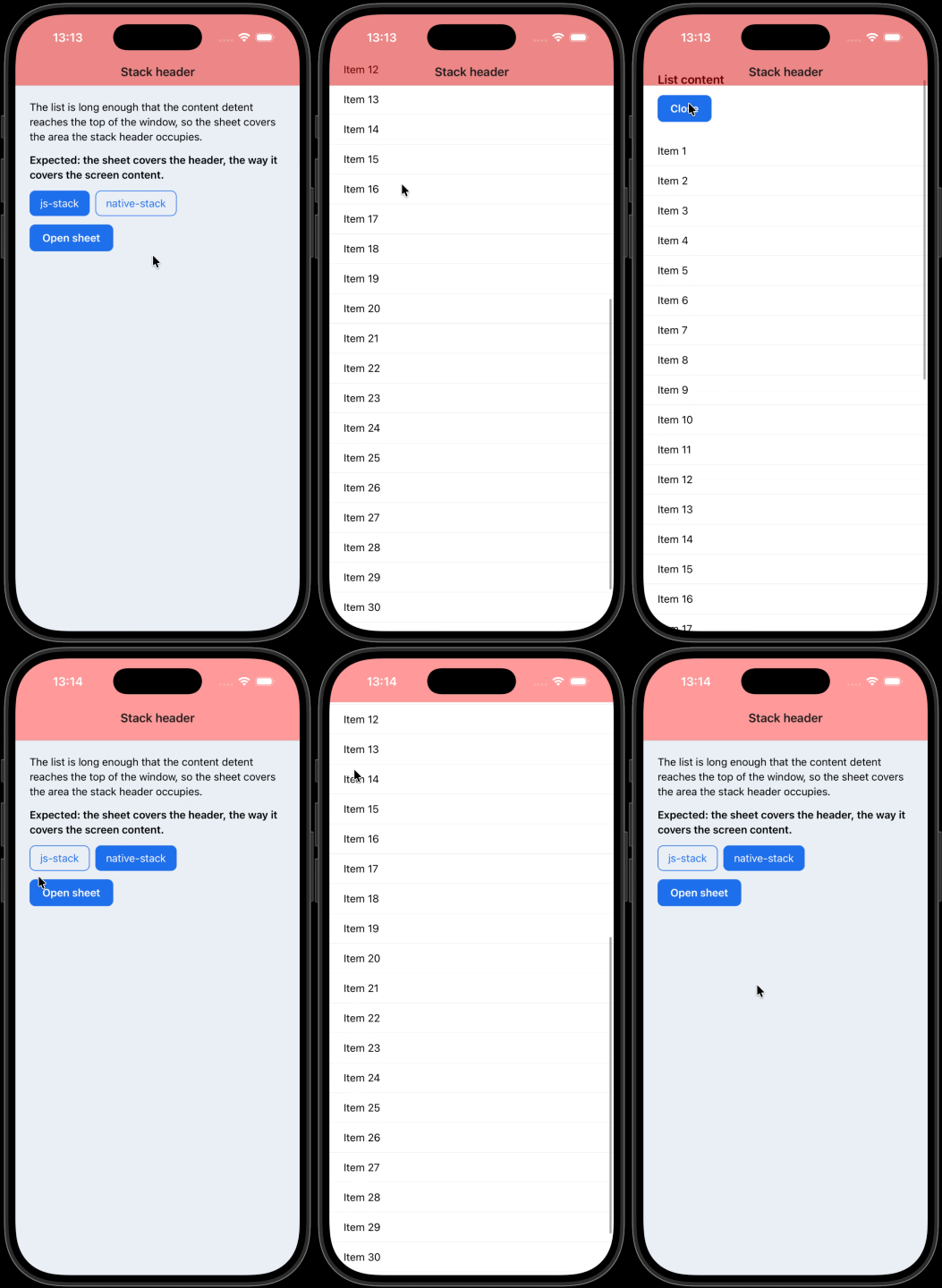
I put an inline BottomSheet next to NavigationContainer and open it to the content
detent, which reaches its full height. The @react-navigation/stack header keeps
drawing on top of the sheet. Everything else on the screen goes under it.
Point the same screen at @react-navigation/native-stack and the sheet covers the
header up to the sheet's top edge.
Expected
The sheet covers the header the same way it covers the rest of the screen.
Actual
| Host | Header while the sheet is open |
|---|---|
js-stack |
draws over the sheet |
native-stack |
covered by the sheet |
Environment
| Package | Version |
|---|---|
@swmansion/react-native-bottom-sheet |
0.16.2 |
@react-navigation/stack |
7.10.22 |
@react-navigation/native-stack |
7.18.9 |
@react-navigation/native |
7.3.16 |
iOS only.
npx expo-env-info
   expo-env-info 2.1.0 environment info:
    System:
      OS: macOS 26.5.2
      Shell: 5.9 - /bin/zsh
    Binaries:
      Node: 22.18.0 - /usr/local/bin/node
      Yarn: 1.22.22 - /usr/local/bin/yarn
      npm: 10.9.3 - /usr/local/bin/npm
      Watchman: 2025.09.15.00 - /opt/homebrew/bin/watchman
    Managers:
      CocoaPods: 1.16.2 - /Users/.../.rbenv/shims/pod
    SDKs:
      iOS SDK:
        Platforms: DriverKit 25.5, iOS 26.5, macOS 26.5, tvOS 26.5, visionOS 26.5, watchOS 26.5
    IDEs:
      Android Studio: 2026.1 AI-261.26222.65.2613.16025427
      Xcode: 26.5/17F42 - /usr/bin/xcodebuild
    npmPackages:
      expo: ~57.0.15 => 57.0.15
      react: 19.2.3 => 19.2.3
      react-native: 0.86
npx expo-doctor
21/21 checks passed. No issues detected!
- Dominant language
- Kotlin
- Stars
- 536
- Forks
- 24
- Avg merge
- 12h 10m
- Merged PRs (30d)
- 22
Getting set up
This project ships no dev container, Dockerfile or contributing guide, so setting up is up to you: start from its README, and see our first-contribution guide for the general steps.
First steps
- Read the whole issue, then the project's contributing guide.
- Comment on the issue to say you are picking it up — it saves two people doing the same work.
- Fork the repository and make your change on a branch.
- Open a pull request that references the issue number.
More from software-mansion/react-native-bottom-sheet
-
Android: NoSuchElementException in ScrollIndicators.refit when a scroll view is garbage collectedOpen
Difficulty 2/5 1-3 hours Newbie friendliness 88/100
software-mansion/react-native-bottom-sheet#140 · 1 comment · 1 reaction ·
Maintainers usually reply within 1 day
-
Difficulty 1/5 Under an hour Newbie friendliness 35/100
software-mansion/react-native-bottom-sheet#137 ·
Maintainers usually reply within 1 day
-
Feature request: opt-in native keyboard avoidancePossibly taken @Asad-Butt claimed this 5 days ago. Open
Difficulty 4/5 3-5 days Newbie friendliness 22/100
software-mansion/react-native-bottom-sheet#134 · 1 comment · 2 reactions ·
Maintainers usually reply within 1 day
-
bug
Difficulty 4/5 3-5 days Newbie friendliness 48/100
software-mansion/react-native-bottom-sheet#132 · 1 comment ·
Maintainers usually reply within 1 day
-
enhancement
Difficulty 5/5 Over a week Newbie friendliness 35/100
software-mansion/react-native-bottom-sheet#64 · 1 comment ·
Maintainers usually reply within 1 day
All issues in software-mansion/react-native-bottom-sheet
Similar issues
-
Remove Collect againOpen
Difficulty 1/5 1-3 hours Newbie friendliness 86/100
thisisartman/Meguri#211 ·
Maintainers usually reply within 1 day
-
follow-up
Difficulty 1/5 Under an hour Newbie friendliness 75/100
Maintainers usually reply within 1 day
-
area:android fleet
Difficulty 2/5 1-3 hours Newbie friendliness 78/100
Maintainers usually reply within 1 day
-
Difficulty 2/5 1-3 hours Newbie friendliness 78/100
Maintainers usually reply within 1 day
-
bug needs-triage
Difficulty 2/5 1-3 hours Newbie friendliness 76/100
emm3000/myGame#2175 · 1 comment ·
Maintainers usually reply within 1 day