CustomRequest Style won't change no matter if the file is uploaded or not. It will always show file uploading style
Nobody has claimed this yet.
Assessment
- Difficulty
- 3/5
- Estimated time
- 1-2 days
- Newbie friendliness
- 35/100
- Issue type
- Bug
- Clarity
- Needs clarification
- Activity status
- Stale
- Tech stack
- javascript, react
- Domain
- frontend
Research direction
Start with the Upload component's customRequest and fileList handling, using the provided customUpload and handleChange callbacks as the reproduction. Verify how upload success and failure are reflected in the displayed file style, and consider the issue resolved when the style differs correctly for successful and failed uploads.
Written by the indexing model from the issue text.
Description
Please see the response here. The first one is with success, the second is with failure.
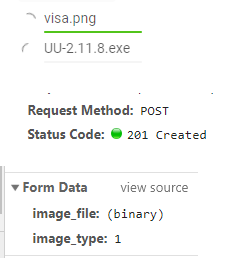
Here is my code.
 state = {
    previewVisible: false,
    previewImage: "",
    fileList: []
  };

handleChange = ({ fileList }) => {
    this.setState({
      fileList: fileList
    });
    console.log(this.state.fileList);
  };

  customUpload = ({
    file,
    onProgress,
    headers,
  }) => {
    const { onSuccess, onError, image_type } = this.props;

    if (file.size / 1024 / 1024 > 5) return false;
    else if (imageTypes.indexOf(file.type) < 0) return false;
    else if (!imageTypes) return false;
    else {
      let data = new FormData();
      data.append('image_file',file)
      data.append("image_type", image_type);
      console.log(data);

      Axios.post(URL + "image_upload/",
      data,
      {
       headers,
        onUploadProgress:({total,loaded}) =>{
          onProgress({ percent: Math.round(loaded / total * 100) }, file)
        }
      })
      .then((res) => {
        onSuccess && onSuccess(res)
      })
      .catch( err=> {
        onError && onError(err)
      });
    }
  }


return (
<Upload
          //listType="picture"
          fileList={fileList}
          headers={headers}
          accept={"image/*"}
          customRequest={this.customUpload}
          onPreview={this.handlePreview}
          onChange={this.handleChange}
        >
        </Upload>
)
- Dominant language
- TypeScript
- Stars
- 804
- Forks
- 323
- Avg merge
- 12m
- Merged PRs (30d)
- 1
Contributor guide
No contributing guide indexed for this repository
First steps
- Read the whole issue, then the project's contributing guide.
- Comment on the issue to say you are picking it up — it saves two people doing the same work.
- Fork the repository and make your change on a branch.
- Open a pull request that references the issue number.
More from react-component/upload
-
Difficulty 2/5 1-3 hours Newbie friendliness 62/100
react-component/upload#170 ·
-
HVAC website Open
Difficulty 5/5 Over a week Newbie friendliness 10/100
react-component/upload#697 ·
-
Difficulty 2/5 1-3 hours Newbie friendliness 15/100
react-component/upload#615 ·
-
Difficulty 4/5 3-5 days Newbie friendliness 35/100
react-component/upload#522 · 2 comments ·
-
Difficulty 4/5 3-5 days Newbie friendliness 25/100
react-component/upload#515 ·
All issues in react-component/upload
Similar issues
-
Difficulty 2/5 1-3 hours Newbie friendliness 75/100
safetrustcr/dApp-SafeTrust#426 ·
-
area:workflow bug ready-for-agent
Difficulty 2/5 1-3 hours Newbie friendliness 75/100
fil-donadoni/tolaria#4409 ·
-
Difficulty 2/5 1-3 hours Newbie friendliness 70/100
Fission-AI/OpenSpec#1960 ·
-
Add dependabot Open
Difficulty 2/5 1-3 hours Newbie friendliness 70/100
-
Difficulty 2/5 1-3 hours Newbie friendliness 75/100
corsairdev/corsair#1764 ·