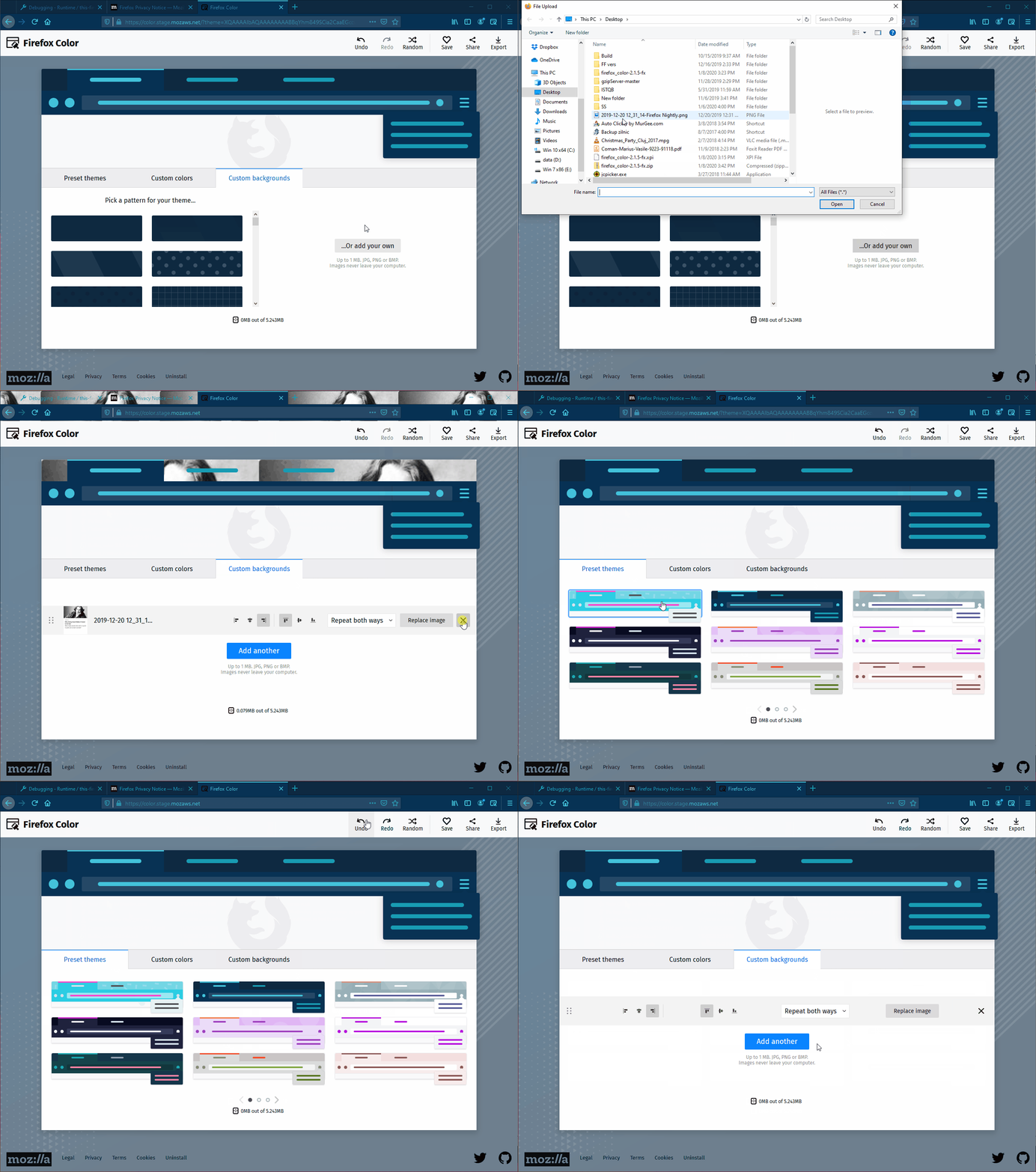
A blank custom background item is wrongly displayed after pressing the “Undo” button if an image was previously deleted and another theme applied
まだ誰も着手していません。
評価
- 難易度
- 3/5
- 見積もり時間
- 1〜2日
- 初心者へのやさしさ
- 42/100
- issue の種類
- バグ
- 明瞭さ
- おおむね明確
- 活発さ
- 停滞
- 技術スタック
- javascript
- 領域
- frontend
調査の方向性
Firefox Color stage website で次の手順を再現します。カスタム背景を追加して削除し、プリセットテーマを適用してから、Custom backgrounds に戻る前に Undo を 2 回押します。カスタム背景、プリセットテーマ、Undo の状態処理を追跡します。以前削除した画像が、空の背景項目ではなく再表示されれば完了です。
索引モデルが issue の本文から書いたものです。
説明
[Affected versions]:
- Firefox Release 72.0.1 - Build ID: 20200107212822
- Firefox Beta 73.0b2 - Build ID: 20200107212705
- Firefox Nightly 73.0a1 - Build ID: 20200108215606
[Affected Platforms]:
- Windows 10 x64
- Mac 10.15.2
- Ubuntu 18.04 x64
[Prerequisites]:
- Have a Firefox Color add-on zip modified in order to link to the stage website.
- Have the previous Firefox Color add-on installed through "about:debugging".
[Steps to reproduce]:
- Open the browser with the profile from prerequisites.
- Navigate to the https://color.stage.mozaws.net/ website.
- Click the “Custom backgrounds” section and add a valid image.
- Click the “Delete” button from the image.
- Go to the "Preset themes" section and apply any theme.
- Click the “Undo” button twice and go back to the “Custom backgrounds” section.
- Observe the behavior.
[Expected result]:
- The preset theme is changed and the previously deleted image is redisplayed in the “Custom backgrounds” section.
[Actual result]:
- The preset theme is changed and the image background section is displayed but it does not contain an image.
[Notes]:
- This issue is not reproducible if the "Custom backgrounds" section is opened before the "Undo" button is clicked.
- Attached a screen recording of the issue.
- 主要言語
- JavaScript
- スター
- 506
- フォーク
- 100
- PR マージ指標
- 30日以内にマージされた PR はありません
環境構築
はじめの一歩
- issue を最後まで読み、次にプロジェクトのコントリビューションガイドを読みます。
- 着手することを issue にコメントします — 二人が同じ作業をするのを防げます。
- リポジトリをフォークし、ブランチを切って変更します。
- issue 番号を参照したプルリクエストを送ります。
mozilla/FirefoxColor のほかの issue
-
難易度 2/5 1〜3時間 初心者へのやさしさ 68/100
mozilla/FirefoxColor#1081 · コメント 1 件 ·
-
does not see browserオープン
難易度 3/5 1〜2日 初心者へのやさしさ 35/100
mozilla/FirefoxColor#1087 · コメント 1 件 ·
-
難易度 5/5 1週間以上 初心者へのやさしさ 35/100
mozilla/FirefoxColor#1085 · コメント 1 件 ·
-
難易度 3/5 1〜2日 初心者へのやさしさ 68/100
mozilla/FirefoxColor#1084 · コメント 1 件 ·
-
難易度 5/5 1週間以上 初心者へのやさしさ 35/100
mozilla/FirefoxColor#1083 · リアクション 1 件 ·
mozilla/FirefoxColor の issue をすべて見る
似ている issue
-
bug good first issue
難易度 2/5 1〜3時間 初心者へのやさしさ 86/100
amponce/archive-movie-browser#354 ·
メンテナーはふだん 1 日以内に返信
-
難易度 2/5 1〜3時間 初心者へのやさしさ 74/100
saayam-for-all/webapp#1870 ·
メンテナーはふだん 1 日以内に返信
-
難易度 2/5 1〜3時間 初心者へのやさしさ 76/100
Imageomics/OpenCite#66 ·
メンテナーはふだん 1 日以内に返信
-
難易度 2/5 1〜3時間 初心者へのやさしさ 64/100
chr15m/twiiit.com#20 ·
-
documentation
難易度 2/5 1〜3時間 初心者へのやさしさ 88/100
antropos17/Aegis#629 ·
メンテナーはふだん 4 日以内に返信