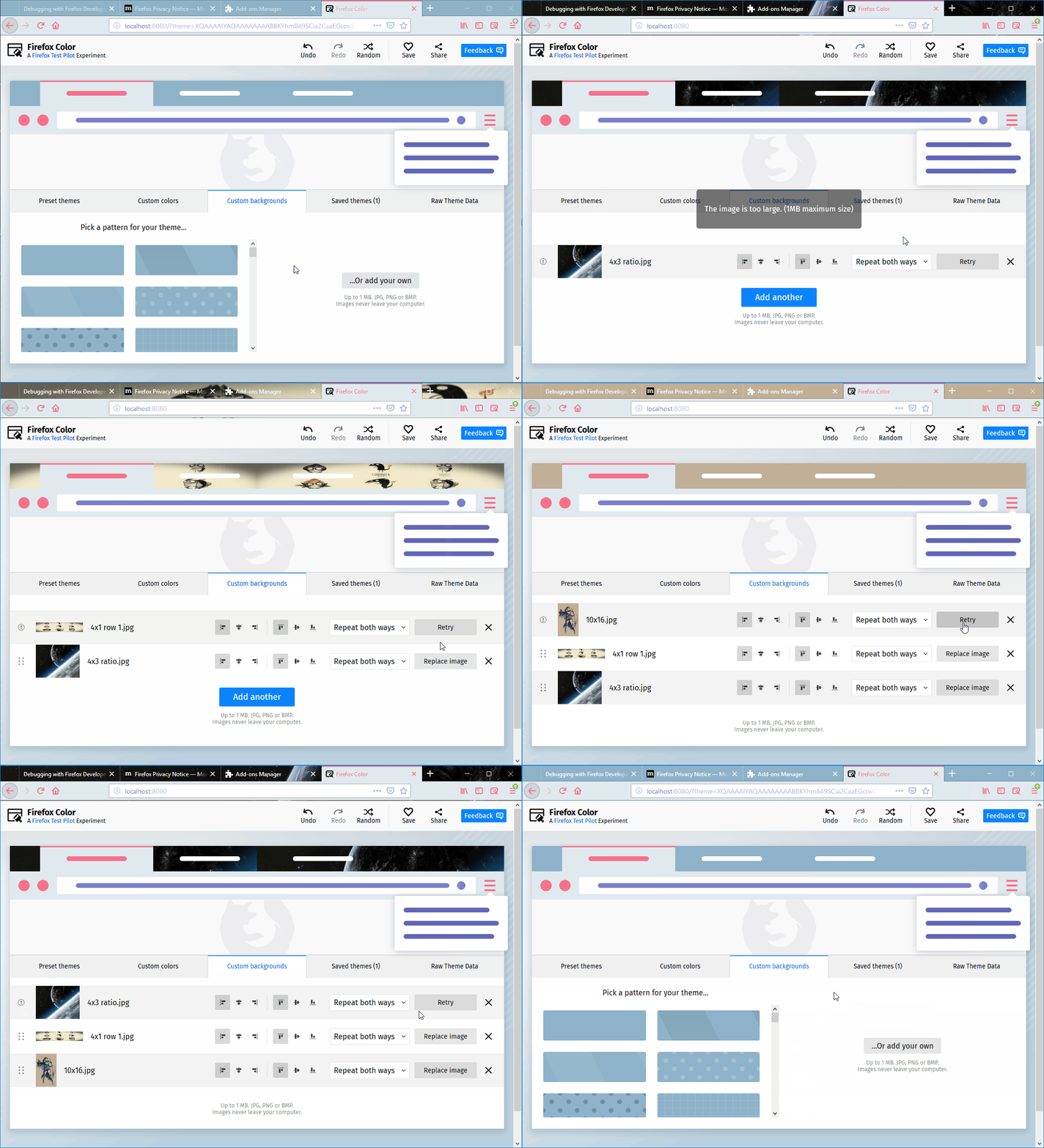
The "Retry" button wrongly remains displayed on the image setting strip position on which it was triggered
まだ誰も着手していません。
評価
- 難易度
- 3/5
- 見積もり時間
- 1〜2日
- 初心者へのやさしさ
- 42/100
- issue の種類
- バグ
- 明瞭さ
- おおむね明確
- 活発さ
- 停滞
- 技術スタック
- javascript
- 領域
- frontend
調査の方向性
Firefox Color アイコン、Custom backgrounds、image setting strip を通るフローを再現することから始めます。有効な画像をアップロードし、無効なファイルで Replace image を実行してから、別の有効な画像をアップロードします。アップロードと並べ替えの際に、各画像の strip の状態がどのように関連付けられるかを確認します。完了条件は、アップロードに失敗した画像に Retry が残り、もう一方の画像には Replace image が残ることです。位置 2 と 3 も含みます。
索引モデルが issue の本文から書いたものです。
説明
[Affected versions]:
- Firefox 62.0.3 and up
[Affected Platforms]:
- All Windows
- All Mac
- All Linux
[Prerequisites]:
- Have a Firefox profile with the latest version of the "Firefox Color" add-on (2.0.0) custom built on 10/09/2018 installed.
- Have a .txt file saved to your PC.
[Steps to reproduce]:
- Open the Firefox browser with the profile from the prerequisites and click the Firefox Color icon from the toolbar.
- Click the "Custom backgrounds" button.
- Click the "...Or add your own" button and upload a valid image to the "Custom backgrounds" section.
- Click the "Replace image" and select an invalid type file.
- Upload another valid image.
- Observe the left part of the settings strip of both images.
[Expected result]:
- The "Replace image" button is set for the first image, and the "Retry" button is set for the second image.
[Actual results]:
- The "Retry" button is set for the first image, and the "Replace image" is set for the second image.
[Notes]:
- This issue is also reproducible on image setting strip positions 2 and 3.
- This issue is also reproducible when reordering the images.
- Attached a screen recording with the issue:
- 主要言語
- JavaScript
- スター
- 506
- フォーク
- 100
- PR マージ指標
- 30日以内にマージされた PR はありません
環境構築
はじめの一歩
- issue を最後まで読み、次にプロジェクトのコントリビューションガイドを読みます。
- 着手することを issue にコメントします — 二人が同じ作業をするのを防げます。
- リポジトリをフォークし、ブランチを切って変更します。
- issue 番号を参照したプルリクエストを送ります。
mozilla/FirefoxColor のほかの issue
-
難易度 2/5 1〜3時間 初心者へのやさしさ 68/100
mozilla/FirefoxColor#1081 · コメント 1 件 ·
-
does not see browserオープン
難易度 3/5 1〜2日 初心者へのやさしさ 35/100
mozilla/FirefoxColor#1087 · コメント 1 件 ·
-
難易度 5/5 1週間以上 初心者へのやさしさ 35/100
mozilla/FirefoxColor#1085 · コメント 1 件 ·
-
難易度 3/5 1〜2日 初心者へのやさしさ 68/100
mozilla/FirefoxColor#1084 · コメント 1 件 ·
-
難易度 5/5 1週間以上 初心者へのやさしさ 35/100
mozilla/FirefoxColor#1083 · リアクション 1 件 ·
mozilla/FirefoxColor の issue をすべて見る
似ている issue
-
bug good first issue
難易度 2/5 1〜3時間 初心者へのやさしさ 86/100
amponce/archive-movie-browser#354 ·
メンテナーはふだん 1 日以内に返信
-
難易度 2/5 1〜3時間 初心者へのやさしさ 74/100
saayam-for-all/webapp#1870 ·
メンテナーはふだん 1 日以内に返信
-
難易度 2/5 1〜3時間 初心者へのやさしさ 76/100
Imageomics/OpenCite#66 ·
メンテナーはふだん 1 日以内に返信
-
難易度 2/5 1〜3時間 初心者へのやさしさ 64/100
chr15m/twiiit.com#20 ·
-
documentation
難易度 2/5 1〜3時間 初心者へのやさしさ 88/100
antropos17/Aegis#629 ·
メンテナーはふだん 4 日以内に返信