Search: the folded bottom bar should be a Home button, not a second search icon
メンテナーはふだん 1 日以内に返信
まだ誰も着手していません。
評価
- 難易度
- 2/5
- 見積もり時間
- 1〜3時間
- 初心者へのやさしさ
- 83/100
調査の方向性
LiquidGlassAppBottomNavigationBar.android.ktから始め、すでにisInSearchDestinationを確認しているcollapsedCircleのロジックを特に見てください。アイコンの選択方法とタップ時の処理を追い、折りたたまれた円にHomeが表示され、SearchからHomeへユーザーを直接移動させることを確認してください。その際、他のタブでの現在の動作は維持します。
索引モデルが issue の本文から書いたものです。
説明
Problem Description
On Android, opening Search folds the bottom bar into a single circle, and that circle shows the search icon. You are already on Search, so it looks like a button that does nothing new. Tapping it only unfolds the bar, and you then need a second tap on Home to leave Search.
Getting back out of Search is the most likely thing someone wants from that button, and right now it takes two taps behind an icon that suggests something else.
Proposed Solution
While on Search, the folded circle shows the Home icon, and one tap goes straight to Home. Everywhere else the circle keeps working as it does now (it shows the current tab and unfolds the bar).
It's a small change in LiquidGlassAppBottomNavigationBar.android.kt: the collapsedCircle already knows isInSearchDestination, so it can pick the Home icon and call selectTab(Home) in that case. I've been using this in my fork and can send a PR against dev if you want it.
Alternative Solutions
- Show the icon of the tab the user came from (Library, Mix…) and go back there. More precise, but less predictable than always Home.
- Keep the search icon but make the tap go back. The icon would still say "search" while doing "back", so I prefer showing Home.
Additional Context
Before (2.5.0): the folded circle on Search shows the search icon.
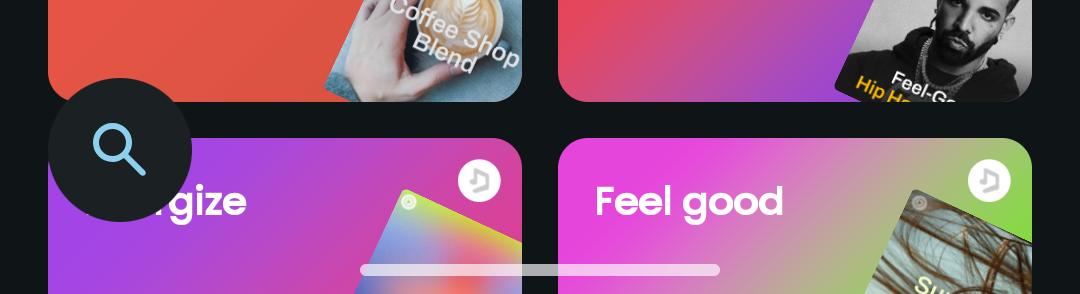
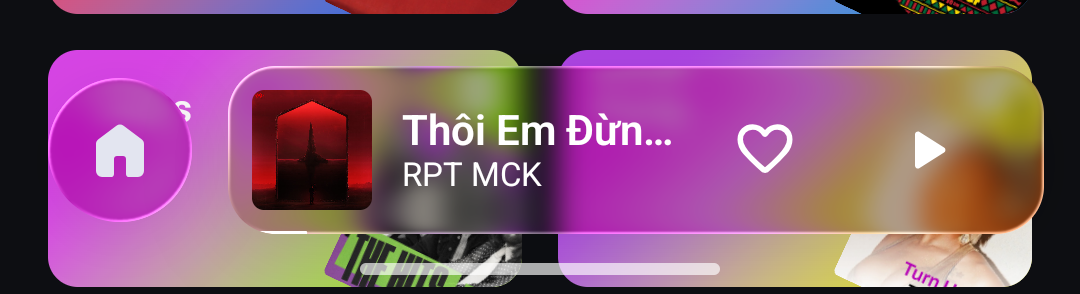
After (my fork): it shows Home, and one tap goes Home. (The mini player beside it is just because something was playing, and isn't part of this request.)
- 主要言語
- Kotlin
- スター
- 13.8k
- フォーク
- 811
- 平均マージ
- 1日 3時間
- マージ済み PR(30日)
- 7
環境構築
- Dockerfile・Docker Compose ファイルなし
- プルリクエストのテンプレートあり
- コントリビューションガイドを読む
はじめの一歩
- issue を最後まで読み、次にプロジェクトのコントリビューションガイドを読みます。
- 着手することを issue にコメントします — 二人が同じ作業をするのを防げます。
- リポジトリをフォークし、ブランチを切って変更します。
- issue 番号を参照したプルリクエストを送ります。
maxrave-dev/SimpMusic のほかの issue
-
難易度 2/5 1〜3時間 初心者へのやさしさ 68/100
maxrave-dev/SimpMusic#2992 · コメント 1 件 ·
メンテナーはふだん 1 日以内に返信
-
Unreadable textオープンbug:unconfirmed
難易度 2/5 1〜3時間 初心者へのやさしさ 65/100
maxrave-dev/SimpMusic#2899 · コメント 2 件 ·
メンテナーはふだん 1 日以内に返信
-
難易度 1/5 1〜3時間 初心者へのやさしさ 82/100
maxrave-dev/SimpMusic#2820 ·
メンテナーはふだん 1 日以内に返信
-
難易度 2/5 1〜3時間 初心者へのやさしさ 64/100
maxrave-dev/SimpMusic#2746 ·
メンテナーはふだん 1 日以内に返信
-
[UI Bug] Home navigation button not selected after pressing Back from Mix, Library, or Search再び着手できるかも このイシューのプルリクエストはマージされずにクローズされました。 オープンbug:unconfirmed
難易度 2/5 1〜3時間 初心者へのやさしさ 68/100
maxrave-dev/SimpMusic#2714 · コメント 1 件 ·
メンテナーはふだん 1 日以内に返信
maxrave-dev/SimpMusic の issue をすべて見る
似ている issue
-
F-Droid FOSS question
難易度 1/5 1時間未満 初心者へのやさしさ 75/100
d4rken-org/butler#365 ·
メンテナーはふだん 1 日以内に返信
-
bug
難易度 2/5 1〜3時間 初心者へのやさしさ 72/100
panel-assistant/android#224 ·
メンテナーはふだん 1 日以内に返信
-
bug
難易度 2/5 1〜3時間 初心者へのやさしさ 68/100
-
enhancement
難易度 2/5 1〜3時間 初心者へのやさしさ 68/100
MetrolistGroup/Metrolist#5484 ·
メンテナーはふだん 1 日以内に返信
-
Streaming repair closes ~~ with strikethrough off (streamingRepairOptions never sets strikethrough)オープン
難易度 1/5 1時間未満 初心者へのやさしさ 92/100
software-mansion/enriched-markdown#1265 ·
メンテナーはふだん 1 日以内に返信