Explain better - unclear what to do and look for in these instructions
まだ誰も着手していません。
評価
- 難易度
- 2/5
- 見積もり時間
- 1〜3時間
- 初心者へのやさしさ
- 35/100
- issue の種類
- ドキュメント
- 明瞭さ
- おおむね明確
- 活発さ
- 停滞
- 技術スタック
- firebase, javascript
調査の方向性
セクション11「通知を表示する」から始め、「デバイスに通知を送信する」に関する手順を確認してください。HTTPリクエストをどこに入力すべきか、どのレスポンスが成功を示すのか、いつ通知が表示されるべきか、そして次のステップでユーザーが何を期待すべきかを明確にしてください。
索引モデルが issue の本文から書いたものです。
説明
Section 11. Show Notifications should be explained more clearly. At: "Send a notification to your device" you say, "To send a notification, you'll need to send the following HTTP request:" What does that mean? Paste the code in the terminal?? Please explain better for newbs like me. Thanks!
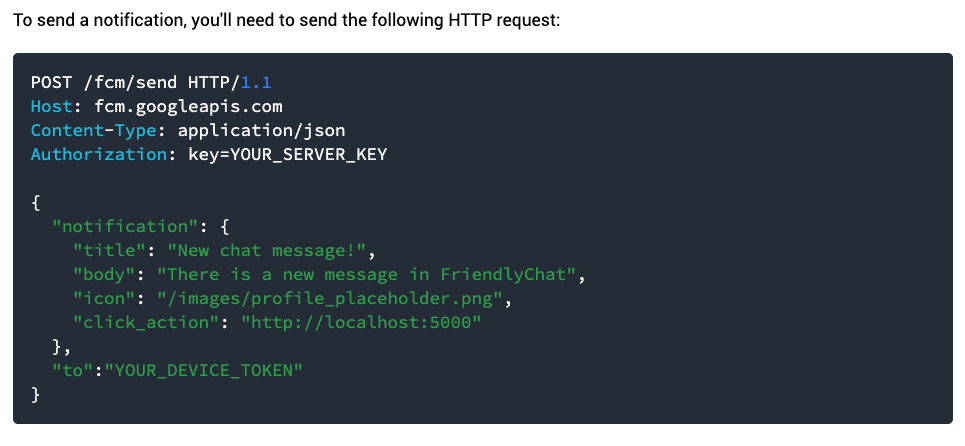
Also, once we do that, what should we expect? A pop up notification? Or are we just looking at the response code? What should the response code say to know that it worked? Or do we have to do the next step before we expect anything. What should we expect from the next step? How to read the response code?

- 主要言語
- JavaScript
- スター
- 1.9k
- フォーク
- 1.8k
- PR マージ指標
- 30日以内にマージされた PR はありません
環境構築
- Dockerfile・Docker Compose ファイルなし
- プルリクエストのテンプレートなし
- コントリビューションガイドを読む
はじめの一歩
- issue を最後まで読み、次にプロジェクトのコントリビューションガイドを読みます。
- 着手することを issue にコメントします — 二人が同じ作業をするのを防げます。
- リポジトリをフォークし、ブランチを切って変更します。
- issue 番号を参照したプルリクエストを送ります。
firebase/codelab-friendlychat-web のほかの issue
-
難易度 5/5 1週間以上 初心者へのやさしさ 15/100
-
Runオープンbug
難易度 5/5 1週間以上 初心者へのやさしさ 10/100
firebase/codelab-friendlychat-web#877 · コメント 2 件 ·
-
Go to '...'オープンbug
難易度 5/5 1週間以上 初心者へのやさしさ 10/100
-
Cameraオープン
難易度 5/5 1週間以上 初心者へのやさしさ 20/100
-
Sifsin projectオープンbug
難易度 5/5 1週間以上 初心者へのやさしさ 10/100
firebase/codelab-friendlychat-web#837 · リアクション 1 件 ·
firebase/codelab-friendlychat-web の issue をすべて見る
似ている issue
-
bug
難易度 1/5 1〜3時間 初心者へのやさしさ 86/100
jellyfin/jellyfin-web#8865 ·
メンテナーはふだん 1 日以内に返信
-
renderer.44: a zoom out cannot keep the center and stay inside data.range at an end of the dataオープンarea:contract P3
難易度 1/5 1時間未満 初心者へのやさしさ 85/100
grafana/viz-contract#100 ·
メンテナーはふだん 1 日以内に返信
-
SUB-1: [CI] Update deprecated CodeQL Action v2 to v4対応中かも @AnkitSatpute が今日担当しました。 オープン
難易度 1/5 1時間未満 初心者へのやさしさ 93/100
-
bug
難易度 2/5 1〜3時間 初心者へのやさしさ 72/100
メンテナーはふだん 1 日以内に返信
-
難易度 1/5 1時間未満 初心者へのやさしさ 84/100