Allow partitioned browser threads: one Inbox tab per thread you follow
メンテナーはふだん 1 日以内に返信
まだ誰も着手していません。
評価
- 難易度
- 5/5
- 見積もり時間
- 1週間以上
- 初心者へのやさしさ
- 15/100
- issue の種類
- 機能追加
- 明瞭さ
- おおむね明確
- 活発さ
- 活発
- 技術スタック
- typescript
調査の方向性
Start by reading how plannotator inbox --open and agent show events pick a target window, and how the leader tab and BroadcastChannel carry window reports. The proposal's three open questions (the &alone hash key, whether show routing is always on, and the badge sub-option) need a maintainer decision before any code. Done means that decision is recorded and the thread-tab routing has a design agreed in the issue.
索引モデルが issue の本文から書いたものです。
説明
The problem
I keep a few Inbox threads open in their own browser tabs, next to the PR or ticket each one is about. Every one of those tabs is the whole Inbox, so they all look and behave the same:
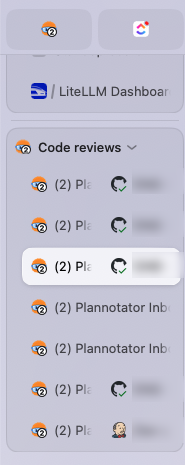
- They're indistinguishable. Every tab has the title "(2) Plannotator Inbox" and the same favicon with the same badge, which counts every unread thread in the Inbox. In a browser sidebar the titles get cut to "(2) Pla…".
- They get retargeted.
plannotator inbox --open <thread>and agent hand-offs navigate the most recently focused Inbox tab, so opening thread X can take over the tab I'd dedicated to thread Y. A plain click on a thread link inside a dedicated tab also navigates that tab away. - Notifications are duplicated. Each tab badges and notifies for the whole Inbox. A thread I'm already watching in its own tab still raises the main tab's count.
Before, with six dedicated thread tabs in one browser tab group (ticket names blurred):
Proposal
An opt-in capability, Thread tabs under Settings → Capabilities, off by default. Nothing changes for one-tab users.
Terms
- Thread tab: a browser tab that shows exactly one Inbox thread and nothing else of the Inbox. Its address is
#thread=<id>&alone, and that's the only marker: a reload or a browser restoring the session keeps the role. - Main tab: any other Inbox tab. When there are several, the one used most recently.
- Anchored thread: a thread with a thread tab open right now. Closing the tab un-anchors it.
Thread tab
- Shows the thread only: header with PR chips, messages, question cards, reply box and attachments. It uses the existing thread-only layout (the one "Show the sidebar and the list" leaves). A Show full Inbox control drops
&aloneand turns it into a main tab. - Title: the thread name, with a
●pip in front while the thread has unseen messages. - Favicon: the face the Inbox shows for the thread, with the thread's open-question count on it. Nothing else is drawn on it, so the icon reads the same whatever shape the face has. Threads with no agent face fall back to the host mark, the same way the sidebar does.
- Sends OS notifications for its own thread only.
- A resolved or archived thread stays shown, marked as resolved. A deleted one shows a notice and a Show full Inbox button.
After, with the same tabs as thread tabs (a mockup produced by scripting the live Inbox pages; ticket and thread names blurred):
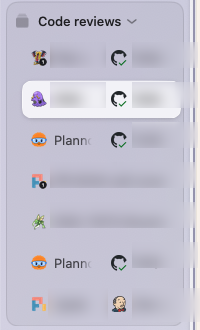
Favicons at full size (open questions in the badge):


Main tab
- Its title, favicon and app badge leave out anchored threads. A sub-option, Main tab counts anchored threads, off by default, puts them back.
- Anchored threads stay in its list with a mark ("open in its own tab").
- It doesn't notify for anchored threads.
Routing
| Action | Result |
|---|---|
| Click an anchored thread, from any tab | Focuses its thread tab when the Inbox can reach it. Otherwise it shows a banner: "This thread is open in another tab". It never navigates the current tab. |
| ⌘/Ctrl-click a thread link | The Inbox opens it as a new thread tab (window.open(url, "thread-<id>"), &alone added), so it can focus that tab later. |
| Plain click on another thread inside a thread tab | Opens it in the main tab. A thread tab is never navigated away from its thread. |
plannotator inbox --open <id> and agent "show" events |
An anchored thread goes to its thread tab. Any other thread goes to the most recently used main tab. |
The tabs coordinate through the existing leader tab and BroadcastChannel. Each tab adds its role (main, or thread <id>) to its window reports, and the server uses those roles to choose the target window for show.
Browser limits that shape this
Tested in Chrome 157; Dia, Arc and Edge share the same Chromium rules:
- A page can bring another tab to the front only if it opened that tab with
window.open(url, name)(nonoopener), or from a notification click. BroadcastChannel, SharedWorker and service-workerfocus()calls are refused or ignored outsidenotificationclick. - So ⌘-click has to go through the Inbox's own
window.open, and the banner covers tabs the Inbox didn't open: ones made by hand, pasted links, and tabs restored after a browser restart.
Out of scope
Grouping other resources with a thread (PRs, reviews, terminals), embedding pages, and peek or preview windows. Those stay with the browser's own link handling.
Open questions for the maintainer
- Is
&aloneacceptable as a new hash key, or would you prefer a different name or a route? - Should
showtargeting (thread tab first, then main tab) apply only when the capability is on, or always? Always fixes the retargeting even for people who never use thread tabs. - Is one sub-option for the main tab badge acceptable, or should it be fixed behaviour?
I'm happy to send the PR once the shape is agreed.
- 主要言語
- TypeScript
- スター
- 8.7k
- フォーク
- 649
- 平均マージ
- 16時間 1分
- マージ済み PR(30日)
- 756
環境構築
はじめの一歩
- issue を最後まで読み、次にプロジェクトのコントリビューションガイドを読みます。
- 着手することを issue にコメントします — 二人が同じ作業をするのを防げます。
- リポジトリをフォークし、ブランチを切って変更します。
- issue 番号を参照したプルリクエストを送ります。
backnotprop/plannotator のほかの issue
-
Inbox: numbered choices in a :::question become free text, and context bullets become the choicesオープン
難易度 2/5 1〜3時間 初心者へのやさしさ 75/100
backnotprop/plannotator#4132 · コメント 1 件 ·
メンテナーはふだん 1 日以内に返信
-
Claude Code: "classic.PermissionRequest hook was skipped" notice is back on Bash permission promptsオープン
難易度 2/5 1〜3時間 初心者へのやさしさ 74/100
backnotprop/plannotator#4051 ·
メンテナーはふだん 1 日以内に返信
-
難易度 2/5 1〜3時間 初心者へのやさしさ 72/100
backnotprop/plannotator#4000 ·
メンテナーはふだん 1 日以内に返信
-
PR description is hidden when a PR review opens on a phone対応中かも @flipcyde101 が 8 日前に担当しました。 オープン
難易度 2/5 1〜3時間 初心者へのやさしさ 78/100
backnotprop/plannotator#3667 ·
メンテナーはふだん 1 日以内に返信
-
難易度 2/5 1〜3時間 初心者へのやさしさ 66/100
backnotprop/plannotator#2643 · リアクション 1 件 ·
メンテナーはふだん 1 日以内に返信
backnotprop/plannotator の issue をすべて見る
似ている issue
-
enhancement status:needs-triage
難易度 2/5 1〜3時間 初心者へのやさしさ 66/100
dongdongbh/Mindwtr#1625 ·
メンテナーはふだん 1 日以内に返信
-
area/ui-schema good first issue type/bug
難易度 1/5 1時間未満 初心者へのやさしさ 88/100
メンテナーはふだん 4 日以内に返信
-
難易度 2/5 1〜3時間 初心者へのやさしさ 67/100
-
難易度 1/5 1時間未満 初心者へのやさしさ 91/100
メンテナーはふだん 1 日以内に返信
-
難易度 2/5 1〜3時間 初心者へのやさしさ 78/100
duckdb/duckdb-wasm#2335 ·
メンテナーはふだん 1 日以内に返信