Disabled tools can still be called by the agent
メンテナーはふだん 1 日以内に返信
評価
- 難易度
- 2/5
- 見積もり時間
- 1〜3時間
- 初心者へのやさしさ
- 79/100
- issue の種類
- バグ
- 明瞭さ
- 明確に書かれている
- 活発さ
- 活発
- 技術スタック
- typescript
調査の方向性
agent-service/src/agent/texera-agent.tsから始めて、sendMessage、createTools、およびdisabledToolsの設定処理を確認してください。エージェントのツール作成または呼び出しを対象とするテストを確認し、無効化されたツールがgenerateTextに渡されない、または実行できないことを検証してください。無効化中に再現手順でexecuteOperatorが実行されなくなれば完了です。
索引モデルが issue の本文から書いたものです。
説明
What happened?
If a tool is in settings.disabledTools, the agent can still call it, and the call still runs.
updateSettings saves disabledTools, and GET /api/agents/:id/system-info shows that tool as enabled: false. But sendMessage gives the model all tools:
const result = await generateText({
  ...
  tools: this.tools,
createTools() never checks disabledTools, so a disabled tool is still given to the model.
Example on main with claude-haiku-4.5. The agent was created with {"settings": {"maxSteps": 5, "disabledTools": ["executeOperator"]}}. system-info showed:
[{"name":"deleteOperator","enabled":true},{"name":"addOperator","enabled":true},
 {"name":"modifyOperator","enabled":true},{"name":"executeOperator","enabled":false}]
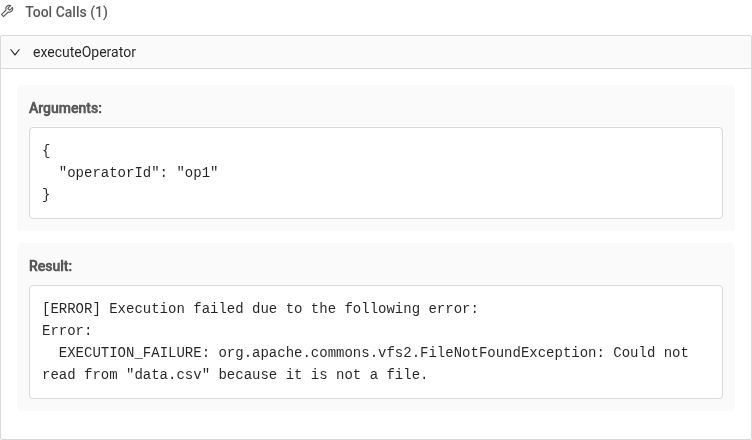
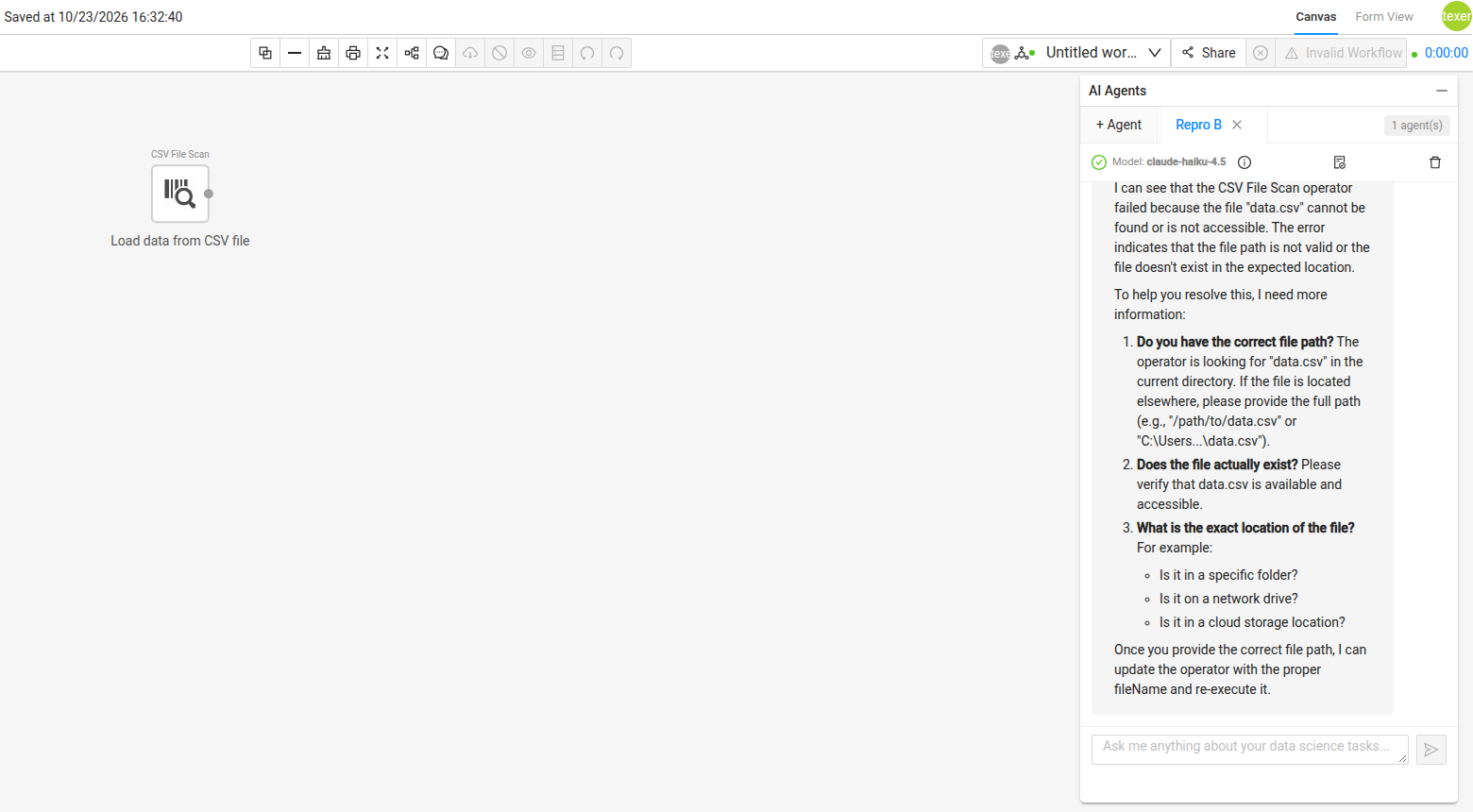
Prompt: "Add a CSV File Scan operator that reads the file data.csv, then call the executeOperator tool on it to run it." The agent called addOperator, then executeOperator({"operatorId":"op1"}), and the workflow really ran on the backend (it failed with FileNotFoundException, because the file does not exist).
Expected: tools in disabledTools should not be passed to generateText, or should be rejected when called.
Screenshots
Step 2, tool call: the agent calls executeOperator and it runs, even though system-info says enabled: false.
The chat and canvas: the agent added a CSV File Scan, ran it, and reported the error.
How to reproduce?
- Create an agent with
POST /api/agentsand"settings": {"disabledTools": ["executeOperator"]}. (The panel has no switch for this, so use the API.) GET /api/agents/<id>/system-infoshowsexecuteOperatorwithenabled: false.- In the agent panel, send:
Add a CSV File Scan operator that reads the file data.csv, then call the executeOperator tool on it to run it. - Step 2's details show an
executeOperatorcall and its result.
Version/Branch
1.4.0-incubating-SNAPSHOT (main)
Commit Hash (Optional)
57faa6b
What browsers are you seeing the problem on?
Chrome
Relevant log output
agent-service/src/agent/texera-agent.ts sendMessage: generateText({ tools: this.tools }); createTools() does not check settings.disabledTools
- 主要言語
- Scala
- スター
- 325
- フォーク
- 196
- 平均マージ
- 3日 12時間
- マージ済み PR(30日)
- 136
環境構築
- Dockerfile・Docker Compose ファイルなし
- プルリクエストのテンプレートあり
- コントリビューションガイドを読む
はじめの一歩
- issue を最後まで読み、次にプロジェクトのコントリビューションガイドを読みます。
- 着手することを issue にコメントします — 二人が同じ作業をするのを防げます。
- リポジトリをフォークし、ブランチを切って変更します。
- issue 番号を参照したプルリクエストを送ります。
apache/texera のほかの issue
-
難易度 2/5 1〜3時間 初心者へのやさしさ 78/100
メンテナーはふだん 1 日以内に返信
-
Failed tool calls are marked as succeeded (isError is always false)対応中かも @oliarmak-web が今日担当しました。 オープン
難易度 2/5 1〜3時間 初心者へのやさしさ 80/100
apache/texera#9120 · コメント 4 件 ·
メンテナーはふだん 1 日以内に返信
-
難易度 2/5 1〜3時間 初心者へのやさしさ 82/100
メンテナーはふだん 1 日以内に返信
-
Search bar autocomplete stops working after a model appears in the suggestions対応中かも @aglinxinyuan が 3 日前に担当しました。 オープン
難易度 2/5 1〜3時間 初心者へのやさしさ 78/100
apache/texera#8700 · コメント 1 件 ·
メンテナーはふだん 1 日以内に返信
-
難易度 2/5 1〜3時間 初心者へのやさしさ 62/100
apache/texera#8682 · コメント 5 件 ·
メンテナーはふだん 1 日以内に返信
似ている issue
-
bug 🐞 Untriaged user issue
難易度 2/5 1〜3時間 初心者へのやさしさ 78/100
valkey-io/valkey-glide#7443 ·
メンテナーはふだん 1 日以内に返信
-
A-api C-bug S-ready-for-human
難易度 2/5 1〜3時間 初心者へのやさしさ 75/100
ergoplatform/ergo#2851 ·
メンテナーはふだん 2 日以内に返信
-
? - Needs Triage audit_4.2.0 feature request test
難易度 2/5 1〜3時間 初心者へのやさしさ 87/100
NVIDIA/cudf-spark#16614 ·
メンテナーはふだん 1 日以内に返信
-
bug unit testing velox backend
難易度 2/5 1〜3時間 初心者へのやさしさ 78/100
メンテナーはふだん 2 日以内に返信
-
requires-triage
難易度 2/5 1〜3時間 初心者へのやさしさ 72/100
apache/datafusion-comet#7240 ·
メンテナーはふだん 2 日以内に返信