Add Clear icon to input fields
まだ誰も着手していません。
評価
- 難易度
- 4/5
- 見積もり時間
- 3〜5日
- 初心者へのやさしさ
- 35/100
- issue の種類
- 機能追加
- 明瞭さ
- おおむね明確
- 活発さ
- 停滞
- 技術スタック
- typescript
- 領域
- frontend
調査の方向性
まず、Stacks 内で predictive search を使用していない検索入力フィールドを特定します。issue では具体的なファイルやテストは指定されていません。次に、管理テーブルで参照されている既存の clear-icon 実装を確認し、少なくとも1文字入力するとアイコンが表示され、それを選択すると入力がクリアされて結果がリセットされることを検証します。
索引モデルが issue の本文から書いたものです。
説明
Context
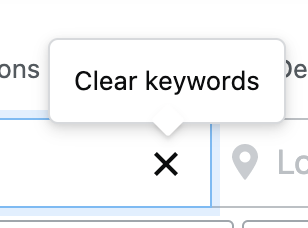
R&R just implemented the clear icon X and feature inside the input field for our admin table. We should make this a standard practice for all search input fields without predictive search. The feature is also available in the Jobs search input field.
UX interaction notes
Once the user starts typing at least 1 character, the @clear icon is added to the right side of the input field. Selecting the @clear icon would reset any search results (if applicable) to default (nothing) and delete any characters the user had typed.
- 主要言語
- TypeScript
- スター
- 672
- フォーク
- 107
- 平均マージ
- 2日 12時間
- マージ済み PR(30日)
- 26
コントリビューションガイド
はじめの一歩
- issue を最後まで読み、次にプロジェクトのコントリビューションガイドを読みます。
- 着手することを issue にコメントします — 二人が同じ作業をするのを防げます。
- リポジトリをフォークし、ブランチを切って変更します。
- issue 番号を参照したプルリクエストを送ります。
StackExchange/Stacks のほかの issue
-
難易度 1/5 1〜3時間 初心者へのやさしさ 62/100
StackExchange/Stacks#1030 ·
-
難易度 2/5 1〜3時間 初心者へのやさしさ 48/100
StackExchange/Stacks#1842 ·
-
難易度 5/5 1週間以上 初心者へのやさしさ 25/100
StackExchange/Stacks#1413 · コメント 2 件 ·
-
難易度 2/5 1〜3時間 初心者へのやさしさ 50/100
StackExchange/Stacks#1242 ·
-
bug
難易度 3/5 1〜2日 初心者へのやさしさ 35/100
StackExchange/Stacks#1224 ·
StackExchange/Stacks の issue をすべて見る
似ている issue
-
VerificationGate: ATTRIBUTION quote guard never matches a normal quotation (\b around the quote) オープン
難易度 2/5 1〜3時間 初心者へのやさしさ 75/100
danielmiessler/LifeOS#2234 ·
-
T: Bug
難易度 2/5 1〜3時間 初心者へのやさしさ 75/100
-
難易度 2/5 1〜3時間 初心者へのやさしさ 65/100
-
難易度 1/5 1時間未満 初心者へのやさしさ 85/100
-
Mend: dependency security vulnerability untriaged
難易度 2/5 1〜3時間 初心者へのやさしさ 70/100