TV Show Project Level 400: Fetch much more data
まだ誰も着手していません。
評価
- 難易度
- 3/5
- 見積もり時間
- 1〜2日
- 初心者へのやさしさ
- 35/100
- issue の種類
- 機能追加
- 明瞭さ
- おおむね明確
- 活発さ
- 停滞
- 技術スタック
- javascript
調査の方向性
まずパートナーのリポジトリで最新の main ブランチを取得し、その level 300 実装を読んでから自分の実装と比較します。番組選択、TVmaze の番組とエピソードの取得、アルファベット順のオプション、機能する検索とエピソード操作、URL ごとに 1 回のリクエストを追加し、必要なパートナーによるレビュー済みの pull request を通じて結果を検証します。
索引モデルが issue の本文から書いたものです。
説明
Level 400
For level 400, you should work in the repo of your partner from level 200.
You do not need to re-add yourself as a collaborator.
Remember to change to the right directory on your machine, and pull the latest changes from their main branch.
Before writing any new code, look at their level 300 implementation.
Compare their implementation to yours. Think:
- How is it different?
- What do you prefer about your implementation?
- What do you prefer about their implementation?
- What did you learn that you didn't know before?
They should do the same with your repository.
Have a discussion about your answers to these questions. In class, together you should give a 3 minute talk about your conclusions.
Refactoring
Feel free to change anything in your codebase which you think will make it easier to work with, or to build new features.
Make a branch and pull request for yourself, and then have your partner review, making sure they understand the changes made.
Adding new functionality
Level 400 is about expanding beyond one TV show.
Until now, your site has only showed information about the episode of one TV show.
But TVmaze has information about lots of TV shows, all in the same format.
We want to display any of them.
Requirements
- Add a
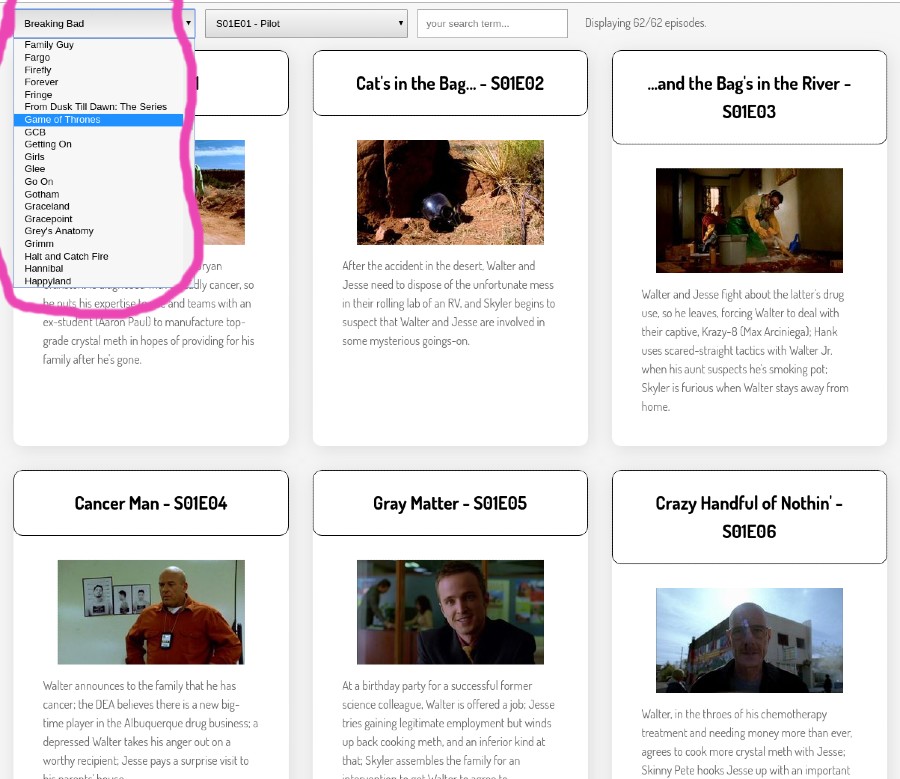
selectelement to your page so the user can choose a show. - When the user first loads the page, make a
fetchrequest to https://api.tvmaze.com/shows (documentation) to get a list of available shows, and add an entry to the drop-down per show. - When a user selects a show, display the episodes for that show, just like the earlier levels of this project.
You will need to perform a fetch to get the episode list.
4. Make sure that your search and episode selector controls still work correctly when you change shows.
5. Your select must list shows in alphabetical order, case-insensitive.
6. During one user's visit to your website, you should never fetch any URL more than once.
[!NOTE]
Be careful when developing with fetch. By default, every time you make a small change to your app it will be restarted by live server - if you are fetching JSON on page load, the JSON will be downloaded again and again. These frequent HTTP requests may lead to the API permanently banning your IP address from further requests, or "throttling" it for some time. Worse, if they don't, they may cause performance issues for the API service we are using.
Send a pull request to your partner's repo with this functionality. Have them review, and when happy, merge your PR.
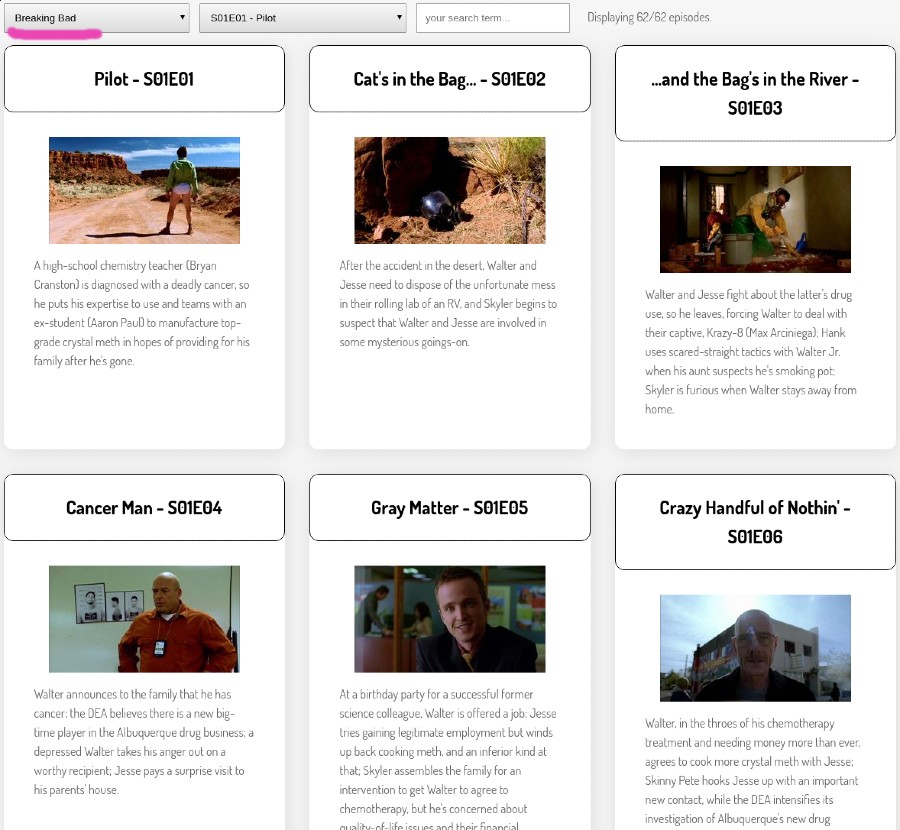
Screenshot of minimal version
Note: Provided your project meets the above requirements, it can look however you want.
Here is one example layout.
- 主要言語
- JavaScript
- スター
- 0
- フォーク
- 276
- PR マージ指標
- 30日以内にマージされた PR はありません
コントリビューションガイド
このリポジトリのコントリビューションガイドは索引されていません
はじめの一歩
- issue を最後まで読み、次にプロジェクトのコントリビューションガイドを読みます。
- 着手することを issue にコメントします — 二人が同じ作業をするのを防げます。
- リポジトリをフォークし、ブランチを切って変更します。
- issue 番号を参照したプルリクエストを送ります。
CodeYourFuture/Module-Data-Flows のほかの issue
-
🏕 Priority Mandatory 📅 Sprint 3 Core Module-Data-Flows Submit:None 🦔 Size Tiny
難易度 1/5 1時間未満 初心者へのやさしさ 85/100
-
🏕 Priority Mandatory 🐇 Size Small 📅 Sprint 2 Core Module-Data-Flows Submit:None
難易度 1/5 1時間未満 初心者へのやさしさ 72/100
-
🏕 Priority Mandatory 🐂 Size Medium 📅 Sprint 3 Core Module-Data-Flows Submit:None
難易度 2/5 1〜3時間 初心者へのやさしさ 35/100
-
🏕 Priority Mandatory 🐂 Size Medium 📅 Sprint 2 Core Module-Data-Flows Submit:None
難易度 2/5 1〜3時間 初心者へのやさしさ 35/100
-
🏕 Priority Mandatory 🐂 Size Medium 📅 Sprint 1 Core Module-Data-Flows Submit:None
難易度 1/5 1〜3時間 初心者へのやさしさ 35/100
CodeYourFuture/Module-Data-Flows の issue をすべて見る
似ている issue
-
難易度 2/5 1〜3時間 初心者へのやさしさ 65/100
-
難易度 2/5 1〜3時間 初心者へのやさしさ 75/100
docToolchain/docToolchain#1705 ·
-
Timezone select lists one option per character; duplicate "Failed" reason; shared tracker popover id オープンbug
難易度 2/5 1〜3時間 初心者へのやさしさ 75/100
nightscout/nocturne#1414 ·
-
bug v2
難易度 2/5 1〜3時間 初心者へのやさしさ 75/100
modelcontextprotocol/inspector#2458 · コメント 1 件 ·
-
Mend: dependency security vulnerability status: needs triage 🕵️♀️
難易度 2/5 1〜3時間 初心者へのやさしさ 70/100
carbon-design-system/ibm-products#9907 ·