[Android] A held tap on a Touchable or Pressable in ScrollView does nothing while the keyboard is up
I maintainer di solito rispondono entro 2 giorni
Valutazione
- Difficoltà
- 4/5
- Tempo stimato
- 3-5 giorni
- Idoneità per principianti
- 50/100
- Tipo di issue
- Bug
- Chiarezza
- Specificata chiaramente
- Stato di attività
- Attiva
- Stack tecnologico
- android, react-native, typescript
Direzione di ricerca
Start by reading packages/react-native-gesture-handler/src/v3/components/Touchable/Touchable.tsx and packages/react-native-gesture-handler/src/v3/scrollViewInterop.ts, then compare their behavior with the linked React Native ScrollView.js touch handling. Reproduce the held-tap case from the gist on Android and inspect the example app's Keyboard Should Persist Taps screen. Done means taps in never mode dismiss the keyboard as expected, and the screen description matches the observed press behavior.
Scritto dal modello di indicizzazione a partire dal testo della issue.
Descrizione
Description
On Android, in gesture-handler's ScrollView with the default keyboardShouldPersistTaps="never", while a React Native TextInput holds the keyboard, a tap on a Touchable or Pressable held past the tap timeout does nothing: the press is dropped as the keyboard-dismissing tap (#4281), yet the keyboard stays up, so the next held tap is dropped again. A quick tap closes the keyboard, and so does every tap on React Native's Pressable in React Native's ScrollView. With delaysChildPressedState={false} on the ScrollView (#4308), in a build where it takes effect (#4652), every tap does nothing, quick ones included.
In never mode React Native's ScrollView takes the touch in the capture phase and blurs the input only on release (ScrollView.js#L1454-L1482). A held button activates while the finger is still down, and its cancelsJSResponder cancel terminates that responder, so no release comes and nothing blurs the input. The press is dropped anyway (Touchable.tsx#L114-L140), since isKeyboardDismissingTap reads only the mode, the keyboard and the focused input (scrollViewInterop.ts#L42-L62). A quick tap activates the button on UP, after the release has blurred the input (#4626); without the pressed-state delay the button activates on touch down, so every tap ends the responder the same way.
Steps to reproduce
- Render the gist's component: a
TextInput, aTouchableand aPressablein gesture-handler'sScrollView, which leaveskeyboardShouldPersistTapsat its default. - Tap the input so the keyboard comes up.
- Hold the
Touchablefor 200 ms withadb shell input swipe <x> <y> <x> <y> 200, then readadb logcat -d -s ReactNativeJS:I: only[scroll view] grantand[scroll view] terminateare logged, with noonPressand no[input] blur, and the keyboard stays up. Holds of 400 ms, and thePressable, read the same, on 3 of 3 holds each. - Tap it with
adb shell input tap <x> <y>:[scroll view] grant,[scroll view] releaseand[input] blurare logged, the keyboard closes, and the press is dropped. - In the example app's Keyboard Should Persist Taps screen in
nevermode, holds on GH Pressable or GH Touchable do the same, while holds on the React Native panel's button close the keyboard every time.
Expected in step 3: the keyboard closes, as in steps 4 and 5.
Actual: the held press logs only the grant and the termination, fires no press and leaves the keyboard up. By hand it shows on a hold of about a second whose finger shifts slightly, as fingers do; a hold the panel reports no move for acts like a quick tap. On a Galaxy S23 (Android 14), the gist's release build, a held press on the Touchable that moves 3 px after the tap timeout (input motionevent DOWN, MOVE, UP over about a second), then a quick tap on it:
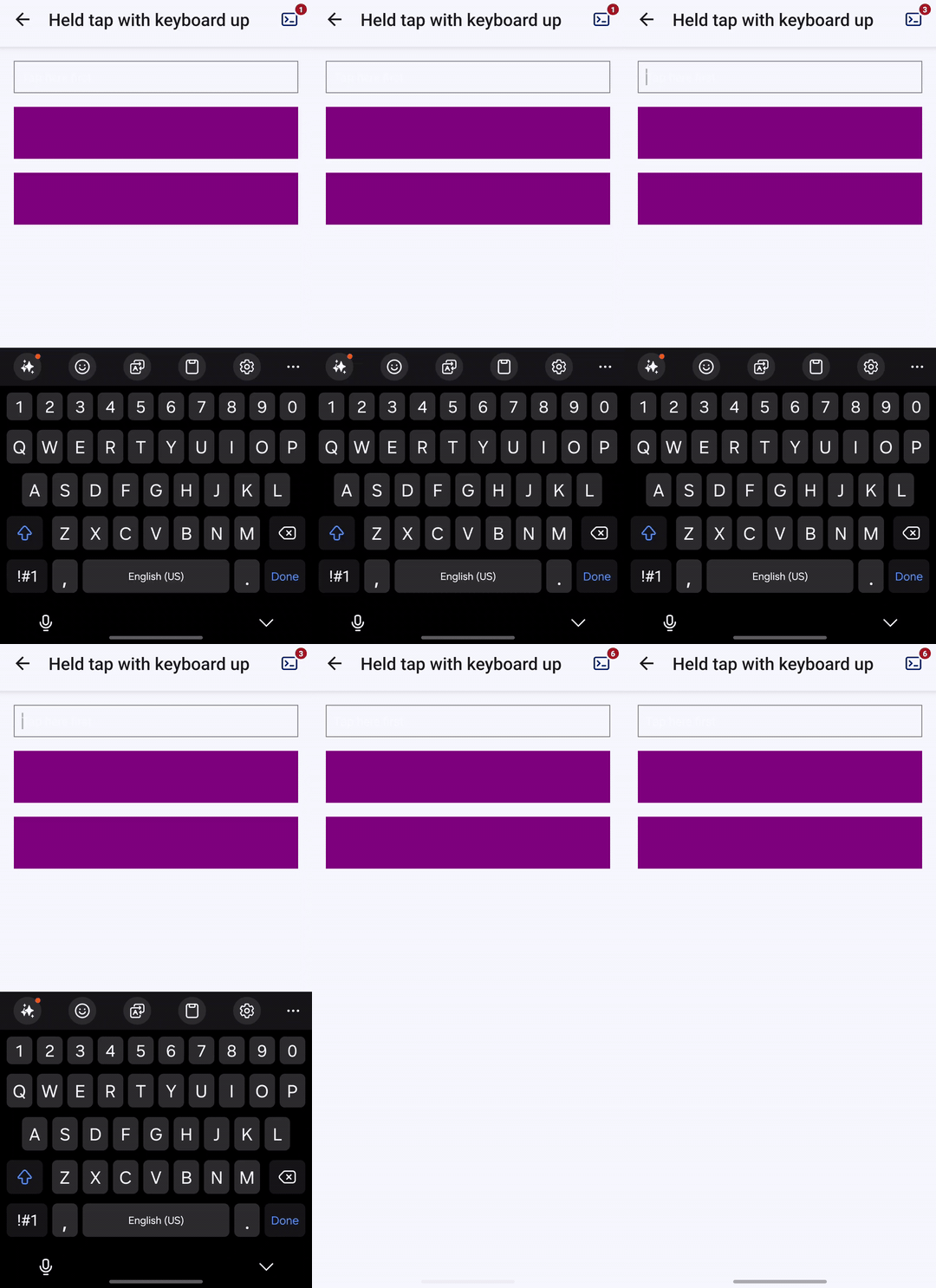
before the hold: keyboard shown
after the held press that shifts: keyboard shown
after the quick tap: keyboard hidden
and what the screen logged, the held press first:
[scroll view] grant
[scroll view] terminate
[scroll view] grant
[scroll view] release
[input] blur
The source video is here, recorded at the variable rate of screenrecord, about 13 frames a second.
With delaysChildPressedState={false} added to that screen's gesture-handler ScrollView, in a build with minification off, a quick tap reads like the hold in step 3: a grant and a termination, and the keyboard stays up.
The screen's never description still says the gesture-handler press fires as well, which #4281 changed.
A link to a Gist, an Expo Snack or a link to a repository based on this template that reproduces the bug.
https://gist.github.com/YevheniiKotyrlo/ea8a1371827b059b73dfc47ba19892de
Gesture Handler version
main at b19e23310
React Native version
0.88.0
Platforms
Android
JavaScript runtime
Hermes
Workflow
Using Expo Prebuild or an Expo development build
Build type
Release mode
Device
Android emulator
Device model
API 34 emulator (x86_64, Google APIs), Android 14
Acknowledgements
Yes
- Lingua principale
- TypeScript
- Stelle
- 6.8k
- Fork
- 1.1k
- Merge medio
- 1g 23h
- PR unite (30g)
- 46
Preparare l'ambiente
- Nessun Dockerfile né file Docker Compose
- Ha un modello di pull request
- Nessuna guida per i contributori
Come iniziare
- Leggi tutta la issue e poi la guida ai contributi del progetto.
- Commenta sulla issue per dire che te ne occupi tu — evita che due persone facciano lo stesso lavoro.
- Fai un fork del repository e lavora su un branch.
- Apri una pull request che faccia riferimento al numero della issue.
Altre issue di software-mansion/react-native-gesture-handler
-
[Jest][3.5.0] `fireEvent.press` no longer reaches `Touchable` when its child is inside an `InterceptingGestureDetector`Forse già presa @m-bert l’ha presa 3 giorni fa. ApertaMissing info Platform: Web
Difficoltà 3/5 1-2 giorni Idoneità per principianti 72/100
software-mansion/react-native-gesture-handler#4689 · 4 commenti ·
I maintainer di solito rispondono entro 2 giorni
-
[Web] GestureDetector blocks context menu by defaultForse già presa @lassiecoder l’ha presa 4 giorni fa. ApertaPlatform: Web
Difficoltà 3/5 1-2 giorni Idoneità per principianti 56/100
software-mansion/react-native-gesture-handler#4687 · 3 commenti ·
I maintainer di solito rispondono entro 2 giorni
-
[Android] v3 `ReanimatedSwipeable` takes over a vertical scroll in a React Native list once the finger drifts 10 dp sidewaysForse di nuovo libera @JaydeepAgravat l’ha presa 10 giorni fa e non c’è nessuna pull request aperta. ApertaPlatform: Android
Difficoltà 4/5 3-5 giorni Idoneità per principianti 55/100
software-mansion/react-native-gesture-handler#4670 · 6 commenti ·
I maintainer di solito rispondono entro 2 giorni
-
Jest: with the hook API, raw touch events fired under a `GestureDetector` don't reach ancestors under Testing Library 14Forse di nuovo libera @aliassar l’ha presa 13 giorni fa e non c’è nessuna pull request aperta. ApertaPlatform: Android Platform: iOS
Difficoltà 3/5 1-2 giorni Idoneità per principianti 66/100
software-mansion/react-native-gesture-handler#4656 · 1 commento ·
I maintainer di solito rispondono entro 2 giorni
-
[IOS] The "hitslop" attribute used in the packaging component FlatList does not work as expected.ApertaClose when stale Missing repro Platform: iOS
Difficoltà 3/5 1-2 giorni Idoneità per principianti 48/100
software-mansion/react-native-gesture-handler#4649 · 2 commenti ·
I maintainer di solito rispondono entro 2 giorni
Tutte le issue di software-mansion/react-native-gesture-handler
Issue simili
-
Difficoltà 2/5 1-3 ore Idoneità per principianti 83/100
pollen-robotics/reachy-mini-desktop-app#341 ·
I maintainer di solito rispondono entro 1 giorno
-
Difficoltà 2/5 1-3 ore Idoneità per principianti 78/100
I maintainer di solito rispondono entro 2 giorni
-
Difficoltà 2/5 1-3 ore Idoneità per principianti 77/100
mike-north/AgentMonitors#648 ·
I maintainer di solito rispondono entro 1 giorno
-
Difficoltà 2/5 1-3 ore Idoneità per principianti 75/100
vercel-labs/ui#700 ·
I maintainer di solito rispondono entro 1 giorno
-
Difficoltà 2/5 1-3 ore Idoneità per principianti 75/100
I maintainer di solito rispondono entro 2 giorni