[Windows]: Guild Wars2
Personne n'a encore pris cette issue.
Évaluation
- Difficulté
- 4/5
- Temps estimé
- 3-5 jours
- Accessibilité débutants
- 15/100
- Type d'issue
- Bug
- Clarté
- À clarifier
- Activité
- Active
- Domaine
- networking
Piste de recherche
This is a compatibility report with no code paths named, so start by reproducing it: enable the SockFilter driver in AdGuard for Windows 8.0.4, open Guild Wars 2, and open the Black Lion Trading Company window. The report says the window stays blank with SockFilter but works with the WFP driver, so the first step is to confirm that difference. Done means a documented root cause and a fix or a compatibility note the maintainers accept, and the report leaves the fix path open.
Rédigé par le modèle d'indexation à partir du texte de l'issue.
Description
Application Name
Guild Wars2
Application Executable Name
Guild Wars2
Troubleshooting Result
- Selecting a different network driver (Suggests low-level network conflict)
Suggested Configuration List
I am not sure, please investigate
Description of the Problem
- Some features aren’t working
Enable SockFilter in AdGuard.
Open Guild Wars 2 (GW2).
Open the Black Lion Trading Company (Trading Post).
Result: The trading post window remains completely blank/black and fails to display content.
Final Checks
- I have confirmed that disabling the Tracking Protection or specific filters did NOT fix the issue.
Screenshots
Screenshot 1
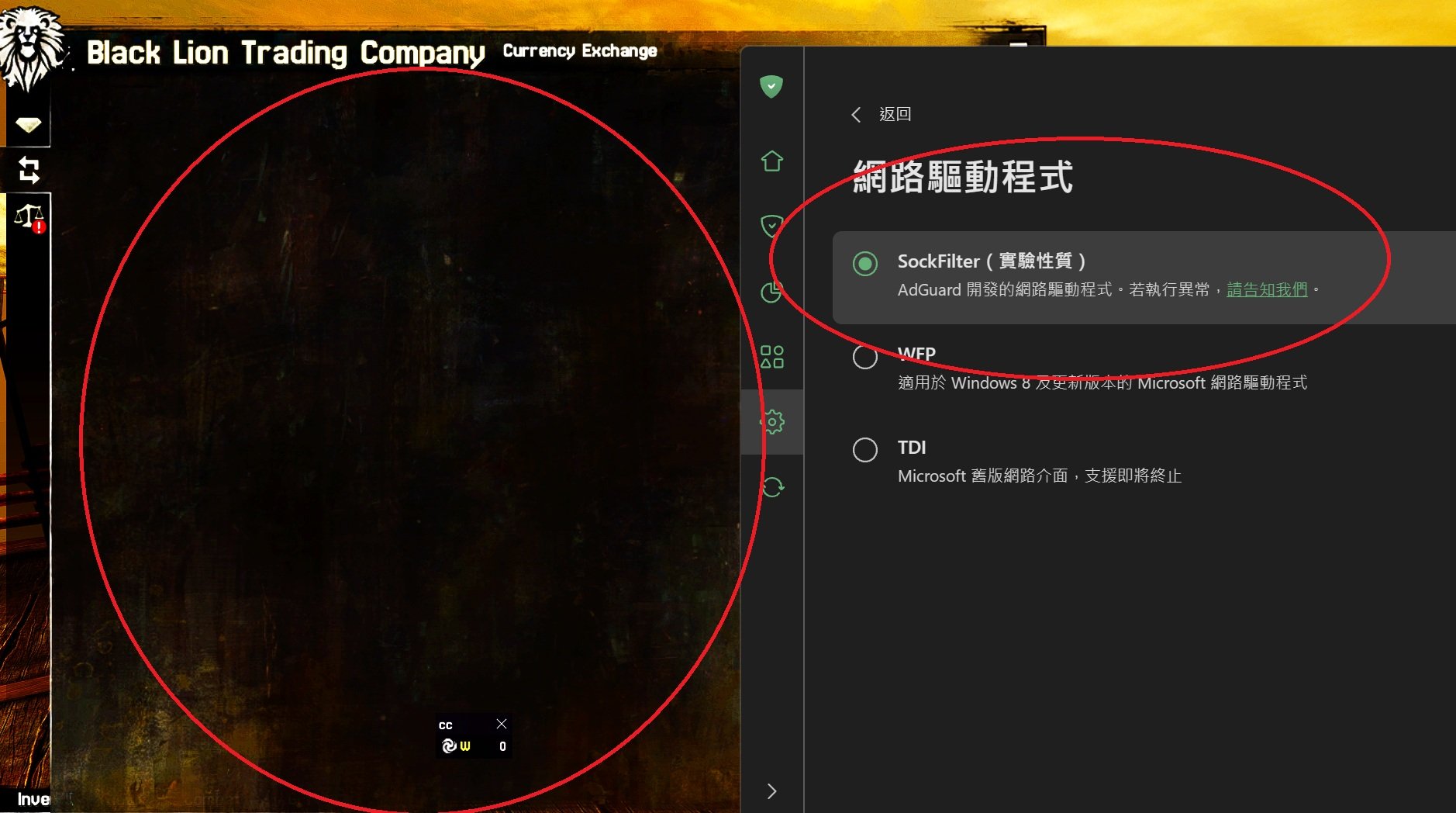
System configuration
| Information | Value |
|---|---|
| AdGuard product: | AdGuard for Windows v8.0.4 |
| System version: | Microsoft Windows NT 10.0.26300.0 |
| Which driver was enabled: | SockFilter (Experimental) |
| Which driver helped: | WFP |
| License type: | paid |
| AdGuard driver: | SOCKFILTER |
| Filters: | Ad blocking: AdGuard Base Privacy: AdGuard Tracking Protection Annoyances: AdGuard Cookie Notices, AdGuard Popups, AdGuard Mobile App Banners, AdGuard Other Annoyances, AdGuard Widgets Language-specific: AdGuard German, AdGuard Japanese, AdGuard Chinese |
| Custom filters: | User rules (url: none) |
| Tracking protection: | General settings: Block trackers, Send Do-Not-Track header Windows tracking: Disable Windows Telemetry, Turn off Advertising ID, Disable Windows Recall Miscellaneous: Remove X-Client-Data header from HTTP requests |
| DNS filtering: | server: Systemfilters: AdGuard DNS filter, User rules (url: none) |
| Browsing Security: | enabled |
| Browsing Security statistics: | disabled |
| Userscripts: | AdGuard Assistant (url: https://userscripts.adtidy.org/release/assistant/4.3/assistant.user.js)<br>AdGuard Extra (url: https://userscripts.adtidy.org/release/adguard-extra/1.0/adguard-extra.user.js)<br>AdGuard Popup Blocker (url: https://userscripts.adtidy.org/release/popup-blocker/2.5/popupblocker.user.js) |
| Userstyles: | disabled |
Issue configuration
- Langage dominant
- Aucune donnée de langage
- Étoiles
- 10
- Forks
- 4
- Merge moyen
- 1 h 13 min
- PR mergées (30 j)
- 7
Préparer son environnement
Ce projet ne fournit ni conteneur de développement, ni Dockerfile, ni guide de contribution : l'installation est à votre charge. Commencez par son README, et consultez notre guide de la première contribution pour les étapes générales.
Par où commencer
- Lisez l'issue en entier, puis le guide de contribution du projet.
- Signalez en commentaire que vous la prenez — cela évite que deux personnes fassent le même travail.
- Forkez le dépôt et travaillez sur une branche.
- Ouvrez une pull request qui référence le numéro de l'issue.
Autres issues de AdguardTeam/CompatibilityIssues
-
[Windows]: MAXOuverteCompatibility Priority: P4 Windows
Difficulté 3/5 Une demi-journée Accessibilité débutants 15/100
-
[Windows]: Arduino IDE 2.3.11OuverteCompatibility Priority: P4 Windows
Difficulté 2/5 1-3 heures Accessibilité débutants 45/100
-
[Windows]: AdguardOuverteCompatibility Priority: P4 Windows
Difficulté 4/5 3-5 jours Accessibilité débutants 28/100
-
[Windows]: DiscordOuverteCompatibility Priority: P4 Windows
Difficulté 4/5 3-5 jours Accessibilité débutants 45/100
-
[Windows]: VK Play Игровой центрOuverteCompatibility Priority: P4 Windows
Difficulté 4/5 3-5 jours Accessibilité débutants 30/100
Toutes les issues de AdguardTeam/CompatibilityIssues
Issues similaires
-
Difficulté 2/5 1-3 heures Accessibilité débutants 78/100
smartcontractkit/external-adapters-js#5651 ·
Les mainteneurs répondent en général sous 1 jour
-
Claude:Bug GPT:Bug triage
Difficulté 2/5 1-3 heures Accessibilité débutants 65/100
open5gs/open5gs#5161 · 2 commentaires ·
Les mainteneurs répondent en général sous 1 jour
-
needs-info
Difficulté 2/5 1-3 heures Accessibilité débutants 78/100
-
Difficulté 2/5 1-3 heures Accessibilité débutants 82/100
Les mainteneurs répondent en général sous 1 jour
-
tools/*_probe.py crash onOuvertegood first issue help wanted
Difficulté 2/5 1-3 heures Accessibilité débutants 85/100
vishwagw/Sky-Sim-drone-simulator-3.0#46 ·
Les mainteneurs répondent en général sous 1 jour