[Bug]: Usage Limits cuts off every account name when a provider has five accounts, even in a wide window
Los mantenedores suelen responder en 1 día
Evaluación
- Dificultad
- 2/5
- Tiempo estimado
- 1-3 horas
- Aptitud para principiantes
- 25/100
- Tipo de issue
- Error
- Claridad
- Bien especificado
- Estado de actividad
- Estancado
- Stack tecnológico
- typescript
- Área
- frontend
Línea de trabajo
Start in UsageLimitsPooled.tsx, where the bar switches to labeled segments on the @2xl/pool container query, and in the Limits list container capped at max-w-5xl. Pull request #36137 is already open against this, so check it before starting. Done means five accounts keep readable names in a wide window, and bars with three or fewer accounts look as they do now.
Escrito por el modelo de indexación a partir del texto del issue.
Descripción
Before submitting
- I searched existing issues and did not find a duplicate.
- I included enough detail to reproduce or investigate the problem.
Area
apps/web
Steps to reproduce
- Add five accounts for one provider. I have five Claude instances, named in Settings → Providers.
- Open Usage → Limits in a wide window. Mine is 2560×1032 on an ultrawide monitor.
- Read the account names in the Claude bars.
Expected behavior
I can tell the accounts apart by reading the bar. If the names do not fit, the numbered rows that narrow screens get would do.
Actual behavior
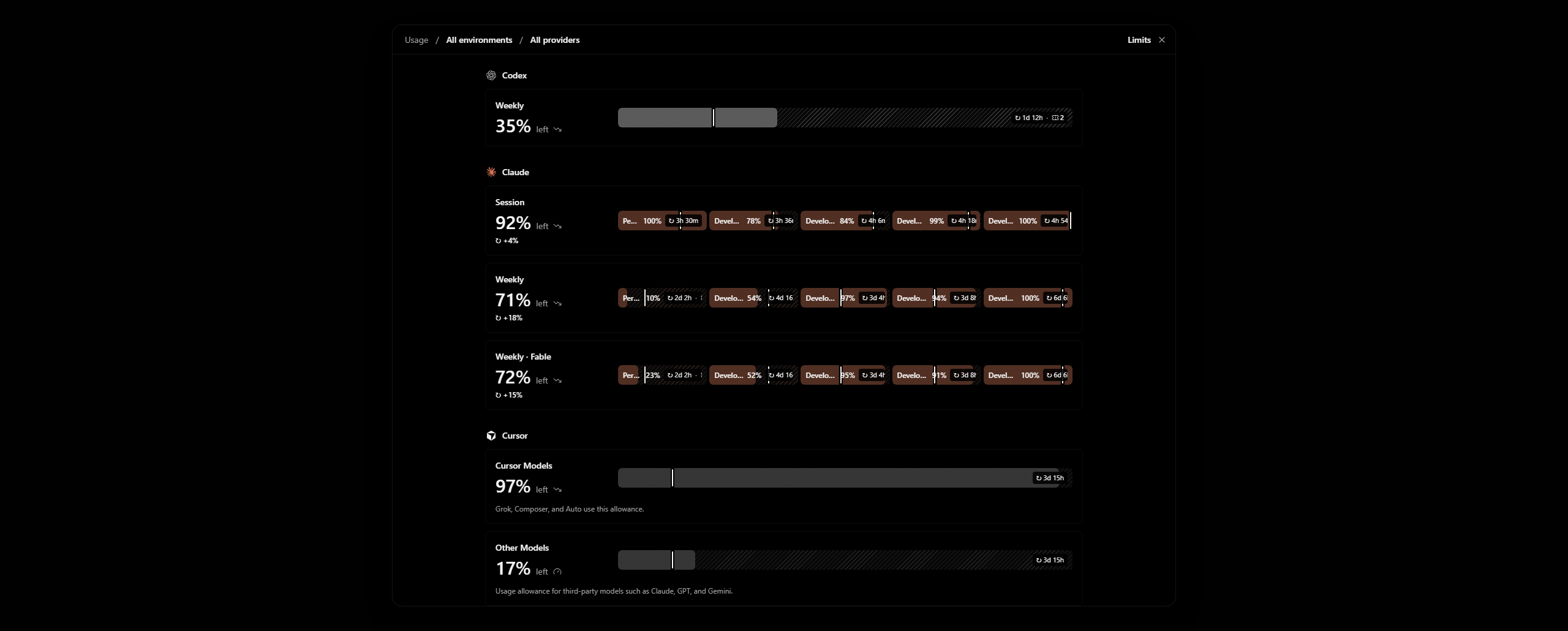
Every name is cut off ("Pe…", "Devel…", "Develo…"), so the five segments look the same. I have to hover each one to see which account it is. The window has more than 600px of unused width on each side of the modal, and the modal has unused width on each side of the list.
Two things cause it:
UsageLimitsPooled.tsxswitches the bar to its labeled layout with@2xl/pool, which looks only at the bar's width (42rem) and not at how many accounts share it. Five accounts get about 9rem each.- The Limits list is held to
max-w-5xlinside the 80rem modal, so the bar never gets wider than about 46rem, however wide the window is.
Bars with three or fewer accounts are fine.
Impact
Minor bug or occasional failure
Version or commit
0.1.10-nightly.20261113.4616. Also on main @ 7903b487.
Environment
Windows 11, T3 Code desktop. One ultrawide monitor in portrait and one in landscape.
Screenshots, recordings, or supporting files
This is a render of the Limits view on made-up accounts named "Personal" and "Developer 1" to "Developer 4", not my own. My real Limits page shows account emails.
2560×1030 window, five Claude accounts:
Workaround
Hover each segment to read its popover. Giving each instance its own accent color helps a little, but the names stay cut off.
Related: #32525 is about a single account losing its label at wide sizes, which is a different case.
- Lenguaje dominante
- TypeScript
- Estrellas
- 24.8k
- Forks
- 6.4k
- Merge medio
- 59 min
- PR fusionados (30 d)
- 418
Preparar el entorno
Inicia el contenedor de desarrollo del proyecto en tu navegador, con tu propia cuenta de GitHub.
- Sin Dockerfile ni archivo de Docker Compose
- Tiene una plantilla de pull request
- Leer la guía de contribución
Primeros pasos
- Lee el issue completo y luego la guía de contribución del proyecto.
- Comenta en el issue que vas a ocuparte — evita que dos personas hagan lo mismo.
- Haz un fork del repositorio y trabaja en una rama.
- Abre un pull request que haga referencia al número del issue.
Más de pingdotgg/t3code
-
Dificultad 2/5 1-3 horas Aptitud para principiantes 66/100
Los mantenedores suelen responder en 1 día
-
via-triage
Dificultad 2/5 1-3 horas Aptitud para principiantes 82/100
Los mantenedores suelen responder en 1 día
-
[Bug]: MCP App inline frames never go below 80px, so compact apps get blank space under themAbierto
Dificultad 2/5 Medio día Aptitud para principiantes 68/100
Los mantenedores suelen responder en 1 día
-
Question card options show LaTeX as raw source, though the question text renders itPosiblemente ocupada Un pull request vinculado a esta issue está abierto o ya se fusionó. Abierto
Dificultad 2/5 1-3 horas Aptitud para principiantes 76/100
Los mantenedores suelen responder en 1 día
-
[Bug]: Settings inheritance popover shows raw slugs for branch naming, default permissions and response streamingPosiblemente ocupada @juliusmarminge la tomó hace 1 día. Abiertovouch:denounced
Dificultad 2/5 1-3 horas Aptitud para principiantes 84/100
Los mantenedores suelen responder en 1 día
Todos los issues de pingdotgg/t3code
Issues similares
-
Dificultad 2/5 1-3 horas Aptitud para principiantes 72/100
nikoheikkila/nikoheikkila.fi#1131 ·
Los mantenedores suelen responder en 1 día
-
Resources: Update work of urumqiPosiblemente ocupada Un pull request vinculado a esta issue está abierto o ya se fusionó. Abierto
Dificultad 2/5 1-3 horas Aptitud para principiantes 65/100
railmapgen/rmp-gallery#4176 ·
Los mantenedores suelen responder en 2 días
-
GraphQL custom headers duplicate differently cased default headersPosiblemente ocupada @yxr-2025 la tomó hoy. Abierto
Dificultad 2/5 1-3 horas Aptitud para principiantes 70/100
elie222/rakazo#4625 · 1 comentario ·
Los mantenedores suelen responder en 1 día
-
Dificultad 2/5 1-3 horas Aptitud para principiantes 76/100
Los mantenedores suelen responder en 1 día
-
[New Project]: PacaAbierto
Dificultad 2/5 1-3 horas Aptitud para principiantes 65/100
github/forgoodfirstissue#574 ·