Import file modal doesn't stay open when switching apps
Nadie ha tomado este issue todavía.
Evaluación
- Dificultad
- 3/5
- Tiempo estimado
- 1-2 días
- Aptitud para principiantes
- 45/100
- Tipo de issue
- Error
- Claridad
- Bien especificado
- Estado de actividad
- Estancado
- Stack tecnológico
- javascript
Línea de trabajo
Empieza reproduciendo el problema mediante Files → Import → From IPFS y, a continuación, compara el comportamiento con ipfs-webui en localhost:5001. La corrección está terminada cuando el modal y su valor introducido permanecen después de cambiar a otra aplicación y volver.
Escrito por el modelo de indexación a partir del texto del issue.
Descripción
- OS: macOS Monterey 12.4 (21F79)
- Version of IPFS Desktop: 0.21.0
- UI v2.15.0
- Revision fadd900
Describe the bug
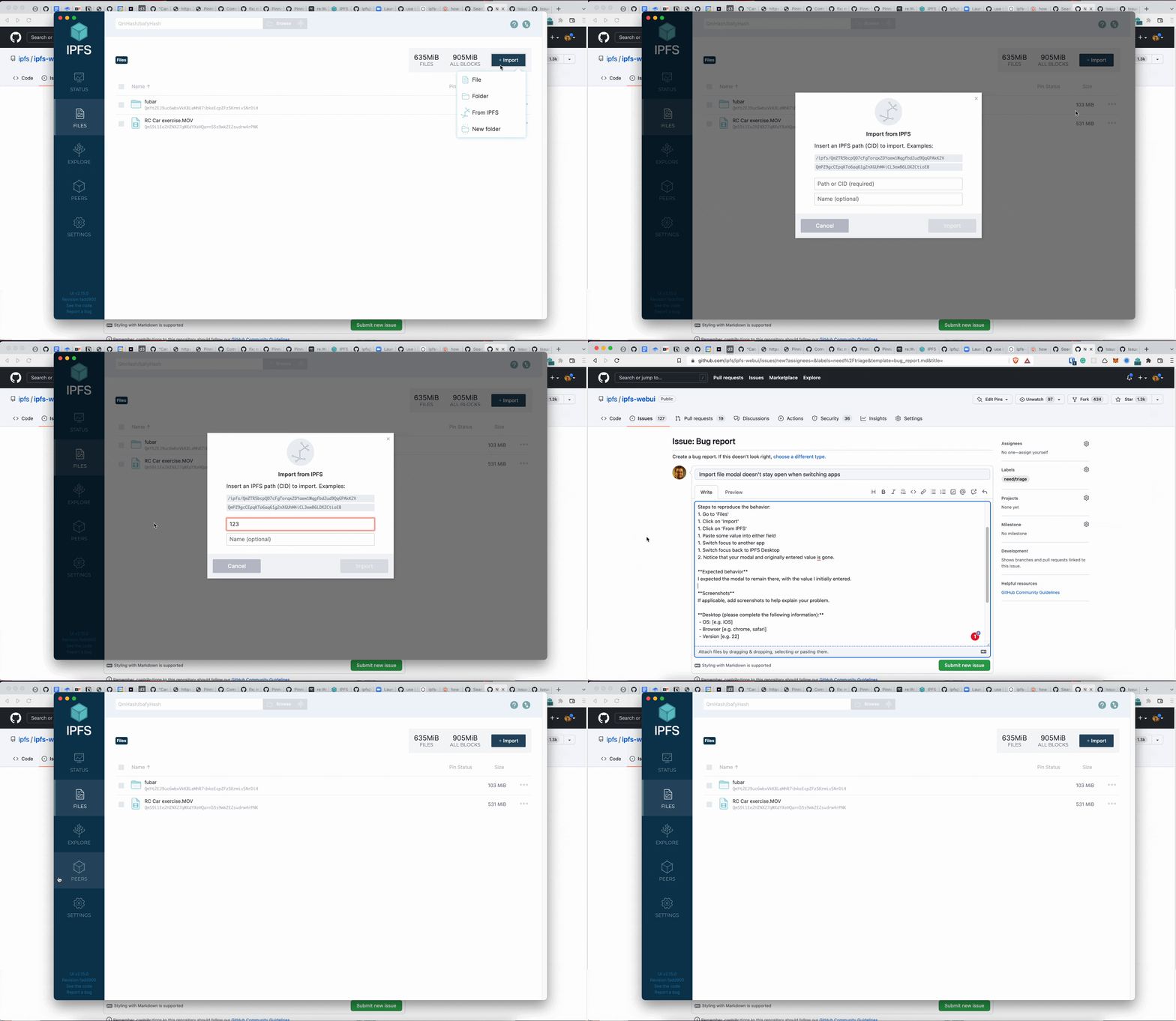
I was attempting to import a file from IPFS when I noticed this error because I had to switch back to my browser to copy the CID and name. After pasting one of the values, switching to the browser, copying the other value, and switching back to IPFS Desktop, the modal with the first value is still there, but immediately gets removed. This shouldn't happen.
To Reproduce
Steps to reproduce the behavior:
- Go to 'Files'
- Click on 'Import'
- Click on 'From IPFS'
- Paste some value into either field
- Switch focus to another app
- Switch focus back to IPFS Desktop
- Notice that the modal and originally entered value is gone.
Expected behavior
I expected the modal to remain there, with the value I initially entered.
This bug does not happen in ipfs-webui (tested at localhost:5001)
Screenshots
Additional context
error.log
- Lenguaje dominante
- JavaScript
- Estrellas
- 6.6k
- Forks
- 908
- Métricas de merge de PR
- Sin PR fusionados en 30 d
Preparar el entorno
Este proyecto no incluye contenedor de desarrollo, Dockerfile ni guía de contribución, así que la configuración corre por tu cuenta: empieza por su README y consulta nuestra guía para la primera contribución para los pasos generales.
Primeros pasos
- Lee el issue completo y luego la guía de contribución del proyecto.
- Comenta en el issue que vas a ocuparte — evita que dos personas hagan lo mismo.
- Haz un fork del repositorio y trabaja en una rama.
- Abre un pull request que haga referencia al número del issue.
Más de ipfs/ipfs-desktop
-
kind/bug need/triage
Dificultad 4/5 3-5 días Aptitud para principiantes 52/100
ipfs/ipfs-desktop#3218 ·
-
Dificultad 4/5 3-5 días Aptitud para principiantes 20/100
ipfs/ipfs-desktop#3215 · 1 comentario · 1 reacción ·
-
kind/bug need/triage
Dificultad 4/5 3-5 días Aptitud para principiantes 25/100
ipfs/ipfs-desktop#3206 ·
-
need/analysis need/community-input P3 topic/linux
Dificultad 5/5 Más de una semana Aptitud para principiantes 35/100
ipfs/ipfs-desktop#3042 · 2 comentarios · 1 reacción ·
-
Feature request: Option to start application minimized to system trayQuizá libre de nuevo @RubenKelevra la tomó hace 82 días y no hay ningún pull request abierto. Abiertoeffort/hours exp/novice kind/enhancement P2
Dificultad 4/5 3-5 días Aptitud para principiantes 45/100
ipfs/ipfs-desktop#3041 · 4 comentarios ·
Todos los issues de ipfs/ipfs-desktop
Issues similares
-
QA
Dificultad 2/5 1-3 horas Aptitud para principiantes 68/100
CSIS-iLab/more-red-ink#164 ·
Los mantenedores suelen responder en 1 día
-
area:filesystem bug need-triage
Dificultad 2/5 1-3 horas Aptitud para principiantes 85/100
Los mantenedores suelen responder en 1 día
-
comp/dashboard P2 type/bug
Dificultad 2/5 1-3 horas Aptitud para principiantes 65/100
NousResearch/hermes-agent#156404 ·
Los mantenedores suelen responder en 1 día
-
Band: compact mode never draws on Claude Code 2.1.292 (level Button has a Text child)Posiblemente ocupada @Bunty9 la tomó hoy. Abierto
Dificultad 2/5 1-3 horas Aptitud para principiantes 78/100
DietrichGebert/ponytail#1437 ·
Los mantenedores suelen responder en 1 día
-
Dificultad 1/5 Menos de una hora Aptitud para principiantes 88/100
huggingface/transformers.js#1945 ·
Los mantenedores suelen responder en 1 día