Question - Windows scaling affecting application render
Nadie ha tomado este issue todavía.
Evaluación
- Dificultad
- 4/5
- Tiempo estimado
- 3-5 días
- Aptitud para principiantes
- 25/100
Línea de trabajo
Comienza con la reproducción proporcionada en Windows 10 usando el diseño de sg.Window, sg.Frame, sg.Column y las llamadas de escalado de tkinter comentadas, comparando el escalado de pantalla al 100 % y al 125 %. Determina si el comportamiento solicitado es compatible y define la finalización como una resolución documentada o reproducible para la diferencia de renderizado.
Escrito por el modelo de indexación a partir del texto del issue.
Descripción
Type of Issue (Enhancement, Error, Bug, Question)
Question
Operating System
Windows 10
PySimpleGUI Port (tkinter, Qt, Wx, Web)
tkinter
Versions
Python version: 3.10.4 (tags/v3.10.4:9d38120, Mar 23 2022, 23:13:41) [MSC v.1929 64 bit (AMD64)]
port: tkinter
tkinter version: 8.6.12
PySimpleGUI version: 4.60.3
PySimpleGUI filename: C:\Users...\AppData\Local\Programs\Python\Python310\lib\site-packages\PySimpleGUI\PySimpleGUI.py
Your Experience In Months or Years (optional)
Years Python programming experience
6-8
Years Programming experience overall
10ish
Have used another Python GUI Framework? (tkinter, Qt, etc) (yes/no is fine)
No
Anything else you think would be helpful?
Troubleshooting
These items may solve your problem. Please check those you've done by changing - [ ] to - [X]
- Searched main docs for your problem www.PySimpleGUI.org
- Looked for Demo Programs that are similar to your goal. It is recommend you use the Demo Browser! Demos.PySimpleGUI.org
- If not tkinter - looked for Demo Programs for specific port
- For non tkinter - Looked at readme for your specific port if not PySimpleGUI (Qt, WX, Remi)
- Run your program outside of your debugger (from a command line)
- Searched through Issues (open and closed) to see if already reported Issues.PySimpleGUI.org
- Have upgraded to the latest release of PySimpleGUI on PyPI (lastest official version)
- Tried using the PySimpleGUI.py file on GitHub. Your problem may have already been fixed but not released
Detailed Description
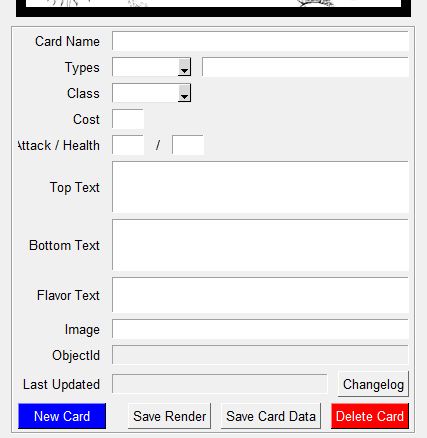
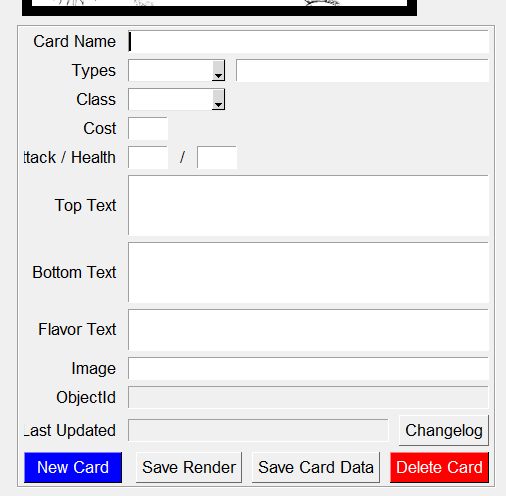
The application was developed on a machine with the Window's scaling set to 100%. Another developer has their scaling set to 125% and it is causing render issues in part of the application. I can provide some code, but this seems like a more general problem. I've looked around but I was unable to find any solutions to the scaling.
I've tried the below code as referenced in #80. But as far as I can tell, it will only set the scaling after the window is created and not before. I'm hoping we can adjust the pysimplegui window to always render at 100% but I don't know if Windows will allow that.
Referring to the screenshot below, Windows is increasing the size of all the elements causing the Frame to be bigger than intended. I'm hoping to overwrite that setting.
If I cannot change the Windows scaling's effect, am I able to set a Fixed design, question no longer relevant.sg.Frame or sg.Column element to have a fixed width but height that only encapsulates the elements?
Code To Duplicate
import PySimpleGUI as sg
from src.lib.GlobalData import config


input_data = [
    [
        sg.Text('Card Name', size=(10,1), justification='right'),
        sg.InputText(size=(4,1),expand_x=True,key='-name_card_data_form-', enable_events=True)
    ],
    [
        sg.Text('Types', size=(10,1), justification='right'),
        sg.Combo(values=config["supertypes"],default_value="",key='-supertype_card_data_form-', enable_events=True),
        sg.InputText(size=(4,1),expand_x=True,key='-subtype_card_data_form-', enable_events=True)
    ],
    [
        sg.Text('Class', size=(10,1), justification='right'),
        sg.Combo(values=config["classes"],default_value="",key='-class_card_data_form-', enable_events=True)
    ],
    [
        sg.Text('Cost', size=(10,1), justification='right'),
        sg.InputText(size=(4,1), justification='center', key='-cost_card_data_form-', enable_events=True)
    ],
    [
        sg.Text('Attack / Health',size=(10,1),justification='right'),
        sg.InputText(size=(4,1), justification='center', key='-will_card_data_form-', enable_events=True),
        sg.Text('/'),
        sg.InputText(size=(4,1), justification='center', key='-morale_card_data_form-', enable_events=True)
    ],
    [
        sg.Text('Top Text', size=(10,1), justification='right'),
        sg.Multiline(size=(5,3),expand_x=True,no_scrollbar=True,key='-toptext_card_data_form-', enable_events=True)
    ],
    [
        sg.Text('Bottom Text', size=(10,1), justification='right'),
        sg.Multiline(size=(5,3),expand_x=True,no_scrollbar=True,key='-bottomtext_card_data_form-', enable_events=True)
    ],
    [
        sg.Text('Flavor Text', size=(10,1), justification='right'),
        sg.Multiline(size=(5,2),expand_x=True,no_scrollbar=True,key='-flavor_card_data_form-', enable_events=True)
    ],
    [
        sg.Text('Image', size=(10,1), justification='right'),
        sg.InputText(size=(5,1),expand_x=True,key='-img_card_data_form-', enable_events=True)
    ],
    [
        sg.Text('ObjectId', size=(10,1), justification='right'),
        sg.InputText(size=(5,1), expand_x=True, key='-_id_card_data_form-', readonly=True)
    ],
    [
        sg.Text('Last Updated', size=(10,1), justification='right'),
        sg.InputText(size=(5,1), expand_x=True, readonly=True, key='-last_updated_card_data_form-'),
        sg.Button(button_text='Changelog', key='-OPENCARDCHANGELOG-')
    ],
    [
        sg.Button('New Card', size=(10,1), key='-NEWCARD-', button_color=('white','blue')),
        sg.Push(),
        sg.Button(button_text='Save Render', key='-RENDER_SINGLE_CARD-'),
        sg.Button(button_text='Save Card Data', key='-SAVECARDDATA-'),
        sg.Button('Delete Card', key='-DELETECARD-',button_color=('white','red'))
    ]
]

standalone_panel = [
    [sg.Column([[sg.Frame(title='',layout=[[]],size=(395,545),background_color="black",key='-SAMPLEIMAGE-')]], justification='left')],
    [sg.Frame(
        title='',
        layout=input_data,
        expand_x=True
        )
    ]
]

layout = [
    # [sg.MenuBar(menu_layout)],
    [
        sg.Column(
            standalone_panel,
            justification='center',
            ),
        # tab_group
    ]
]

window = sg.Window(
    f'Card Management Tool',
    layout,
    finalize=True,
    resizable=True
)
# dpi = window.TKroot.winfo_fpixels('1i')
# window.TKroot.tk.call('tk', 'scaling', 1) # Likely does not fix app size issue.
window.TKroot.minsize(1920,1000)
window.Maximize()

while True:
    event, values = window.read(timeout=1000)
    if event == sg.WIN_CLOSED or event == 'Exit':
        break

window.close()
Screenshot, Sketch, or Drawing
Windows Scaling
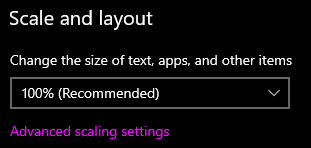
Scaling = 100%
Scaling = 125%
Watcha Makin?
If you care to share something about your project, it would be awesome to hear what you're building.
- Lenguaje dominante
- Python
- Estrellas
- 13.8k
- Forks
- 1.8k
- Métricas de merge de PR
- Sin PR fusionados en 30 d
Guía de contribución
Primeros pasos
- Lee el issue completo y luego la guía de contribución del proyecto.
- Comenta en el issue que vas a ocuparte — evita que dos personas hagan lo mismo.
- Haz un fork del repositorio y trabaja en una rama.
- Abre un pull request que haga referencia al número del issue.
Más de PySimpleGUI/PySimpleGUI
-
Bug Done - Install Dev Build (see docs for how) Platform Specific Issue - Linux Port - TK
Dificultad 2/5 1-3 horas Aptitud para principiantes 68/100
PySimpleGUI/PySimpleGUI#6904 · 15 comentarios ·
-
Bug Demo Programs Done - Install Dev Build (see docs for how) Interoperability Port - TK workaround available
Dificultad 2/5 1-3 horas Aptitud para principiantes 68/100
PySimpleGUI/PySimpleGUI#6900 · 1 comentario ·
-
Done - Install Dev Build (see docs for how) enhancement
Dificultad 2/5 1-3 horas Aptitud para principiantes 62/100
PySimpleGUI/PySimpleGUI#3251 · 12 comentarios ·
-
Dificultad 3/5 1-2 días Aptitud para principiantes 74/100
PySimpleGUI/PySimpleGUI#6906 · 1 comentario · 1 reacción ·
-
Bug Done - Install Dev Build (see docs for how) Port - TK
Dificultad 3/5 1-2 días Aptitud para principiantes 45/100
PySimpleGUI/PySimpleGUI#6902 · 1 comentario ·
Todos los issues de PySimpleGUI/PySimpleGUI
Issues similares
-
Dificultad 2/5 1-3 horas Aptitud para principiantes 75/100
anthropics/skills#1811 · 1 comentario ·
-
Dificultad 2/5 1-3 horas Aptitud para principiantes 75/100
speaches-ai/speaches#678 ·
-
bug
Dificultad 2/5 1-3 horas Aptitud para principiantes 75/100
datalayer/mcp-compose#42 ·
-
Dificultad 2/5 1-3 horas Aptitud para principiantes 75/100
conda-forge/spacy-feedstock#177 ·
-
Dificultad 2/5 1-3 horas Aptitud para principiantes 70/100
UKGovernmentBEIS/inspect_evals#2523 ·