Consistent "Invalid number of sections" and "Index out of range" errors when using typing indicator
Nadie ha tomado este issue todavía.
Evaluación
- Dificultad
- 4/5
- Tiempo estimado
- 3-5 días
- Aptitud para principiantes
- 35/100
Línea de trabajo
Comienza con AdvancedExampleViewController, Documentation/CUSTOM_CELLS.md y performUpdatesForTypingIndicatorVisability(), y luego sigue las rutas de conteo de secciones, celdas y calculador de tamaños descritas en el informe. Reproduce el problema en la configuración indicada de MessageKit 4.1.1 y verifica que mostrar el indicador de escritura produzca una sección adicional coherente, sin errores por actualizaciones no válidas ni fallos por indexación de messageForItem.
Escrito por el modelo de indexación a partir del texto del issue.
Descripción
Describe the bug
All attempts to add a typing indicator to our MessagesViewController have resulted in fatal crashes. We get "Invalid number of sections" or "Index out of range" errors. It seems a number of people have had similar issues with the typing indicator (https://github.com/MessageKit/MessageKit/issues/1387, https://github.com/MessageKit/MessageKit/issues/1787) , despite us all basing our code off of the working example, AdvancedExampleViewController.
We are using a custom cell implementation, we believe we have taken the additional steps necessary to handle typing indicators for custom cells (found here), namely adding code to return typingIndicatorSizeCalculator in our custom cell size calculator and the typing indicator cell itself in the cellForItemAt function.
To Reproduce
Take an existing, currently functional, implementation of MessageKit with a custom cell. Then add the following at some point in the view's lifecycle (which attempts to add the typing indicator to the view):
self.setTypingIndicatorViewHidden(false, animated: true)
Running it at this stage will obviously crash, as you haven't updated the necessary functions to handle the fact that there is now an extra section that will appear in certain cases. So update these functions:
While the class you've inherited has the isTypingIndicatorHidden case in numberOfSections handled already, you would have had to implement it in your view controller as well in order to conform to MessagesDataSource, so rather than just returning messages.count, you'll need to add 1 in the case that the typing indicator is being shown.
func numberOfSections(in messagesCollectionView: MessageKit.MessagesCollectionView) -> Int {
   let sections = messages.count
   return isTypingIndicatorHidden ? sections : sections + 1
}
As mentioned above, you'll also need to make sure you return the typing indicator cell when it's being shown, rather than trying to paint a message cell.
override func collectionView(_ collectionView: UICollectionView, cellForItemAt indexPath: IndexPath) -> UICollectionViewCell {
        guard let dataSource = messagesCollectionView.messagesDataSource else{fatalError("No data for messages.")}
        if isSectionReservedForTypingIndicator(indexPath.section) {
            return dataSource.typingIndicator(at: indexPath, in: messagesCollectionView)
        }

      ....

}
And lastly, in order to calculate the correct size for the typing indicator, you'll need to return the correct calculator in your custom MessagesCollectionViewFlowLayout.
override open func cellSizeCalculatorForItem(at indexPath: IndexPath) -> CellSizeCalculator {
        let message = messagesDataSource.messageForItem(at: indexPath, in: messagesCollectionView)
        if isSectionReservedForTypingIndicator(indexPath.section) {
            return typingIndicatorSizeCalculator
        }
    ...
}
Those are the only modifications that should be needed, and specifically no modifications to messageForItem should be needed either, because we're not pretending to have an extra message, we're just telling the view to paint an extra row with a certain cell.
Expected behavior
The typing indicator should just show up when you open the view.
What actually happens
Invalid update: invalid number of sections. The number of sections contained in the collection view after the update (2) must be equal to the number of sections contained in the collection view before the update (0), plus or minus the number of sections inserted or deleted (1 inserted, 0 deleted).
Which really has me confounded. To make things simpler, my chat view has no messages in it, so it should just be the typing indicator. No messages are being added during this process either. What should be happening is that we start with 0 sections, then setTypingIndicatorViewHidden is called which runs a messagesCollectionView.insertSections([section]) (which you can find in performUpdatesForTypingIndicatorVisability()), which adds a single section. Now, if numberOfSections is called at any point in this process, it's very simple: it'll return 0 sections if the typing indicator is hidden, and 1 if it's not. So we should be going from 0, adding 1, and getting to 1. Somehow, though, the crash claims we got to 2 sections. Regardless of the number of messages, this was the same error. n messages would result in it expecting n + 2, even though it only ever should expect n + 1. This, I'm pretty sure, is a bug.
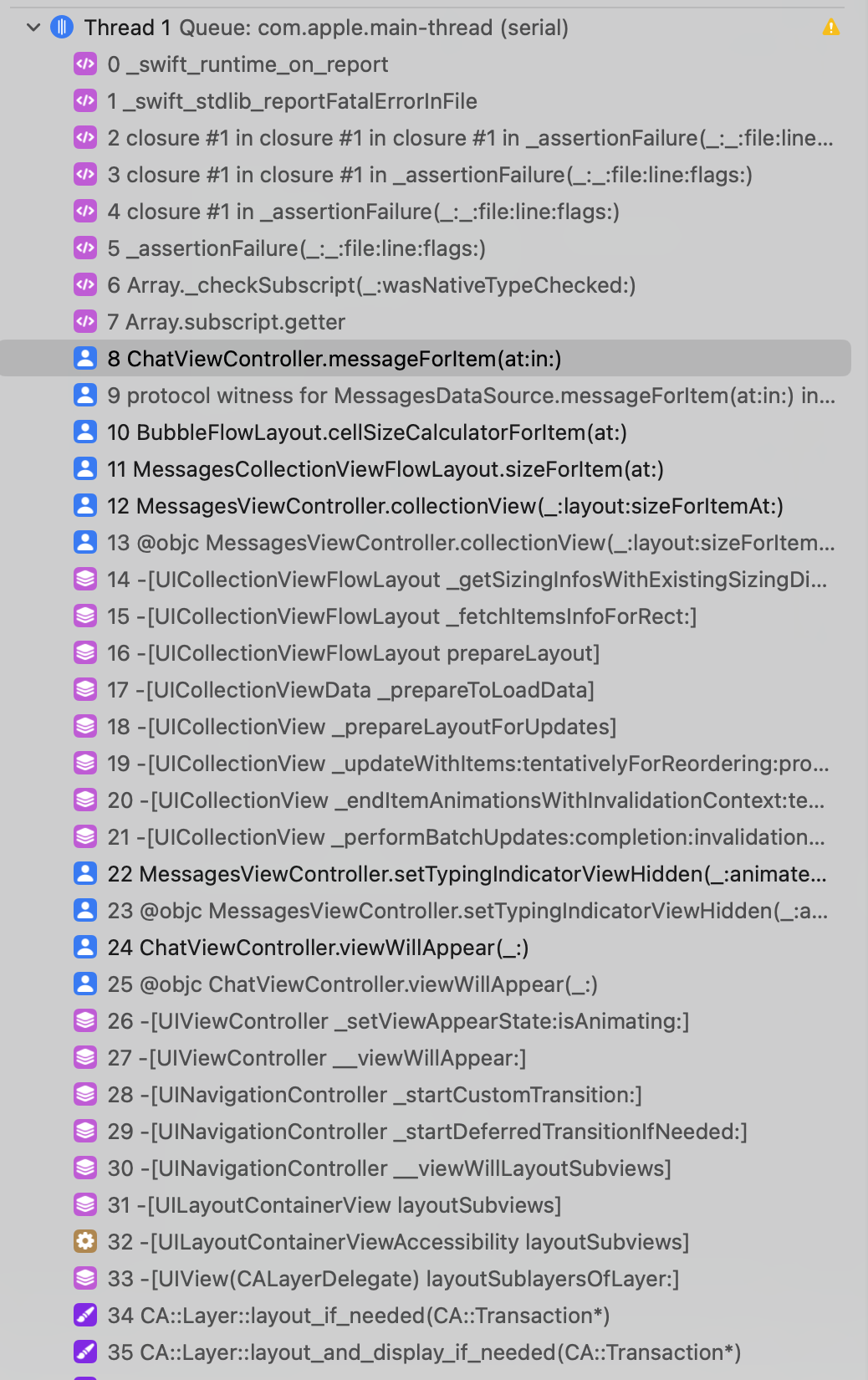
In an attempt to fix this, we tried just removing the + 1 from our numberOfSections function, but this just caused messageForItem to break immediately with an Index out of range error. The problem was, even after using the debugger, we couldn't really figure out where messageForItem was being called. The only evident place was in cellForItemAt, but in the case of the typing indicator cell, it never should get called because isSectionReservedForTypingIndicator causes it to return the typing indicator cell before it gets to that line.
In a desperate attempt to get this to work, I gave this a whirl: numberOfSections returning just the message count, and compensating for it by providing a dummy "Message" object when it asks for the message at that row. That looks like:
    func messageForItem(at indexPath: IndexPath, in messagesCollectionView: MessageKit.MessagesCollectionView) -> MessageKit.MessageType {
        if isTypingIndicatorHidden{
            return messages[indexPath.section]
        }else{
            if indexPath.section != messages.count{
                return messages[indexPath.section]
            }else{
                return Message.init(id: 0, chatID: 0, coursicleID: 0, userName: "This is an abuse", userPhoto: "SAD.jpg", type: .text, data: JSON(), sent: Date(), reactions: [], state: .delivered)
            }
        }
    }
This does achieve the desired result (although the cell isn't animating), but it causes a bunch of downstream errors, because we can no longer assume we have a "real" message when our messageForItem is called.
Screenshots
Here's the stack trace when you get the invalid number of sections error:
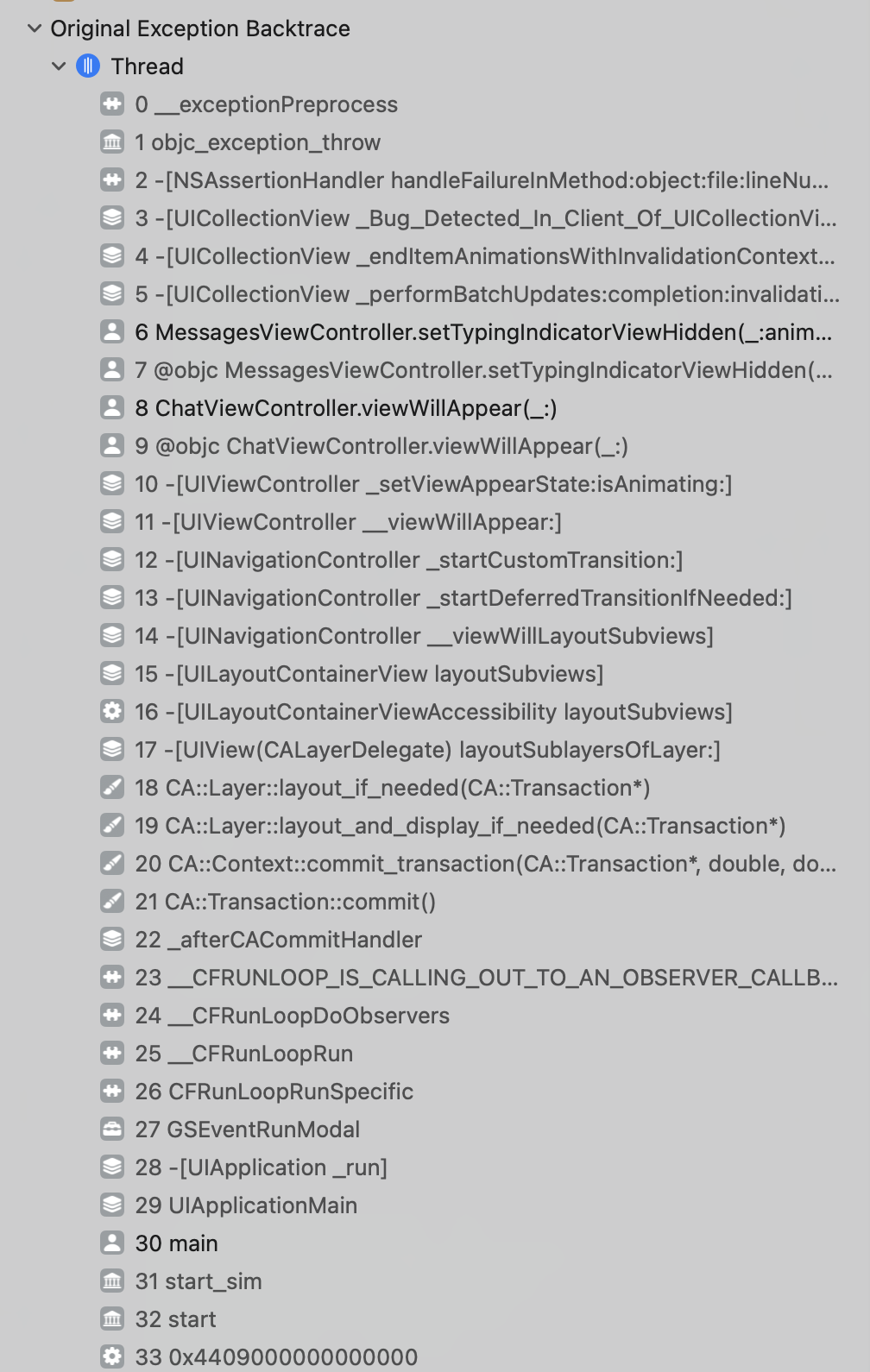
Here's the stack trace when you get the Index out of range error on messageForItem:
Goal
Why is the number of sections after the update 1 more than it should be after calling setTypingIndicatorViewHidden()? What is the standard way of adding typing indicators to message views with custom cells?
This is an issue that has been brought up many times (https://github.com/MessageKit/MessageKit/issues/1108, https://github.com/MessageKit/MessageKit/issues/1387, https://github.com/MessageKit/MessageKit/issues/1787, https://github.com/MessageKit/MessageKit/issues/1324), so my hope is that we can come up with a good path forward for those using custom cells who want to add a typing indicator.
Environment
- What version of MessageKit are you using?
- 4.1.1 (latest release)
- What version of iOS are you running on?
- 16.4 (current)
- What version of Swift are you running on?
- 5.8 (current)
Update: I was able to solve a small part of this problem, the Index out of range that I refer to. Basically I just swapped the order of two blocks inside cellSizeCalculatorForItem. You have to make sure that you don't try getting the messageForItem on the typing indicator's section, so you short circuit it before calling messageForItem. Of course, this doesn't solve the primary issue, which is the invalid number of sections detailed above.
override open func cellSizeCalculatorForItem(at indexPath: IndexPath) -> CellSizeCalculator {
        if isSectionReservedForTypingIndicator(indexPath.section) {
            return typingIndicatorSizeCalculator
        }
        let message = messagesDataSource.messageForItem(at: indexPath, in: messagesCollectionView)
    ...
}
- Lenguaje dominante
- Swift
- Estrellas
- 6.3k
- Forks
- 1.2k
- Merge medio
- 12 h 4 min
- PR fusionados (30 d)
- 9
Guía de contribución
Primeros pasos
- Lee el issue completo y luego la guía de contribución del proyecto.
- Comenta en el issue que vas a ocuparte — evita que dos personas hagan lo mismo.
- Haz un fork del repositorio y trabaja en una rama.
- Abre un pull request que haga referencia al número del issue.
Más de MessageKit/MessageKit
-
Keyboard bug Abiertobug?
Dificultad 3/5 1-2 días Aptitud para principiantes 45/100
MessageKit/MessageKit#1901 ·
-
question
Dificultad 4/5 3-5 días Aptitud para principiantes 35/100
MessageKit/MessageKit#1888 · 2 comentarios ·
-
Transparent navigation bar in messageInputBar but messagesCollectionView is not shown in these areas Abiertofeature request
Dificultad 3/5 1-2 días Aptitud para principiantes 35/100
MessageKit/MessageKit#1884 · 1 comentario ·
-
feature request
Dificultad 3/5 1-2 días Aptitud para principiantes 45/100
MessageKit/MessageKit#1880 ·
-
bug?
Dificultad 4/5 3-5 días Aptitud para principiantes 35/100
MessageKit/MessageKit#1878 ·
Todos los issues de MessageKit/MessageKit
Issues similares
-
Dificultad 2/5 1-3 horas Aptitud para principiantes 75/100
-
Dificultad 2/5 1-3 horas Aptitud para principiantes 75/100
-
Dificultad 2/5 1-3 horas Aptitud para principiantes 75/100
maxgoedjen/secretive#840 ·
-
Dificultad 2/5 1-3 horas Aptitud para principiantes 88/100
manaflow-ai/cmux#13763 ·
-
Dificultad 2/5 1-3 horas Aptitud para principiantes 75/100
openwallet-foundation/multipaz#2028 ·