How to use this example in a different Cloud
Nobody has claimed this yet.
Assessment
- Difficulty
- 4/5
- Estimated time
- 3-5 days
- Newbie friendliness
- 20/100
Research direction
Start with the provider in the client-cpp project, its .ini configuration, and the generated files under keys2. Compare the provider's registration request with the successful Swagger request and review gen_certs.sh and the installed certificates. Done means the provider can register successfully with the user's separate Cloud.
Written by the indexing model from the issue text.
Description
Hi everyone, I am trying to use this example for my own Cloud, but the registration is every time "unsuccessful".
How I was trying to achieve this:
I installed the "core-java-spring" project by compiling the code (https://github.com/arrowhead-f/core-java-spring#quickstart_compile)
After all the building I installed all the .deb from the core-java-spring/target/ directory
Now to the new cloud, I generated new certificates with this project https://bitbucket.org/thingwave/certificate-generation/src/master/ it worked really well, I also installed these with the install script.
I restarted the arrowhead framework with systemctl restart arrowhead-*
Everything worked and I could login in all services via the web interface and swagger.
Back to the client-cpp. I already got Provider and Consumer running for the testcloud. For my Cloud I tried to get the provider ready. So I started to generate new .pem files in keys2 new with the gen_certs.sh from keys (I reconfigured it). After that I had all new .pem files. I tried first to don't change the names of the .pem so nothing in code could go wrong, I also changed the .ini file to point to my localhost arrowhead system.
But its not working and I don't know why.
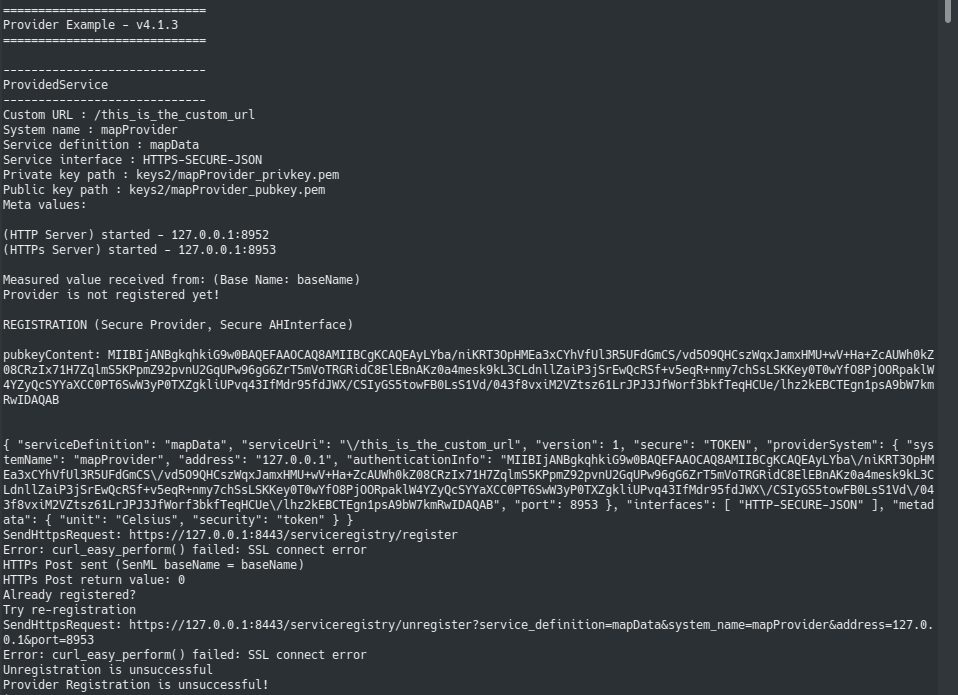
I also tried to register it with the web access, I used the .p12 of the service and used in the web access with swagger the same request which the provider used in the screenshot and it worked, but I really don't know why the the Provider can't manage it by it self.
Please help
- Dominant language
- C
- Stars
- 1
- Forks
- 5
- PR merge metrics
- No merged PRs in 30d
Getting set up
This project ships no dev container, Dockerfile or contributing guide, so setting up is up to you: start from its README, and see our first-contribution guide for the general steps.
First steps
- Read the whole issue, then the project's contributing guide.
- Comment on the issue to say you are picking it up — it saves two people doing the same work.
- Fork the repository and make your change on a branch.
- Open a pull request that references the issue number.
More from arrowhead-f/client-cpp
-
ServiceUri doesn't start with '/'May be free again @tottthy claimed this 2383 days ago, and no pull request is open. Openbug
arrowhead-f/client-cpp#8 · 1 assignee ·
All issues in arrowhead-f/client-cpp
Similar issues
-
Difficulty 2/5 1-3 hours Newbie friendliness 88/100
Maintainers usually reply within 1 day
-
Difficulty 2/5 1-3 hours Newbie friendliness 88/100
-
Difficulty 1/5 Under an hour Newbie friendliness 92/100
-
enhancement
Difficulty 1/5 Under an hour Newbie friendliness 92/100
-
enhancement
Difficulty 1/5 Under an hour Newbie friendliness 94/100